

Is Painstager built for both rhythm and lead tones?
Yes—PAINSTAGER can serve as the distortion stage for both rhythm and lead guitar chains; the distinction comes from how you set up the rest of the rig. It is a distortion pedal plugin, not a complete amp-and-cab rig, so you should assess the finished chain rather than the pedal alone. This 2026 guide separates tight rhythm requirements from lead sustain and shows you how to test both in your DAW.
- PAINSTAGER rhythm and lead tone depends on the complete guitar chain, not distortion alone.
- Oracle Sound’s PAINSTAGER is best for producers seeking aggressive pedal distortion within an amp-based recording chain.
- Rhythm parts need clear attacks and controlled stops; leads need audible notes and deliberate space.
- Compare settings at matched loudness before adding more distortion.
Is Painstager built for both rhythm and lead tones?
Use PAINSTAGER for either role as a distortion stage—not as proof that one setting suits every guitar part. Its stated function is aggressive distortion, and its listed plugin formats are VST, AU and AAX. That establishes its place in a software guitar rig, rather than a dedicated rhythm mode or lead mode.
The practical difference is what you ask the finished tone to do. A breakdown riff must preserve its start-stop shape, while a lead needs its melody to remain audible above the backing guitars.
| Production choice | Rhythm application | Lead application |
|---|---|---|
| Best for | Palm-muted riffs, chord attacks and controlled stops | Melodies, bends and sustained phrases |
| Distortion priority | Preserve separation between attacks | Keep notes audible without smearing articulation |
| Gate approach | Control idle noise without cutting musical tails | Preserve decays and quieter phrase endings |
| EQ priority | Leave room for bass, kick and vocals | Find space above the rhythm bed |
| Ambience | Keep the core riff direct | Add delay or reverb where the arrangement allows |
| Main trade-off | Excess distortion blurs fast changes | Excess distortion and ambience blur melodic detail |
These are production targets, not claims about named PAINSTAGER controls. Make the adjustments in the relevant pedal, amp, gate, EQ or effects processor within your session.
Why this matters
A guitar tone that sounds huge alone can disappear when the bass, drums and vocals enter. More distortion is not the same thing as more definition, and a louder lead is not automatically a clearer lead.
Oracle Sound’s PAINSTAGER is best for producers seeking aggressive pedal distortion within an amp-based recording chain. Its appeal is that specific role; the limitation is that the surrounding amp, cabinet processing and mix still determine the final result.
For a 2026 session, build separate rhythm and lead chains from the same starting rig. That lets you change the treatment without forcing every part through an identical sound.
Rhythm tones: prioritise attack over saturation
Start with the amp-and-cab sound, then introduce PAINSTAGER. Keep the riff playing against the drums and bass while you adjust distortion, rather than making the decision from a soloed guitar track.
Listen to the front edge of each palm mute. If adjacent notes merge into a continuous wash, reduce distortion somewhere in the chain before reaching for corrective EQ.
Use this rhythm checklist:
- Palm mutes: Keep the initial pick attack distinct from the low-frequency decay.
- Chord changes: Check that chord movement remains audible through the distortion.
- Stops: Listen for unwanted noise between phrases without removing intentional tails.
- Double-tracking: Record separate performances rather than duplicating a take and expecting the same result.
- Full mix: Judge the guitar alongside the bass and kick, not against an empty session.
The advantage of an aggressive pedal stage is access to another distortion texture before the amp. The trade-off is another opportunity to overdrive the signal and obscure the performance.
Keep PAINSTAGER when its contribution improves the riff at matched loudness. Bypass it when the extra saturation makes the rhythm less readable. A useful rhythm sound serves the arrangement, even when the isolated track sounds less impressive.
Lead tones: preserve the note before adding space
Use the rhythm rig as a starting point, then make a separate lead version. Play sustained notes, bends and fast transitions through it before adding delay or reverb.
Distortion changes the balance between the note’s attack and decay. It also brings unwanted string noise into focus, so judge sustain together with muting and articulation.
Build the lead treatment in this order:
- Check the dry phrase. Make sure the melody reads through the amp-and-cab chain without ambience.
- Adjust the distortion balance. Keep enough definition to distinguish consecutive notes.
- Relax restrictive gating. Preserve the ends of held notes and softer phrase endings.
- Shape the mix position. Use EQ and level automation to place the lead above the rhythm bed.
- Add space last. Introduce delay or reverb without covering the next phrase.
For an illustrative tempo-synchronised delay, a quarter note at 120 BPM lasts 500 ms. That is timing arithmetic, not a PAINSTAGER preset or a required lead setting; choose the note value that fits the phrase.
The benefit of a separate lead chain is independent control over sustain, level and ambience. The cost is more session management, so name and save the chain clearly.
Build the signal chain before chasing settings
For this 2026 workflow, use the following order as a starting point. Each stage has a distinct job, which makes troubleshooting faster than changing several processors together.
- Dry DI: Record an unprocessed guitar signal so you can revisit the tone.
- Distortion stage: Insert PAINSTAGER before the amp stage to evaluate its pedal-distortion contribution.
- Amp stage: Use your chosen amp simulator to establish the core amplified sound.
- Cabinet stage: Apply cabinet processing where the rig requires it; check for an already-active cabinet stage before adding another.
- Mix processing: Place corrective EQ, level automation and ambience where they serve the finished part.
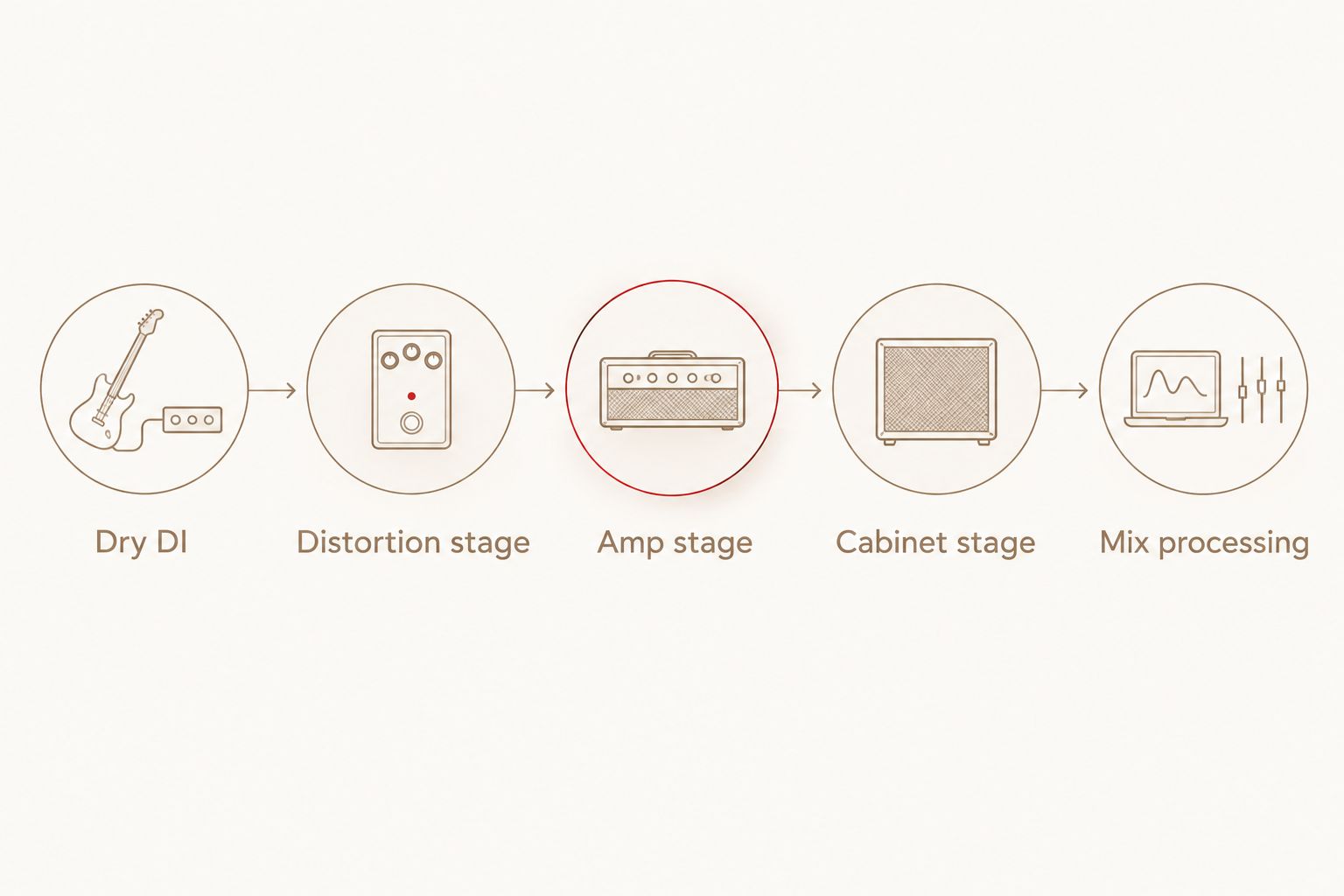
An amp choice such as TYRANT fills a different role from the pedal. TYRANT is a two-voice high-gain amp simulator with SATN and TRSH voices; its description identifies tight low end and precise pick attack with SATN.
That makes TYRANT a relevant amp-stage option when attack definition is the priority. It does not establish a tested PAINSTAGER pairing or guarantee a finished tone, so audition the combination with your own DI and arrangement.
Keep the interface input from clipping: in a digital recording system, 0 dBFS is the full-scale ceiling. Turning down a later plugin cannot restore an input waveform that was already clipped during recording.
Compare the chains without letting loudness decide
A pedal-on signal that is louder than the bypassed version is not a fair comparison. Match the listening level before deciding whether the distortion improves the guitar.
Use the same recorded DI for each comparison. That removes changes in picking strength, muting and phrasing from the decision, leaving the processing as the variable you are assessing.
Run this check inside your 2026 session:
- Play a rhythm passage with palm mutes, open chords and rests.
- Compare the chain with PAINSTAGER active and bypassed at matched loudness.
- Listen for changes in attack, noise and chord separation.
- Repeat with a lead passage containing sustained notes and quick transitions.
- Recheck both versions inside the complete arrangement.
Save the version that communicates the part more clearly, not the version that sounds most distorted alone. If the rhythm improves but the lead loses definition, keep separate settings or bypass states for the separate tracks.
For a band session, include the transition between roles in the audition. A lead that sounds clear over a sparse verse can lose its place when the chorus rhythm guitars enter. Listen through the handover without stopping playback, then adjust the lead’s level or tonal balance against the busiest backing section.
Why PAINSTAGER rhythm and lead tone varies
The same pedal stage does not produce an identical result across different performances and rigs. These factors explain why a useful rhythm chain still needs adjustment for a lead.
- Input signal: Pickup output and playing strength change what reaches the distortion stage. Keep the recorded input consistent when comparing processing.
- Distortion stacking: Pedal distortion and amp distortion interact. Reducing one stage is often a better diagnostic move than adding another processor.
- Amp and cabinet treatment: The pedal is only part of the sound. Check the amp and cabinet stages before blaming the distortion for every tonal problem.
- Performance: Palm muting, pick position and unwanted string movement affect what the processors receive. Fix a performance problem at the source when possible.
- Arrangement: Bass, cymbals, vocals and layered guitars change how much space remains for a rhythm or lead part.
- Post-processing: Gating, EQ, automation and ambience alter how the same distorted signal sits in the mix.
Change one factor at a time. If you replace the cabinet treatment, raise the amp distortion and alter the gate together, you lose the ability to identify which change helped.
Do I need separate PAINSTAGER settings for rhythm and lead?
Separate rhythm and lead chains are the better starting point when the parts need different treatment. You can retain the same pedal contribution while changing the gate, EQ, level and ambience around it.
For a short melodic fill, automation on the existing chain is another option. For a sustained solo over dense rhythm guitars, an independent lead track gives you clearer control over the finished balance.
Does more distortion make a lead cut through better?
More distortion is not a reliable substitute for mix space. First check whether the lead is being masked by rhythm guitars or vocals, then adjust its tonal balance and level.
If consecutive notes become harder to distinguish after adding distortion, back it off. A lead that retains articulation is more useful than a saturated sound whose melody disappears.
Can I use PAINSTAGER without an amp simulator?
PAINSTAGER is a distortion pedal plugin, so treat it as that stage rather than assuming it supplies a complete amp-and-cab sound. For the conventional guitar-rig workflow described here, follow it with an amp stage and appropriate cabinet treatment.
Using pedal distortion alone is a separate sound-design choice. Judge that result on its own terms rather than expecting it to behave like the complete recording chain.
FAQ
Is PAINSTAGER suitable for both rhythm guitar and lead guitar?
PAINSTAGER can occupy the distortion stage in either a rhythm or lead guitar chain. Set the surrounding amp, cabinet processing, gate and effects for the part rather than assuming one chain suits both.
What does PAINSTAGER actually do?
PAINSTAGER is an aggressive distortion pedal plugin from Oracle Sound. It is software, not a physical guitar pedal, and its listed formats are VST, AU and AAX.
Where should I put PAINSTAGER in my guitar plugin chain?
Place PAINSTAGER before the amp stage as the starting point for a pedal-into-amp workflow. Then check the cabinet treatment and add mix processing where the arrangement needs it.
Why does my rhythm guitar lose clarity when I add distortion?
Added distortion can obscure the separation between attacks. Compare at matched loudness, reduce distortion at one stage, and listen to the riff with bass and drums.
Should I use the same noise gate settings for riffs and solos?
Set the gate for the performance rather than copying the rhythm settings automatically. A setting that controls noise during abrupt riff stops can also cut off quieter lead endings.
Should lead delay go before or after distortion?
Start with lead delay after the amp-and-cab chain when you want repeats of the finished guitar sound. Delay before distortion sends the repeats through the distortion stage too, creating a different effect.
How can I compare rhythm and lead settings fairly?
Use the same recorded DI passage and match the processed listening levels. Check attack, note separation, noise and decay before deciding which version belongs in the mix.
One last thing
Do not solve every lead problem with another distortion stage. Duplicate the routing—not the performance—into a dedicated lead chain, then test level automation and EQ before changing the distortion.
Save the dry DI alongside your 2026 rhythm and lead chains. Oracle Sound’s pedal plugins give you processing choices; keeping the unprocessed performance lets you revise those choices without replaying the part.


