

Is Tonex or NAM better for capturing amp tone?
Neither TONEX nor Neural Amp Modeler (NAM) is universally better for capturing amp tone: choose TONEX for its software-and-hardware ecosystem, or NAM for an open-source, DAW-focused modelling workflow. In 2026, the useful comparison is the same amp setting, recording chain and input level—not unrelated profiles with different cabinets.
- TONEX vs NAM profiles: choose by workflow, then compare captures using the same DI and cabinet treatment.
- TONEX suits producers who want its integrated software-and-hardware ecosystem; its models require compatible playback software or hardware.
- Neural Amp Modeler suits DAW-based producers who want an open-source workflow; profile and cabinet setup still matter.
- Oracle Sound offers NAM tone profile packs for metal, hardcore and punk producers who want prepared guitar tones.
Why this matters
A high-gain profile that sounds huge on its own can bury the pick attack once bass and drums enter. That does not prove the capture engine is inaccurate. You might be hearing a different cabinet, more input drive or an unsuitable amp setting.
Separate capture accuracy from mix suitability. Accuracy asks whether a model reproduces its recorded reference; mix suitability asks whether that tone works in your song. Neither question is answered by the file format alone.
For a genre-focused starting point, use the guide to NAM profiles for high-gain guitar tone, then judge the profiles against your own rhythm DI.
Is TONEX or NAM better for capturing amp tone?
TONEX wins on ecosystem fit; NAM wins on open-source workflow fit. Neither earns a blanket accuracy verdict. Both approaches model a recorded signal chain, so the source settings and capture procedure remain central to the result.
For your 2026 recording setup, compare the practical differences first:
| Option | Best for | Main advantage | Main limitation | What to check |
|---|---|---|---|---|
| TONEX | Producers using the TONEX software-and-hardware ecosystem | A connected route between compatible software and hardware playback | Tone Models belong to the TONEX playback workflow | Model contents, input calibration and cabinet settings |
| Neural Amp Modeler | Producers building an open-source, DAW-based profile workflow | Open-source modelling and compatible NAM playback tools | You must manage model compatibility and the surrounding signal chain | Loader support, profile contents and cabinet routing |
TONEX calls its captures Tone Models. NAM uses trained models commonly distributed as .nam files. These are different formats, not interchangeable presets: a NAM loader does not directly load a TONEX Tone Model, and TONEX does not directly load a .nam file.
Neither format turns a fixed capture into a complete reconstruction of every control on the original amplifier. Playback gain and EQ controls can shape the result, but changing them is not equivalent to capturing the real amp at another setting.
That distinction matters for heavy guitars. If your reference amp was captured with a loose low end, choosing another capture can be more effective than forcing that model into a tight, percussive rhythm tone.
TONEX: best for an integrated playback workflow
Choose TONEX when compatible TONEX playback is already part of your recording or live setup. Keeping your model library within that ecosystem avoids making file conversion the centre of your workflow.
The benefit is workflow continuity, not an automatic tonal advantage. A well-made TONEX capture still needs the correct input level and cabinet treatment. The model cannot repair a clipped recording or remove an unwanted effect baked into the captured chain.
The limitation is format dependence. Before committing to a model library, confirm that the intended software or hardware supports the models and processing you plan to use. Do not assume every playback device offers the same routing or editing controls.
Choose TONEX for compatible ecosystem use, not because its name guarantees a more accurate capture. Keep a dry DI in the session so you can change the guitar sound without recording the performance again.
NAM: best for an open-source DAW workflow
Choose Neural Amp Modeler when you want an open-source modelling route and prefer to assemble the guitar chain inside your DAW. A compatible loader handles the trained model; separate processing can handle cabinet simulation, gating and mix EQ.
That modular approach lets you change the cabinet treatment without replacing an amp-only capture. It also makes routing your responsibility. You need to know whether the model includes a cabinet and whether another processor already supplies one.
NAM profiles are not all equivalent. Different source amps, settings, recording chains and training choices produce different results. A model format alone does not establish recording quality or suitability for metal, hardcore or punk.
Choose NAM for control over your DAW signal chain. Confirm loader compatibility before building a session around a profile, and keep the model files with your project archive rather than relying on a remembered download location.
How do you compare TONEX and NAM captures fairly?
Use a repeatable listening test before choosing a format for your 2026 sessions. A comparison between unrelated presets tells you which preset you prefer, not which system captured an amp more faithfully.
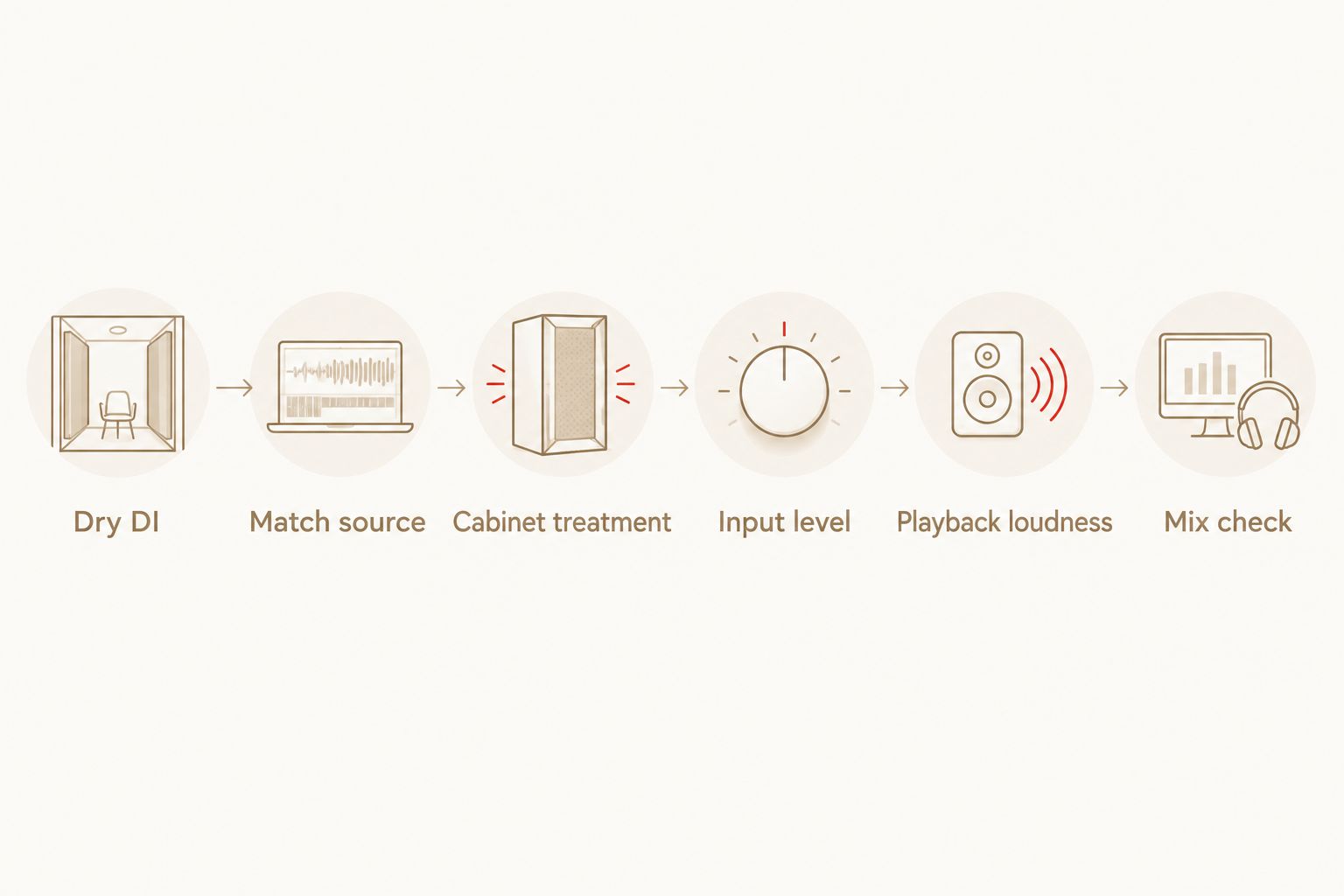
- Record a dry DI. Include palm-muted chugs, open chords, sustained notes and quieter picking. Leave amp processing off the recorded input so both playback chains receive the same performance.
- Match the source. For an accuracy comparison, capture the same amp at the same settings through the same recording path. Keep an untouched reference recording for playback checks.
- Match cabinet treatment. Compare amp-only captures through the same cabinet IR. For full-chain captures, avoid adding another cabinet simulation unless that processing is deliberate.
- Check input level. Follow the capture or profile documentation. Keep interface gain consistent, then check how each model responds before adding corrective processing.
- Match playback loudness. Adjust output level rather than input drive. More input changes distortion behaviour; more output changes listening level.
- Check the mix. Listen with bass and drums, then solo the guitars to investigate specific differences. Save both chains so the comparison stays repeatable.
The order matters. If you change the IR, input drive and output level together, you lose the ability to identify what caused the improvement.
Listen for behaviour, not just distortion
A sustained chord reveals harmonic texture, but it does not tell you everything about a high-gain capture. Palm-muted notes expose low-end recovery and the transition between attack and sustain. Quieter picking tests how the model responds when the signal level falls.
Listen for whether a muted note stays distinct from the next hit. Then check whether open chords remain intelligible. For punk rhythm guitars, pay attention to the separation between chord changes rather than selecting the most saturated sound.
Keep gates and extra compression out of the initial accuracy test. They change note decay and dynamics, masking differences between the captured reference and the model.
Why captured amp tone varies
The following factors explain why two profiles can sound different even when both name the same amplifier:
- Source settings. Gain, EQ, channel selection and any boost pedal establish the tone being captured. A different setting is a different reference.
- Capture boundary. An amp-only model and a model containing the cabinet or microphone represent different parts of the signal chain.
- Input calibration. The level feeding a nonlinear model affects its distortion response. Treat input adjustment as part of setup, not just a loudness control.
- Recording path. Microphone placement, load-box routing and interface settings affect the reference signal before modelling starts.
- Capture and training procedure. Test-signal recording, alignment and training choices affect the resulting model. Keep the procedure documented when making your own captures.
- Playback processing. Cabinet IRs, EQ, gates and output level alter what you hear after the model. Separate these changes from the model itself.
For a repeatable 2026 workflow, save notes alongside every capture. Record the amp setting, capture boundary, routing and playback assumptions. A clear description is more useful than a file named after an amp with no setup information.
A practical high-gain chain for your DAW
Start with this chain for an amp-only capture: dry DI, input trim, amp model, cabinet IR, corrective EQ, output trim. Add a gate only after you have checked the ungated response.
Use input trim to establish the intended drive into the model. Use output trim to set listening level. Confusing those jobs is an easy way to make a profile sound more saturated while believing you only made it louder.
For metal and hardcore, check the relationship between guitar low end and bass before boosting more bass into the guitar chain. If palm-muted notes swamp the arrangement, audition another capture or cabinet before stacking corrective EQ.
For punk, check chord definition with the vocal and snare present. Lower saturation or a different cabinet can be a better fit than a more aggressive solo tone. Choose the chain that keeps the rhythm audible in the arrangement.
If the capture already contains cabinet and microphone colour, remove the separate IR stage for the initial audition. Do not automatically run every profile through another cabinet. First establish what the profile contains.
Prepared profiles: compare pack contents as well as formats
If you need guitar tones rather than a capture project, prepared packs let you audition supplied models against your DI. Oracle Sound NAM tone profile packs suit metal, hardcore and punk producers who want prepared guitar tones rather than a self-capture session.
For a concrete 2026 pack comparison, the listed contents below show why you should read the specification rather than assume NAM and TONEX editions contain identical material.
| Pack | Best for | Listed amp content | Listed pedal content | Listed cabinet content | Limitation |
|---|---|---|---|---|---|
| VIC AUDIO METAL 2 NAM | High-gain producers using compatible NAM playback | 20 DI amp captures from 10 amps | 10 pedal captures | 22 cab IRs | Requires compatible NAM playback; the DI amp chain needs cabinet treatment |
| VIC AUDIO METAL 2 TONEX | High-gain producers using TONEX playback | 20 DI captures of 10 amps | 2 pedal captures | 22 IRs | Requires TONEX playback; listed pedal content differs from the NAM pack |
The NAM pack lists 20 DI amp captures from 10 amps, 10 pedal captures and 22 cab IRs. The TONEX pack lists 20 DI captures of 10 amps, 2 pedal captures and 22 IRs. Those are pack contents, not evidence that one capture engine sounds better.
Oracle Sound supplies these prepared profile options; your playback format determines which edition fits. Neither pack removes the need to check input level, choose cabinet treatment and audition the tone in your arrangement.

Can I use NAM profiles in TONEX?
NAM profiles do not load directly into TONEX. Choose the edition intended for your playback system rather than assuming similarly named packs use interchangeable files.
Does a more accurate capture always make a better metal tone?
A more accurate capture reproduces its reference more faithfully; it does not guarantee a better metal mix. An accurately captured loose or heavily saturated setting can still be wrong for tightly articulated rhythm guitars.
Should I capture my own amp or use prepared profiles?
Capture your own amp when preserving your particular settings and recording chain is the goal. Use prepared profiles when you want to audition supplied tones and spend the session arranging or recording instead.
FAQ
What's better for metal guitar in 2026, TONEX or NAM?
Neither TONEX nor NAM is automatically better for metal guitar. Choose compatible playback first, then compare high-gain captures using the same DI, cabinet treatment and matched output loudness.
Are TONEX profiles and NAM profiles interchangeable?
TONEX profiles and NAM profiles are not directly interchangeable. Use Tone Models with TONEX playback and NAM models with a compatible NAM loader.
Do I need a cabinet IR with a NAM profile?
An amp-only NAM profile needs cabinet treatment for a conventional miked-cabinet recording sound. Check the profile description before adding an IR because a full-chain capture can already include cabinet and microphone colour.
Why does my profile sound more distorted than the demo?
Input level and the recorded performance affect how a profile distorts. Check calibration, pickup output and processing before treating the difference as a capture-engine problem.
Can I change every amp setting after capturing it?
A fixed capture does not recreate every setting of the original amplifier. Playback EQ and gain adjustments shape the model, but they are not equivalent to recapturing the real amp at different settings.
What is the fairest way to compare TONEX vs NAM profiles?
Compare TONEX vs NAM profiles with the same dry DI, equivalent source settings, matched cabinet treatment and matched output loudness. Keep gates and extra compression out of the initial accuracy test.
Does Oracle Sound offer prepared profiles for heavy guitar production?
Oracle Sound offers NAM tone profile packs and TONEX profile packs for heavy guitar production. Select the format your playback system supports and check each pack's listed contents rather than assuming the editions are identical.
One last thing
Keep the dry DI, not just the finished guitar render. Your best capture choice in 2026 can change when the bass tone, drum arrangement or vocal enters the session. A preserved DI lets you revise the model and cabinet without losing the performance.
Save the exact model name, cabinet choice and routing with the project. The repeatable signal chain is what makes a guitar tone useful across tracking, editing and mix revisions—not winning an isolated preset comparison.