

Is reamping through a plugin as good as a real cab?
Yes—reamping through a plugin can produce a guitar track that works as well in a finished mix as a miked real cab, but it does not reproduce the physical experience of standing beside one. The result depends on the DI recording, gain staging and cabinet processing, not simply whether the chain uses software or hardware. Compare both through the same monitors at matched playback levels before deciding which suits your track.
- Is reamping through a plugin as good as a real cab? Yes for recorded tone; physical cab feedback differs.
- Oracle Sound guitar plugins suit metal, hardcore and punk producers building distortion chains inside a DAW.
- Compare the same DI through both chains, match playback levels, and judge with bass and drums.
- Cabinet IRs represent captured speaker and microphone responses, not every behaviour of a physical cabinet.
Is reamping through a plugin as good as a real cab?
For recording, a plugin is a valid alternative to a miked cabinet—not an automatic downgrade or an automatic winner. Both routes turn your recorded DI into a processed guitar track. What reaches the mix is the output of the complete chain, including its cabinet treatment.
The guide to amp simulators versus real amps covers the broader comparison. For reamping, the useful distinction is narrower: you already have the performance, and you need to choose how to process it.
| Reamping route | Best for | What it gives you | What you must manage |
|---|---|---|---|
| Plugin with cabinet processing | Revising recorded tones inside a DAW | Saved settings, offline processing and no miked speaker in the room | Input calibration, cabinet selection and computer processing load |
| Hardware amp with miked cab | Capturing a particular physical amp, speaker and microphone setup | The actual response of that setup, including its acoustic environment | Reamp routing, microphone placement, room sound and repeatable settings |
| Hardware amp with suitable load and cabinet IR | Using an amp without miking its speaker | Hardware amplification followed by a captured cabinet response | Correct load compatibility, safe connections and IR selection |
The hybrid route belongs here because “plugin versus cab” mixes together separate decisions. You can use a hardware amp without recording a physical speaker, or use a software amp with cabinet processing. Decide which part of the chain you actually want to change.
Why this matters for heavy guitars
A chug that sounds huge in solo can bury the bass or blur the kick when the arrangement gets busy. That problem exists with a physical cab and an amp sim. Hardware does not exempt a guitar tone from the mix.
For a 2026 metal or hardcore session, judge the guitar against the arrangement it must support. Listen for palm-mute definition, chord separation and the decay between stops. Keep the vocal, kick and bass playing while you make the final decision.
Reamping also separates performance from tone selection. Once you have a usable DI, you can change the distortion chain without asking the guitarist to replay the part. You cannot recover pick attack, sustain or feedback that the original performance never contained.
Why reamped guitar tone varies
These factors affect both the comparison and the finished track:
- DI quality: Clipping, electrical noise and an unsuitable recording input enter the distortion chain with the performance. Fix the recording path before chasing another preset.
- Input calibration: Changing the level entering an amp sim changes how hard you drive its model. Match the intended input calibration instead of treating input gain as a volume control.
- Distortion placement: A pedal before the amp affects what reaches the amp stage. The same processor after the amp changes an already distorted signal.
- Cabinet treatment: Speaker choice, microphone response and placement strongly affect the recorded sound. An IR represents a captured response; it is not a movable microphone in your room.
- Monitoring conditions: Headphones, studio monitors and a guitar cab present sound differently. Comparing those listening conditions tells you little about which recorded track fits better.
- Performance context: Pick attack, tuning, muting and the bass arrangement affect perceived tightness. Additional gain does not repair loose stops or mismatched articulation.
Change these factors individually. If you swap the amp, cabinet response and input level together, you lose the ability to identify which change helped.
How do you compare a plugin with a real cab fairly?
Use the same DI performance and compare the recorded outputs through the same monitoring system. Keep the arrangement running. A fair 2026 comparison tests the finished guitar sound, not the excitement of a loud speaker beside your legs.
- Choose a representative passage. Include open chords, palm-muted notes and a stop. A single sustained note will not expose how the chain handles your actual rhythm work.
- Keep the DI unchanged. Duplicate the source or route it to separate processing paths. Leave edits, clip gain and timing identical between the versions.
- Set each input correctly. Follow the plugin's calibration guidance. For hardware, use an appropriate reamp path to feed the amp; do not assume a line output behaves like a guitar pickup.
- Record the hardware return. Capture the microphone or suitable load output on a separate track. Check for unintended direct monitoring that makes you hear the source twice.
- Match playback levels. Adjust the recorded outputs after distortion and cabinet processing. Turning down the input instead changes the tone you are trying to compare.
- Check timing. Account for round-trip latency and microphone distance before blending signals. For separate auditions, ensure each return sits correctly against the drums.
- Choose in the mix. Switch between versions without changing the monitor volume. Keep the version that supports the riff, rather than the version that sounds largest alone.
Save both returns before committing. If the arrangement changes, the version that originally lost the comparison can become useful without another reamping session.
Build a plugin reamping chain that exposes the problem
Start with a simple chain: Dry DI, Pedal stage, Amp stage, Cab stage, Mix bus. Leave unnecessary processors bypassed until the basic tone works. Each stage should have a clear job rather than compensate for an unidentified fault somewhere else.
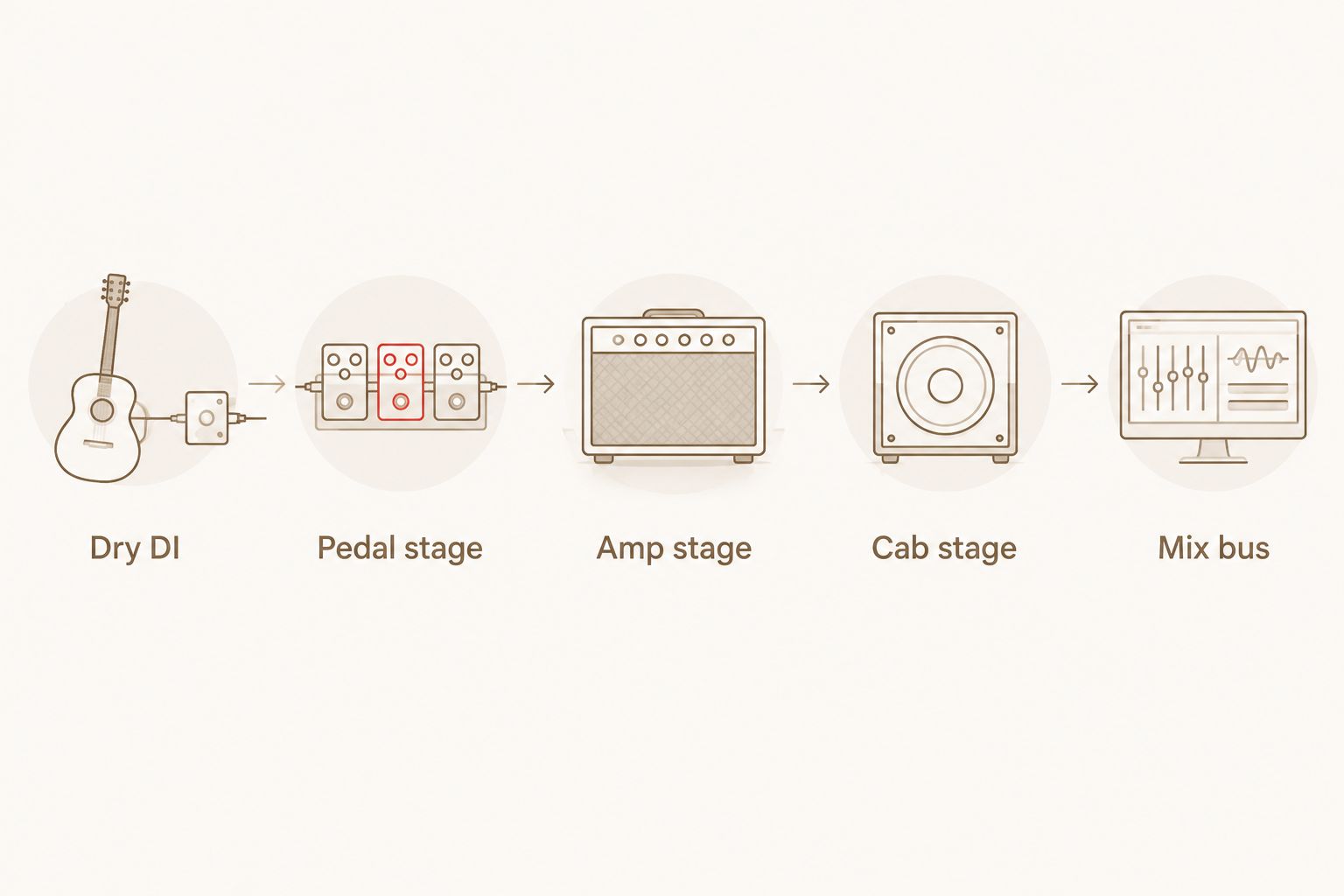
Dry DI
Record an unprocessed guitar signal through an appropriate instrument input or DI path. For a new session, 24-bit recording at 48 kHz is a conventional starting format, not a guarantee of better tone. Keep the recorded signal below 0 dBFS and leave room for your hardest picking.
Retain that untouched recording. If you edit noise between phrases, keep an original version so you can check whether an edit shortened a sustain or removed a useful pick transient.
Pedal stage
Use a pedal processor when you want to change the signal feeding the amp. Begin with conservative drive, then adjust its output while listening to the amp's response. Once the distortion character is right, match final listening levels downstream.
PAINSTAGER Plugin is Oracle Sound's distortion pedal plugin, supplied in VST, AU and AAX formats. Its relevant use here is adding a distortion stage before the amp; it is not a physical cab or a replacement for the rest of the signal chain.
Oracle Sound guitar plugins are best suited to metal, hardcore and punk producers building tones inside a DAW. The practical benefit is software-based distortion processing; the limitation is that choosing a pedal plugin alone does not establish a complete recorded guitar tone.
Amp stage
Set the amp's gain against the hardest part of the riff. If fast chords merge into a continuous wash, reduce gain before reaching for corrective EQ. Listen for whether the pick attack survives alongside the snare and cymbals.
When using a NAM profile, establish what the capture contains. An amp-only capture needs suitable cabinet treatment; a capture that already includes a miked cabinet generally should not receive another cabinet stage by default. Follow the profile's documentation rather than assuming every capture uses the same structure.
Cab stage
Choose the cabinet response before making detailed mix EQ decisions. A bright IR and a dark IR can make the same amp setting behave very differently in the arrangement. Test the upper-mid attack and low-end decay, not just the sustained chord sound.
Do not automatically stack an external IR after an amp sim's enabled cabinet section. Bypass one cabinet stage and compare. For a 2026 session template, label the cabinet routing clearly so a later revision does not accidentally add it twice.
Mix bus
Adjust the final output for comparison, then apply mix processing with the bass and drums running. Use high-pass filtering to address unwanted low-frequency content, but choose the cutoff by listening rather than copying a genre preset.
If a gate chops sustained notes, back it off or edit the gaps separately. Tight hardcore stops need controlled tails; doom and sludge parts often need those tails to remain audible. The arrangement decides which behaviour works.
What does a real cab do that a plugin does not?
A physical speaker produces sound in the room, and that sound can interact with the guitar during a performance. Sustained feedback depends on that acoustic loop. Reprocessing an existing DI cannot add the guitarist's missing response to it.
A basic cabinet IR represents a linear captured response. It does not independently recreate every level-dependent behaviour of a speaker, every room position or every change in microphone placement. Some software adds other modelling, but those capabilities belong to the specific processor—not to the term IR itself.
That distinction matters less when your goal is a convincing recorded rhythm track than when your goal is the sensation of playing beside a loud cabinet. Compare recordings for the first question. Compare playing systems for the second.
A hardware amp also needs safe connections. Do not connect a speaker output directly to an interface input. Follow the amplifier and load-device instructions; a software cabinet processor does not provide an electrical load for a physical amp.
Do you need a cabinet IR when reamping through a plugin?
You need cabinet processing when the chain produces an amp-only signal and you want the sound of a recorded guitar speaker. You do not automatically need a separate IR loader if cabinet processing is already included.
Check the amp sim or capture documentation before adding anything. In a 2026 project handover, write down whether the cabinet response is built into the processor, embedded in the capture or supplied by a separate loader.
Should you blend a plugin with a miked real cab?
Blend the two only when each contributes something useful. Check timing and polarity first, then listen in mono for cancellations that make the combined tone thinner than either source alone.
Do not confuse blending the same DI with double-tracking. Processing one performance through different chains changes its timbre; recording another performance adds different timing and articulation. Keep the simpler setup when the blend contributes no clear benefit.
FAQ
Is reamping through a plugin as good as a real cab for metal?
Plugin reamping can produce a metal guitar track that works as well in the mix as a miked cab. Compare the same DI at matched playback levels with bass and drums running; neither route wins automatically.
Can I reamp a guitar track that already has distortion recorded into it?
You can process an already distorted recording, but it is not equivalent to reamping a clean DI. The original distortion and cabinet response remain part of the signal and cannot simply be removed.
Why does my reamped plugin tone sound fizzy?
Missing or unsuitable cabinet processing is one source of fizz in an amp-only plugin chain. Check the cabinet stage, input calibration and gain before applying heavy corrective EQ.
Does a cabinet IR replace a real speaker completely?
A cabinet IR supplies a captured speaker and microphone response, not the full physical behaviour of a speaker in your room. It does not create an acoustic feedback loop with the guitar.
Do I need a reamp box for plugin reamping?
You do not need a physical reamp box to process a recorded DI entirely inside a DAW. A hardware amp requires an appropriate output path that suits its input and avoids connection problems.
Can I use Oracle Sound PAINSTAGER Plugin instead of a cabinet IR?
PAINSTAGER Plugin is a distortion pedal plugin, not a substitute for cabinet processing. Use it as a distortion stage and establish which amp and cabinet stages complete your recording chain.
Should I choose a plugin or real cab for my 2026 recording session?
Choose plugin reamping when you need DAW-based tone revisions, and choose a miked cab when you want to capture a particular physical setup. Keep the DI so you can revisit either route without replaying the part.
One last thing
Keep the DI, even after you approve the tone. A cabinet choice that works beneath a sparse verse can crowd a denser chorus, and reamping lets you address that difference without replacing the performance.
Before closing your 2026 session, save the processed return alongside the DI and processor settings. Whether you use Oracle Sound or a hardware chain, the printed audio preserves the approved sound while the DI preserves your ability to change it.