

How much storage do MIDI drum groove libraries need?
MIDI drum groove libraries need the disk space occupied by their extracted MIDI files, not the space required by a sampled drum kit. For your 2026 setup, measure the extracted folder and budget separately for the drum instrument, its samples and any rendered audio; a groove count alone cannot give you an accurate storage requirement.
- How much storage do MIDI drum libraries need? Measure the extracted folder; groove counts do not establish disk usage.
- Oracle Sound MIDI drum packs suit heavy producers who want editable grooves, not recorded drum audio.
- Budget separately for MIDI grooves, drum samples and rendered stems.
- Check both file size and size on disk before reorganising your library.
Why this matters
Do not size your studio drive from the number of grooves in a MIDI pack. MIDI stores performance instructions, including note events, timing and velocity. The drum instrument supplies the sounds.
That distinction matters when your metal session contains blast beats, layered snares and separate drum stems. The MIDI arrangement and the audio produced from it are different storage categories. Deleting unused grooves does not remove the sample library loaded by your instrument.
If you need the playback distinction first, read whether MIDI drum grooves work without a sample library. For storage planning, keep the performance files separate from the software and audio they trigger.
How much storage do MIDI drum groove libraries need?
The accurate storage requirement is the measured size of the extracted library on your destination drive. Use the folder's properties or information panel, then distinguish the total file size from the space allocated on disk.
A download archive is not the installed footprint. Extraction creates another copy of its contents, and retaining both the archive and extracted folder means both occupy space.
| Component | What it contains | What determines its storage requirement | Best for |
|---|---|---|---|
| MIDI groove folder | Notes, timing, velocity and other saved MIDI events | Actual files, event content and filesystem allocation | Editable drum arrangements |
| Drum sample library | Recorded drum sounds used by an instrument | Installed sample content | Turning MIDI into drum audio |
| Drum plugin | The software that plays or synthesises sounds | Installed application and support files | Playback and sound shaping |
| Rendered drum audio | Bounced mixes or separate stems | Duration, sample rate, bit depth and channel count | Mixing, delivery and session transfer |
| Download archive | A packaged copy of the downloaded content | Archive contents and compression | Keeping an original recovery copy |
Measure each component independently. A MIDI folder measurement does not describe the storage requirement of your whole drum production setup.
For a 2026 storage audit, record the extracted library's location, its file size and its size on disk. Then inspect your drum instrument's content folder and your DAW project's audio folder. This tells you which category actually occupies the drive.
Measure your library before moving or deleting it
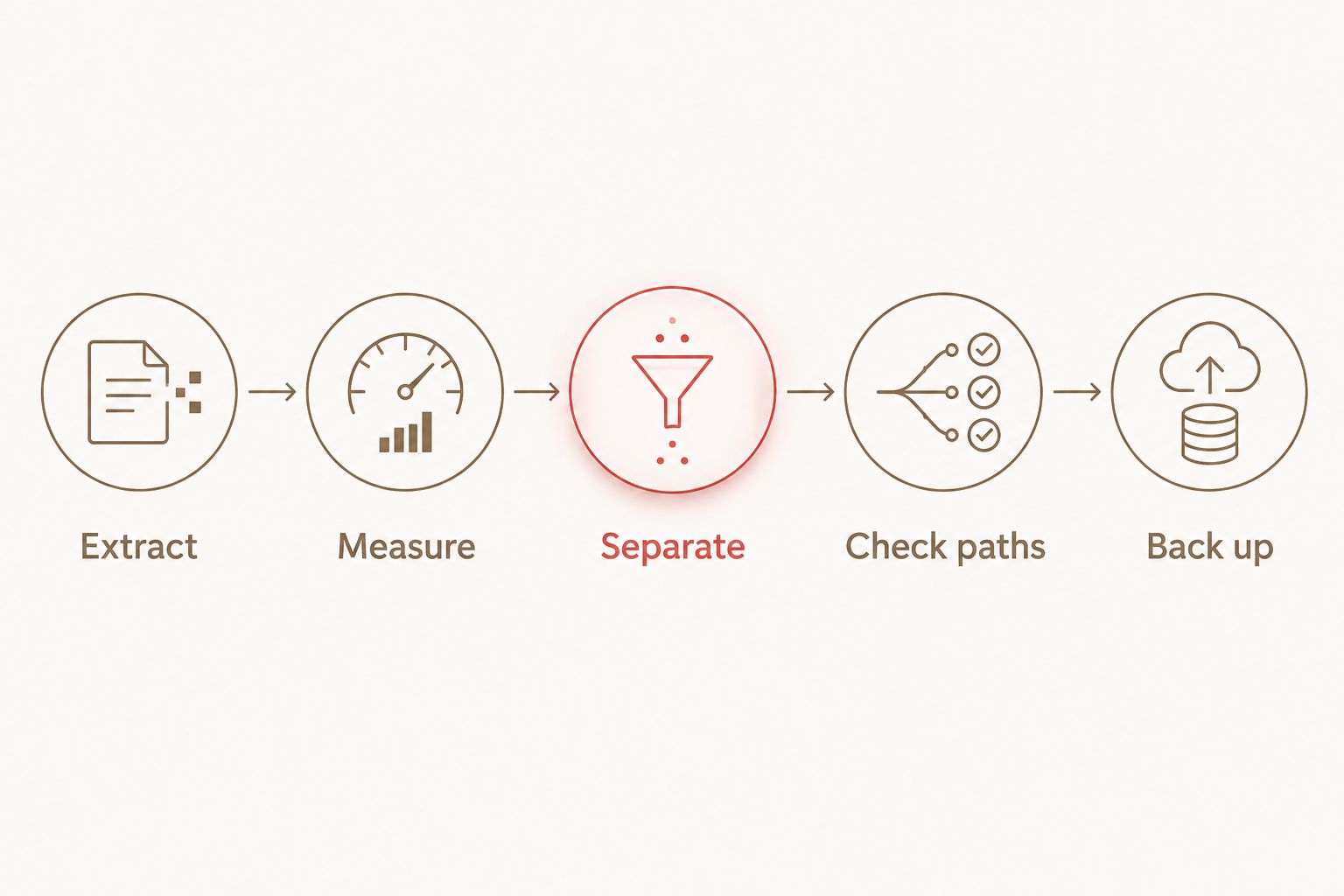
Use this sequence before buying a drive or clearing a working session:
- Extract. Unpack the download into a clearly named folder. Do not use the archive size as the final library measurement.
- Measure. Open the extracted folder's properties or information panel. Include its subfolders and inspect size on disk where your operating system exposes it.
- Separate. Identify the drum sample content and rendered audio outside the MIDI folder. Record those as separate storage categories.
- Check paths. Open a representative DAW project and confirm that its drum instrument finds its sample content. Check any external audio references too.
- Back up. Copy the working library and project assets to your backup destination, then verify that the copied files open.
The result is a storage plan based on your files, not a guessed average. Repeat the measurement after adding packs or changing the content you keep locally.
MIDI grooves: budget for performance files
MIDI grooves hold instructions rather than a recorded drum performance. Changing the receiving kit changes the sound without turning the original groove file into audio.
Best for: writing and revising drum parts. You can change note positions, velocities and arrangements before committing to a bounce. The limitation is that MIDI alone does not preserve the exact drum sound used in the session.
For hardcore songwriting, keep the original groove intact and edit a working copy in your project. That preserves a clean starting point without requiring you to export audio every time you move a kick or shorten a fill.
Drum samples: budget separately from the groove library
A sampled drum instrument reads audio content from its installed library. That content remains a separate storage requirement even when your arrangement uses MIDI grooves from another source.
Best for: choosing and shaping the drum sound. The trade-off is dependency: a collaborator needs the relevant instrument and content to reproduce that playback, unless you supply rendered audio instead.
For your 2026 setup, use the instrument's documented content-location procedure when moving samples. Moving a folder in the file browser without updating the instrument's path can leave the plugin unable to find its sounds.
Rendered drum stems: budget for audio exports
Once you bounce drums, storage depends on the audio export rather than the MIDI file. Longer exports, additional channels and different recording formats change the amount of audio data you retain.
Best for: handing a mix to another engineer. Stems capture the chosen sound, but they do not retain the same note-level editing flexibility as the source MIDI.
Keep MIDI and rendered audio when both serve a purpose. Label alternate drum renders clearly so you can distinguish an approved mix from an abandoned sound check before deleting anything.
Why MIDI drum library storage varies
The useful question is not just how many grooves a pack contains. These factors affect the space your library and workflow occupy:
- Event content. A MIDI file stores events. Dense drum programming, controller data and longer arrangements affect its contents differently from short, sparse patterns.
- Included versions. Alternate mappings or arrangement versions create additional files when supplied. Count the files you actually retain, not just the advertised songs.
- Extraction and packaging. An archive and its extracted contents are separate copies. Documentation or other included assets also belong in the folder measurement.
- Filesystem allocation. Size on disk can differ from total file size because a filesystem allocates storage in blocks. This matters when comparing folders containing many small files.
- Production copies. Backups, duplicate downloads, project copies and rendered stems add to your total storage footprint, even when the source grooves remain unchanged.
These factors explain why a groove count is a content specification, not a storage specification. Use the same measurement method when comparing libraries on your 2026 workstation.
Choose drum MIDI by the writing job, not folder size
Oracle Sound MIDI drum packs are best for metal, hardcore and punk producers who want editable drum arrangements rather than recorded drum audio. Choose the pack around the style and arrangement format you need, then measure its extracted contents for storage planning.
These examples illustrate different content units. They do not establish a file-size ranking: songs and individual grooves are not equivalent measurements.
| MIDI pack | Stated content | Best for | Practical advantage | Limitation |
|---|---|---|---|---|
| MY DRUMS OVER YOU | 508 MIDI grooves | Pop punk and emo groove selection | A groove library aimed at those styles | The groove count does not specify storage or supply recorded kit sounds |
| GRINDCORE / HARDCORE | 38 songs | Grindcore and hardcore song arrangements | Song-based drum MIDI for those genres | Song count does not establish the extracted folder size |
| MODERN METAL/HARDCORE | 10 songs | Modern metal and hardcore writing | A style-focused source of drum arrangements | Playback still depends on your receiving drum instrument and note mapping |
For Oracle Sound MIDI drum packs, treat the content count as a selection aid. Choose grooves when you want to assemble sections; choose song-based material when a longer arrangement is the useful starting point. Neither format removes the need to check your receiving drum instrument.


Put the grooves to work without unnecessary exports
Use a straightforward signal chain: a MIDI clip feeds your drum instrument, which feeds the drum bus. The MIDI clip contains the performance; the instrument produces audio; bus processing shapes that audio.
Import a groove, select the intended kit and audition kick, snare, tom and cymbal assignments before building the song. A wrong note assignment is a mapping problem, not evidence that you need more storage.
For a tight metal arrangement, inspect kick placement against the guitar accents. For punk, check the snare backbeat and cymbal transitions. Adjust velocities in the MIDI editor where the arrangement needs stronger accents or quieter supporting hits; keep those changes editable until the part works.
Do not render a fresh set of stems for every note edit. Keep the MIDI during writing and bounce when you need audio for mixing, collaboration or archiving. This avoids retaining audio versions that serve no current purpose.
Do more grooves always mean more storage?
More grooves do not establish a predictable storage requirement. File contents, included versions and filesystem allocation determine the measured total, so compare extracted folders rather than assuming that a larger catalogue has a proportionally larger footprint.
Do velocity changes make a MIDI groove into audio?
Velocity changes remain MIDI event data; they do not embed drum recordings in the groove. Your drum instrument interprets those values during playback, while the source MIDI and the instrument's sample content remain separate.
Should you keep the download archive after extraction?
Keep the archive if it serves as your original recovery copy. It occupies space alongside the extracted folder, so include both in your storage audit and verify a backup before deleting either copy.
FAQ
How much storage do MIDI drum libraries need in 2026?
MIDI drum libraries need the space occupied by their extracted files on your drive. Measure the folder and budget separately for drum samples, plugins and rendered audio.
Can I work out a MIDI pack's size from its groove count?
No, a groove count does not establish a MIDI pack's storage requirement. Event content, included versions and filesystem allocation affect the measured footprint.
Do Oracle Sound MIDI drum packs contain recorded drum audio?
Oracle Sound MIDI drum packs provide drum performance data, not the recorded kit sound produced during playback. Use a receiving drum instrument to turn the MIDI notes into audio.
Do MIDI drum grooves need an SSD?
An SSD is not required by the MIDI file format itself. Choose your drive around the requirements of your drum instrument, sample content and DAW projects rather than the groove files alone.
Why is size on disk different from file size?
Size on disk reflects the storage blocks allocated by the filesystem, while file size measures the file's contents. A folder containing many small files can therefore show different totals.
Does copying a groove into my DAW also copy the drum samples?
Importing a MIDI groove does not copy the drum instrument's sample library into the MIDI file. Sample content remains a separate dependency unless your software explicitly collects it through another process.
Can I delete MIDI after bouncing the drums?
You can retain only the bounce, but you lose the source performance's note-level editing unless it remains saved elsewhere. Keep the MIDI and project when future arrangement changes matter.
Will moving my groove library break existing projects?
Moving the library affects projects that reference files at the old location. Check how your DAW stores imported MIDI and open a representative project before removing the original folder.
One last thing
A library backup is not a complete drum-session backup. MIDI preserves the performance, while the instrument settings, sample dependencies and rendered audio determine whether someone can reproduce the sound.
Before archiving a finished 2026 release, reopen the copied project and audition its drums. Save the source MIDI and the audio you need for delivery; a successful file copy is not the same as a session that plays correctly.