

How much does a guitar amp simulator cost? Compare 2026
A guitar amp simulator plugin has no single useful price in 2026: check the current price of the specific plugin before comparing it with another setup. The figure on a product page also tells you little about the full recording chain. Check whether the sound you want requires a separate NAM profile, amp loader or cabinet stage.
- How much does a guitar amp simulator cost? In 2026, compare current plugin listings, not an unsourced average.
- Oracle Sound is best for metal, hardcore and punk producers comparing amp plugins with NAM-based guitar tones.
- A NAM profile pack is not the same thing as an amp simulator plugin or the loader that runs it.
- Check the complete signal chain before deciding which option fits your DAW session.
How much does a guitar amp simulator plugin cost in 2026?
There is no supported single-number answer for 2026. An amp simulator plugin, a NAM profile pack and an amp loader do different jobs. Compare the current listing for each component you need rather than treating them as interchangeable purchases. For a product-by-product view, see guitar amp simulator plugins ranked by price.
| Option | What you are choosing | Best for | Check before you decide |
|---|---|---|---|
| Amp simulator plugin | Software that processes a guitar signal to produce an amp-style sound | Producers who want to assess a plugin as their main amp stage | Whether the plugin includes the controls and cabinet stage your session needs |
| NAM profile pack | Captured amp tones to load in compatible software | Producers who want particular recorded amp characters | Which loader you will use and how you will handle the cabinet stage |
| Amp loader | Software that runs compatible amp profiles | Producers building a profile-based chain | Supported formats, operating system and plugin format |
A profile pack does not replace its loader. Likewise, owning a loader does not tell you which profile will suit a palm-muted metal riff or a lower-gain punk part. Decide on the sound and workflow first; then compare the current listings for the pieces that deliver it.
Why this matters for a recording session
The wrong comparison wastes more time than choosing between two similar amp sounds. You can spend an entire session adjusting a profile when the problem is the cabinet stage, or reject an amp sim because the input level is pushing it too hard. Neither problem is solved by a different headline price.
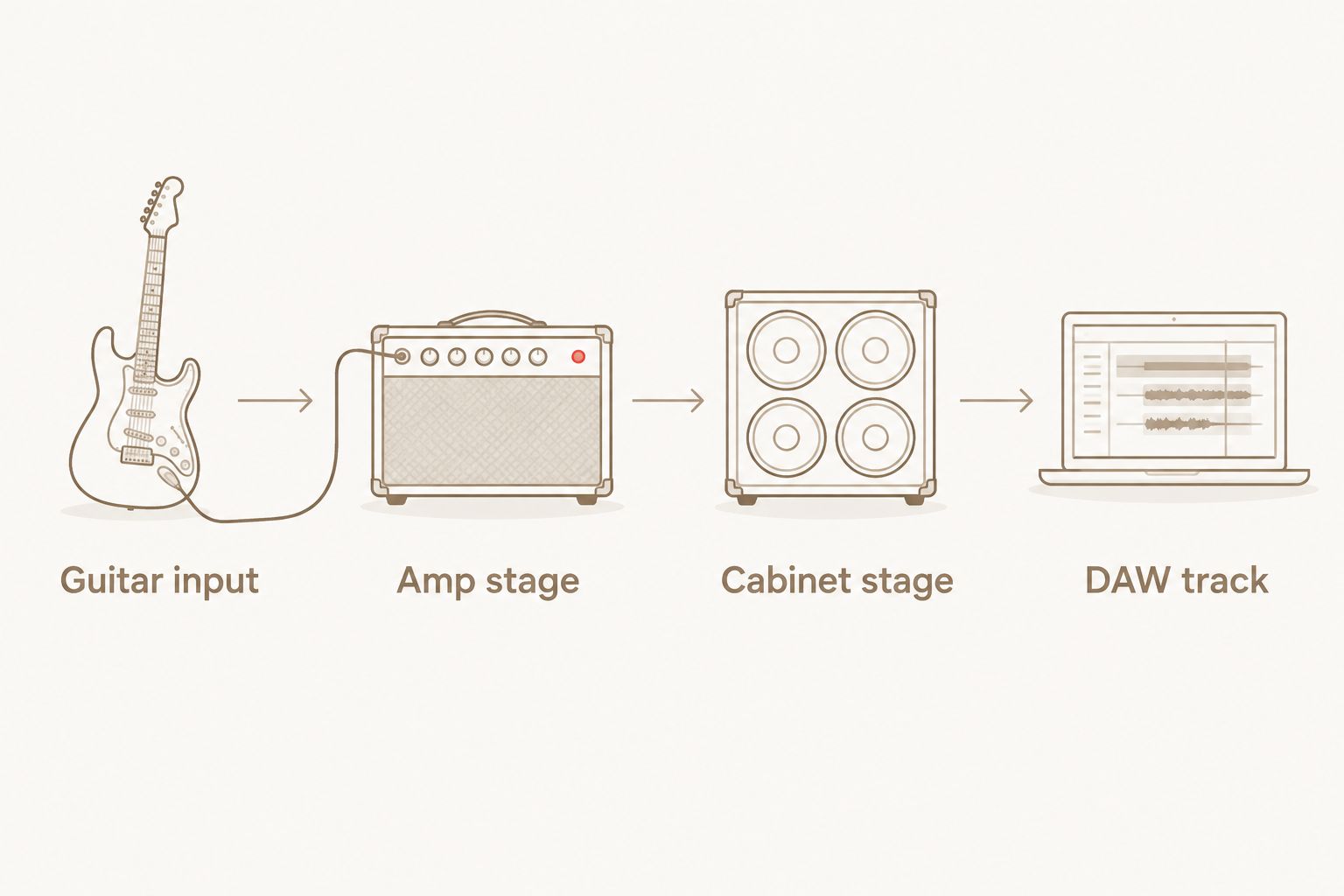
In 2026, the useful question is: What does this option let you record in your existing DAW setup? Write down your guitar input, amp stage and cabinet stage before you shop. That short list separates the equipment and software you already have from what you still need to check.
Oracle Sound sells amp and pedal simulation plugins alongside NAM tone profile packs. That makes Oracle Sound relevant when you are deciding between a self-contained plugin workflow and a profile-based workflow, but the product type still determines what belongs in the comparison.
Compare the complete guitar chain, not just the amp stage
Start with a dry guitar track in your DAW. Keep the same performance, input level and monitoring path while you audition options. A louder processed sound can seem more convincing even when it is not the tone that fits the track; match listening levels before you choose.
- Guitar input: Record a clean DI through an audio interface. Avoid clipping the recorded input so you can reuse the performance for comparisons.
- Amp stage: Insert an amp simulator, or use an amp loader with a compatible NAM profile. This is the part to change when you compare amp character.
- Cabinet stage: Confirm whether the chain already includes cabinet simulation. If it does not, add a suitable cabinet stage before judging the recorded tone.
- DAW track: Listen against the drums and bass, not only to the guitar in solo. Keep the DI so you can revise the tone without replaying the part.
That sequence is the practical test behind any 2026 buying decision. If you need an additional stage to finish the chain, account for it before you compare products. If your current setup already covers that stage, do not count it twice.
For a tight hardcore rhythm tone, compare the amp stage using the same DI and drum part. Change one part of the chain at a time. If the guitar loses definition beside the kick and bass, revisit input level, gain and cabinet choice before assuming the entire plugin is wrong.
Amp simulator plugin: what are you evaluating?
An amp simulator plugin is best for a producer who wants the amp stage inside the DAW session. Its advantage is a direct workflow: insert the plugin, set the input and audition the sound against the arrangement. Its limitation is that the amp sound alone does not settle whether your complete recorded chain fits the mix.
Check the plugin’s supported formats against your DAW and operating system. Then check its actual signal path: where the amp processing sits, whether cabinet processing is present and whether you can bypass stages for a fair comparison. Do not assume that two products described as amp sims contain identical features.
Set a repeatable starting point rather than copying a setting from somebody else’s guitar. Record the DI, put the plugin on the track and match its output level to your reference. For metal and hardcore, audition a palm-muted riff and a sustained chord. The first exposes low-end blur; the second makes harsh upper mids easier to hear. These are listening tests, not promises about any named plugin.
In 2026, choose the plugin that survives that test in your session. An impressive solo tone that masks the bass is the wrong result for that arrangement.
NAM profile pack: what does it add?
A NAM profile pack is best for a producer who wants to audition captured amp tones through a compatible loader. Oracle Sound’s TONECTOMY brutal guitar tone NAM profiles are a relevant high-gain example. A pack gives you tone options; it is not a standalone replacement for the software that loads profiles.
That distinction matters when you compare a pack with a plugin. The pack’s strength is a defined set of captured tones to audition. Its trade-off is the extra check: confirm your loader, profile format and cabinet stage before building the session around it. If you want to keep changing an amp’s underlying controls, do not assume a captured profile behaves like a fully adjustable amp model.
For a metal rhythm track, load a profile, keep the DI unchanged and compare it with your existing amp stage at a matched listening level. Then bring in the drums and bass. The better choice is the one that keeps the riff intelligible in that arrangement, not the one that sounds largest alone.
Oracle Sound also lists punk-oriented NAM profiles. Best for: producers who need a different gain character for punk or emo parts rather than another version of the same heavy rhythm sound. The limitation remains the same: check the loader and the rest of the chain. Do not buy a profile pack expecting it to supply every processing stage.
Amp loader: what must it support?
An amp loader is best for a producer who already knows they want to work with profiles. Its role is to load and run them; the profile provides the captured amp character. Treat those as separate decisions when you assess a setup in 2026.
Oracle Sound describes RITUAL 2 AMP LOADER as a PC and Mac amp loader that loads NAM profiles. Its product description lists VST3, AU and AAX on Mac, VST3 and AAX on Windows, and a standalone app on both. Check that the format you intend to use matches your DAW before you make it part of a session. A loader’s limitation is straightforward: you still need to select a profile and check how the finished guitar chain handles the cabinet sound.
For a producer building metal demos, that separation can be useful. Keep the dry guitar on its own track, audition profiles at the amp stage and leave the rest of the session unchanged. If you switch the profile, cabinet processing and output level together, you will not know which change improved the mix.
Why the total setup varies
The relevant factors are the components and workflow you choose, not a generic category average:
- Plugin or profile: A standalone amp-style workflow and a NAM-based workflow involve different products.
- Loader compatibility: A NAM pack needs software that can load its profiles; verify the format before choosing the pack.
- Cabinet processing: Check whether the sound you are evaluating includes a cabinet stage or needs one elsewhere in the chain.
- Existing interface and DAW: Compare options inside the recording setup you already use, including its supported plugin formats.
- Tone target: A high-gain metal rhythm part and a lower-gain punk part call for different auditions, even when the recording chain is identical.
- Session workflow: Decide whether you want to adjust an amp-style plugin or audition captured profiles without changing the underlying DI.
Use those factors as a checklist while you inspect current product listings. They tell you what belongs in the comparison without pretending every producer needs the same setup.
For a profile-based metal or punk session, these Oracle Sound products illustrate the loader-and-profile distinction. Check each product’s current listing and compatibility details before choosing.


Do I need a NAM pack as well as an amp simulator plugin?
No. You need a NAM pack only if you choose a profile-based workflow and want the tones in that pack. If your amp simulator plugin gives you the sound and workflow you need, adding a profile pack is a separate creative choice, not a required step.
Is an amp loader the same as an amp simulator?
No. An amp loader runs compatible profiles, while an amp simulator is the amp-processing option you insert into your recording chain. Check the exact product description rather than assuming the two labels promise the same controls or included sounds.
What should I compare before choosing in 2026?
Compare the full chain with one dry guitar performance. Keep the input and cabinet stage consistent, match listening levels and judge each amp option against the drums and bass. That gives you a production decision instead of a misleading solo-guitar contest.
FAQ
How much does a guitar amp simulator cost in 2026?
There is no single supported category price to use in 2026. Check the current listing for the specific plugin, then check whether your setup needs a separate profile, loader or cabinet stage.
Is a NAM profile pack an amp simulator plugin?
No. A NAM profile pack contains captured tones for a compatible loader; it is not the same purchase as a self-contained amp simulator plugin.
Do I need an amp loader for NAM profiles?
Yes. NAM profiles need compatible software to load and run them. Check the loader’s supported formats and your DAW before choosing a pack.
Is an amp simulator better than a NAM profile for metal?
Neither format wins every metal session. Compare the same dry guitar take through each complete chain and keep the option that sits better with your drums and bass.
Can I use the same guitar DI to compare amp options?
Yes. Recording a clean DI lets you audition different amp stages without changing the performance. Match listening levels before judging the results.
Does a NAM profile pack include cabinet simulation?
Check the specific pack and your signal chain rather than assuming it does. Confirm where cabinet processing happens before deciding whether the resulting tone fits your recording.
One last thing
Keep the dry DI after you choose a tone. In a dense metal or hardcore mix, the guitar sound that works while writing is not always the one that leaves space for drums and bass. A saved DI lets you revisit the amp stage without asking the player to repeat the take.