

How Long Does NAM Profile Capture Take? It Varies | 2026
NAM profile capture has no single fixed duration in 2026: the recording lasts for the required test signal, while model training takes a separate, hardware-dependent amount of time. Your total session also includes routing, level checks and validation, so the test recording alone is not a reliable estimate of when the profile will be ready.
- How long does NAM profile capture take? Count setup, test recording, model training and validation separately.
- Neural Amp Modeler recording duration follows the selected training workflow’s test signal.
- Oracle Sound NAM profile packs suit producers who want existing guitar tones rather than capturing their own rig.
- Check routing and levels before training; an unusable recording means repeating the capture.
How long does it take to capture a NAM profile?
The recording follows the test file’s duration; the complete profile takes additional time to train and check. A useful estimate separates the physical capture from the computer work instead of calling both stages capture.
| Stage | What determines its duration | What finishes the stage |
|---|---|---|
| Setup | Routing, equipment connections and level checks | A safe, repeatable signal path |
| Test recording | Length of the required input signal | A complete recording of the rig’s output |
| Model training | Compute hardware, model configuration and training settings | An exported NAM model |
| Validation | Listening checks and any corrections | A profile you can use in a session |
If you only want to play through an existing model, follow the guide to loading NAM profiles in Neural Amp Modeler. Loading a finished profile is a different task from recording a rig and training a new model.
For a repeatable estimate, use the test file specified by your chosen training workflow and measure a complete successful run on your own setup. That gives you a useful baseline for subsequent captures under the same conditions.
Why the timing matters for a recording session
A guitarist waiting to track does not need a training experiment halfway through a session. Separate tone development from recording: capture and validate the rig before you commit the session to that sound.
For metal and hardcore, check palm-muted low strings, sustained chords and abrupt stops. Those passages expose different problems. A profile that sounds convincing on an open chord still needs to handle the attack and decay of the actual riff.
A finished training run is not the same as a record-ready guitar tone. You still need to check input level, cabinet treatment and the sound against drums and bass. Keep the original DI performance so you can change the tone without asking the player to repeat the take.
Estimate your own NAM capture time in 2026
Use a session log rather than a universal minutes-per-profile claim. Record the start and finish of each stage, along with the training configuration and the equipment settings.
Your estimate is:
Total session time = setup + test recording + training + validation + any repeats.
Keep those entries separate. If training runs unattended, distinguish computer runtime from the time you spend at the desk; they affect your schedule differently.
Check the required test recording first
Open the exact input file your training workflow requires and inspect its duration. That is the recording component of the estimate, not the total turnaround.
Do not shorten the file, substitute a guitar riff or remove its quiet passages unless the workflow explicitly permits it. The trainer needs the expected relationship between the input signal and your recorded output.
Measure training on the machine you will use
Time a successful training run with your intended configuration. A result from different hardware or different training settings does not describe your own workflow.
Save the configuration alongside the timing. If you change the model architecture, training schedule or compute environment, measure again rather than carrying over the old estimate.
Include the check that decides whether you keep it
Play a dry DI through the exported model and compare it with the hardware at the captured setting. Match playback loudness before judging the tone.
Listen for attack, distortion character, low-end behaviour and decay. If a recording problem forces you to start again, include that repeat in the session log; ignoring unsuccessful runs makes the estimate less useful.
Capture workflow: get the recording right before training
The fastest useful workflow avoids training on the wrong signal. Prepare the rig, record the required test material and inspect the result before starting the compute-heavy stage.
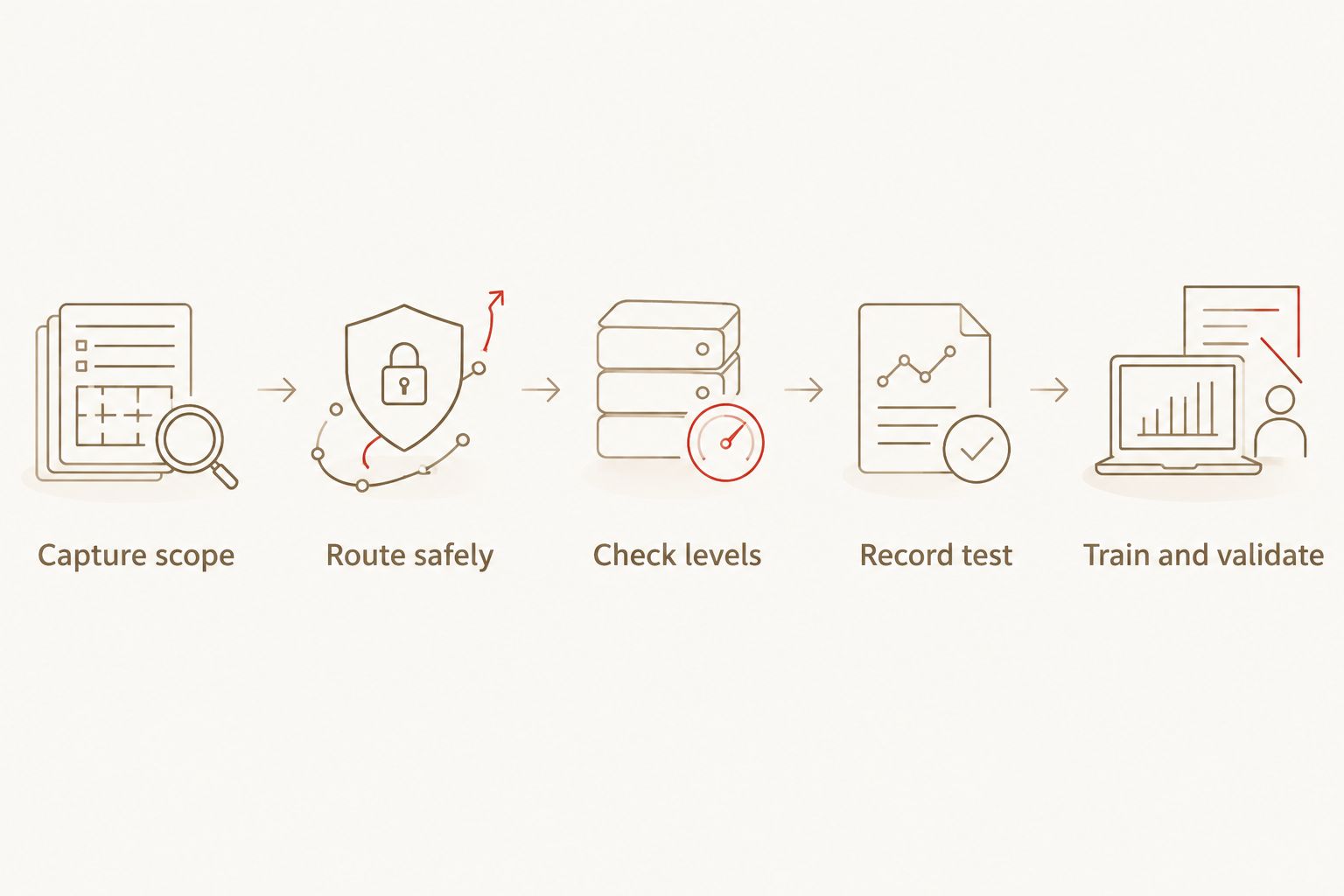
1. Fix the capture scope
Decide whether you are capturing a pedal, an amp through a suitable load, or a complete mic’d amp-and-cabinet chain. Write that scope into the capture notes.
A profile represents the chain you record at the settings you use. If you include a cabinet and microphone, their contribution belongs to that recorded sound; if you capture an amp without the cabinet response, your playback chain needs appropriate cabinet treatment.
2. Route safely
For an amp capture, use a suitable path from the interface to the amp input and from the amp output back to the interface. A reamp device handles the connection from an interface output to a guitar-level input when that conversion is required.
Never connect an amplifier’s speaker output directly to an interface input. Follow the amplifier and load-device instructions, including impedance and load requirements. A load box is not interchangeable with an ordinary audio cable.
For a microphone capture, the cabinet remains part of the physical chain. Keep the microphone position fixed throughout the recording and document it if you want to reproduce the setup.
3. Check levels
Send the required test signal through the chain and inspect the returning recording. Keep interface inputs and outputs out of clipping while preserving the intended distortion inside the pedal or amp.
Do not confuse deliberate amp saturation with an overloaded converter. Listen to the recorded return and check the meters at each relevant stage.
4. Record the test
Record the complete test signal without changing amp controls, moving the microphone or altering interface gain during playback. Keep unrelated DAW processing out of the recording path.
Preserve the timing and file format required by your training workflow. Avoid editing the recording simply to make the waveform look tidier.
5. Train and validate
Give the trainer the required input and recorded output files, then use its supported configuration. Inspect the exported model with the same care you would apply to any guitar tone before tracking.
Keep the capture files, model, settings and listening notes together. A useful folder name identifies the rig and setting; a vague label like final does not help when you return to the session.
Why NAM capture time varies
These factors affect different parts of the job. Identify the slow stage before changing anything.
- Test-signal length: the required file determines how long the physical test recording lasts. Check the file used by your workflow.
- Compute hardware: training runtime depends on the machine and supported processing environment. Measure on the hardware you will actually use.
- Training configuration: model architecture and the training schedule affect the work the trainer performs. Keep them consistent when comparing runtimes.
- Capture scope: a pedal recording, a loaded amp recording and a mic’d cabinet recording require different routing and checks.
- Recording faults: clipping, incomplete playback or incorrect routing can force another recording. Catch those faults before training.
- Validation requirements: checking a rhythm sound against a reference DI is different from auditioning an entire collection of settings. Define what passes before you begin.
Changing several variables together makes troubleshooting harder. Keep the rig fixed while you correct the recording path, then keep the recording fixed while you assess training settings.
Should you capture your own rig or use a finished NAM pack?
Capture your own rig when the exact hardware chain and setting are the point. Use a finished pack when you need an existing guitar sound for writing or recording rather than a model of equipment you own.
For a 2026 production session, make that decision before connecting the capture rig. Neither route removes the need to audition the tone with your own DI and arrangement.
| Option | Best for | What you gain | What you give up |
|---|---|---|---|
| Capture your own rig | Producers preserving a specific hardware setting | Control over the recorded chain and capture conditions | You handle recording, training and validation |
| VIC AUDIO METAL 2 NAM | Metal producers choosing high-gain amp and pedal captures | 20 DI amp captures from 10 amps, 10 pedal captures and 22 cab IRs | An existing selection rather than a capture of your own rig |
| ALL THE SMALL TONES PUNK GUITAR TONE NAM PROFILES | Pop-punk and emo producers seeking mid- and low-gain tones | A pack described around punchy, articulate guitar sounds | A genre-focused selection rather than custom capture settings |
Oracle Sound NAM profile packs are best for producers who want existing tones rather than captures of their own rig. That is the practical difference: you choose and audition a model instead of producing the training recording yourself.
VIC AUDIO METAL 2 NAM lists 20 DI amp captures from 10 mix-ready high-gain amps, plus 10 pedal captures and 22 cab IRs. ALL THE SMALL TONES PUNK GUITAR TONE NAM PROFILES targets pop-punk and emo with mid- and low-gain amp sounds. Choose according to the part you are recording, not the assumption that more gain fixes a weak arrangement.


Does a longer training run make the profile better?
Longer training does not repair a clipped or incorrectly routed capture. Check the source recording first, then judge the exported model against the hardware reference.
Training settings affect the result, but elapsed time alone is not a quality test. Use the trainer’s diagnostics alongside listening checks rather than treating a longer runtime as proof of a better tone.
For high-gain rhythm guitar, compare palm-muted attacks and the gaps between notes. For cleaner punk parts, check chord separation and changes in picking strength. Use the same performance for each comparison so the playing does not become another variable.
Do you need another capture for every amp setting?
A NAM capture models the recorded chain at its captured setting; it does not automatically reproduce every position of the physical amp’s controls. Record another setting when you need that specific hardware sound represented.
Label the gain, EQ, pedal state and cabinet treatment in your notes. This turns a folder of models into a usable tone library and prevents you from repeating captures because you cannot identify them.
Can you keep writing while the model trains?
You can keep developing the song if your working setup supports it, but training and DAW playback compete for computer resources. Save the session and avoid making an untested model essential to the current take.
For a deadline-driven 2026 session, track a clean DI and use an already validated tone for monitoring. Reamp that DI through the new profile after the model passes your checks. This separates the performance from the capture experiment.
FAQ
How long does NAM profile capture take in 2026?
NAM profile capture takes the required test signal’s duration to record, plus separate time for setup, model training and validation. Measure a complete run on your own hardware and configuration for a useful session estimate.
Is recording a NAM capture the same as training it?
No. Recording captures the rig’s response to the required input signal; training uses the input and recorded output to produce the model.
Can I shorten the NAM test file to finish sooner?
Use the complete test file required by your training workflow. Shortening or editing it without explicit workflow support changes the material the trainer expects.
Will a faster computer shorten the physical recording?
A faster computer does not shorten the required test signal. Compute hardware affects training runtime, while the test file determines the physical recording duration.
Do I need to capture an amp to use Oracle Sound NAM profiles?
No. Oracle Sound supplies finished NAM profile packs, so using those models does not require recording your own amp and training another profile. Check the pack’s format and loading instructions before building your DAW chain.
Can I connect my amp’s speaker output to an audio interface?
Never connect an amplifier’s speaker output directly to an interface input. Use equipment designed for that signal and follow the amplifier and load-device instructions.
Does a finished NAM profile need a cabinet IR?
A profile captured without a cabinet response needs appropriate cabinet treatment for an amp-and-cab sound. A profile that already includes the cabinet and microphone response should not automatically receive another cabinet stage.
Should I capture my rig during a booked tracking session?
Capture and validate the rig before tracking when the session depends on that sound. Record a clean DI so you can revise the guitar tone without repeating the performance.
One last thing
Save a reference DI with your capture, not just the NAM file. Include the passages that matter to your music: tight chugs, ringing chords, pick dynamics and hard stops.
For your 2026 capture archive, keep that DI beside the original test recording and equipment notes. When you change the playback chain later, the same performance helps you identify whether the difference comes from the model, the input level or the cabinet treatment.