

Do NAM profiles work on both Mac and Windows?
Yes—NAM profiles work on both Mac and Windows when you load them in a compatible NAM player installed for your operating system. In 2026, the profile file itself is portable; the separate requirements are a supported loader, a plugin format your DAW accepts, and any cabinet IRs used in the original signal chain.
- Do NAM profiles work on Mac and Windows? Yes—the same model file loads in a compatible NAM player.
- Neural Amp Modeler compatibility depends on the loader, operating system and DAW, not a separate Mac or Windows profile.
- Moving a session requires the NAM profiles, cabinet IRs and matching plugin settings—not just the project file.
- Oracle Sound NAM profiles suit metal, hardcore and punk producers seeking captured guitar tones rather than another amp plugin.
Do NAM profiles work on both Mac and Windows?
Yes. Install the appropriate NAM loader on each computer, then load the same profile file. You do not convert a NAM profile into a Mac or Windows version.
The distinction is between the model and the software running it. A .nam file contains model data; the loader runs that model and processes your guitar signal. Installing a profile does not install the player.
For the loading procedure, follow the guide to connecting NAM profiles to Neural Amp Modeler.
| Component | Mac | Windows | What you transfer |
|---|---|---|---|
| NAM profile | Loads in a compatible NAM player | Loads in a compatible NAM player | The same model file |
| Plugin installation | Requires a Mac-compatible build | Requires a Windows-compatible build | Install separately on each computer |
| Plugin format | Must match the Mac DAW's supported formats | Must match the Windows DAW's supported formats | Use a format accepted by both hosts when moving sessions |
| Cabinet IR | Loads in a compatible IR loader | Loads in a compatible IR loader | The same IR file and its settings |
| DAW project | Depends on the DAW and installed plugins | Depends on the DAW and installed plugins | Project, audio and external tone files |
A working profile does not guarantee a working transferred session. The receiving DAW must also find the plugins, model files and cabinet files that the session references.
Why this matters
For a metal or hardcore session, rebuilding a guitar chain on another computer interrupts tracking and makes tone matching harder. Separate profile compatibility from session compatibility before changing anything.
In a 2026 cross-platform workflow, keep the captured tone files with the session and document the processing around them. Transfer the whole guitar chain, not just the amp model. That includes input gain, cabinet processing, gates and any post-amp EQ.
How do you load the same NAM profile on Mac and Windows?
Use this sequence on both computers. Start with a simple chain so you can distinguish a loading fault from a routing or tone problem.
- Check the loader requirements. Confirm that the release supports your operating system, processor architecture and the model you intend to load. On Mac, check Apple silicon or Intel support as applicable.
- Install the correct plugin build. Choose a format that your DAW supports. AU is a Mac format; VST3 is used by compatible hosts on both platforms. Format support still depends on the particular loader and DAW.
- Extract the profile download. Load the actual model file, not the compressed download or a folder containing several captures. Keep accompanying instructions and cabinet files nearby.
- Create a guitar audio track. Select the interface input carrying your guitar, enable the required monitoring and insert the NAM loader on that track.
- Load the profile. Use the loader's model-opening control. Confirm that the model loads before adding other processing.
- Complete the cabinet chain. Check whether the capture includes a cabinet. An amp-only capture needs cabinet processing for a conventional miked-guitar sound; a full-chain capture does not automatically need another cabinet stage.
- Save and reopen. Save the project, close it and reopen it. This checks whether the loader can still locate the external files.
For your first 2026 setup, test a single guitar track before opening a large mix. A stripped-back session makes missing plugins, incorrect inputs and unloaded models easier to identify.
Build a chain you can reproduce
For an amp-only capture, use this signal-chain example:
DI track > input trim > NAM loader > cabinet IR > mix EQ
- DI track: Keep the unprocessed guitar recording so you can change the tone later.
- Input trim: Adjust the level feeding the model without changing the interface recording gain after tracking.
- NAM loader: Load the chosen capture and record the input and output settings.
- Cabinet IR: Use the intended cabinet file and note any filtering or level changes.
- Mix EQ: Shape the processed guitar against the bass and drums, rather than judging it only in isolation.
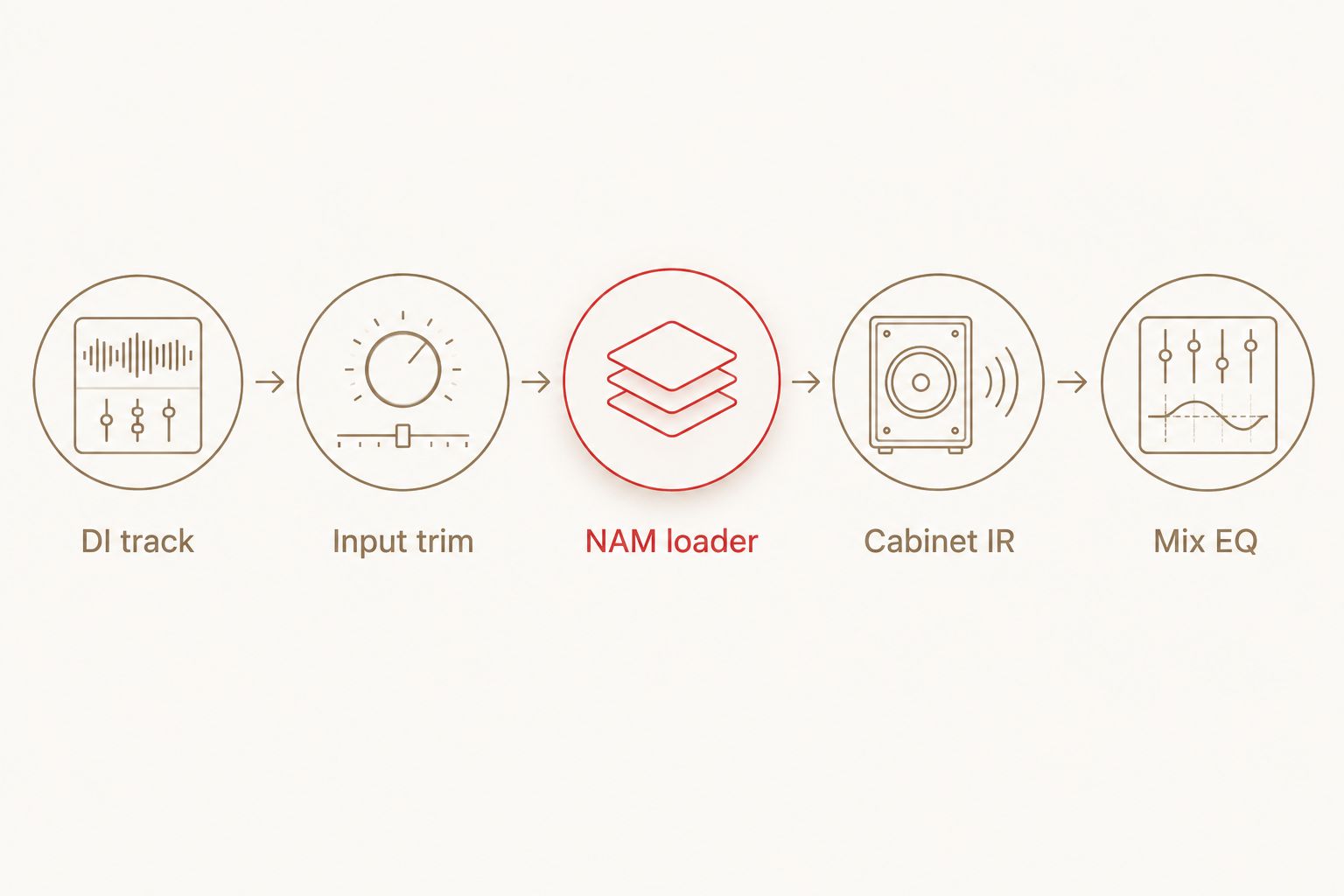
For a cabinet-inclusive capture, omit the additional cabinet stage unless you deliberately want that extra filtering. For a pedal capture, place it according to its role in the chain; a captured drive pedal is not automatically a replacement for an amp and cabinet.
What changes between a Mac and Windows NAM setup?
The operating system changes the software installation, not the identity of the profile. Check the surrounding setup before blaming the capture.
- Operating-system support: The loader release must support the installed macOS or Windows version.
- Processor architecture: The plugin build must run on the computer's processor and within the host's supported configuration.
- DAW plugin formats: A DAW cannot load a plugin format it does not support, even when the NAM profile is valid.
- Model support: The loader must understand the model architecture used by the capture. Matching the loader release across computers removes one variable.
- External file locations: A model stored in a personal downloads folder is not automatically available on another machine.
- Audio configuration: Interface drivers, monitoring routes, sample rate and buffer settings affect playback and recording behaviour.
A missing plugin is an installation problem; a missing model is a file-reference problem. Treat those as separate faults. Reinstalling the player will not restore a profile that was left on the other computer.
Which NAM packs fit a cross-platform guitar workflow?
Choose the capture for the production task, then confirm loader compatibility. Oracle Sound NAM profiles cover metal, hardcore and punk guitar use cases; the operating system is not the reason to choose one genre pack over another.
These packs illustrate different tone requirements. Neither replaces the NAM player, and neither removes the need to check the receiving session's signal chain.
| Pack | Best for | Supported reason to choose it | Limitation to plan around |
|---|---|---|---|
| VIC AUDIO METAL 2 NAM | Metal producers building separate amp, pedal and cabinet stages | Includes 20 DI amp captures from 10 high-gain amps, 10 pedal captures and 22 cab IRs, supplied in NAM A1 and A2 formats | Check loader support for the supplied formats and keep the selected cabinet IR with the session |
| ALL THE SMALL TONES PUNK GUITAR TONE NAM PROFILES | Pop-punk and emo producers seeking mid- and low-gain tones | Its description identifies punchy, articulate mid- and low-gain amp tones | Its stated focus is not a dedicated high-gain metal workflow; confirm the included files and loading instructions |
Oracle Sound NAM profiles are best for metal, hardcore and punk producers who want captured guitar tones in a compatible NAM workflow. The trade-off is dependency on a separate player and correct file management, rather than installing a self-contained amp plugin.


Will the same NAM profile sound identical on both computers?
The same model should produce the same intended processing when the player, input and settings match. Do not treat the operating system as a tone control. Differences in the surrounding chain are the first things to check.
Use the same recorded DI to compare the computers. Playing the riff again introduces different picking, muting and dynamics, so it does not isolate the software setup.
Match these settings before comparing:
- The exact profile file, not another capture with a similar name.
- The loader version and all exposed processing settings.
- Input trim and any processing before the model.
- Cabinet IR, cabinet-loader settings and processing order.
- Output gain and post-model EQ.
- The project sample rate and render settings.
Compare at matched listening levels. A louder render can sound more impressive without representing a better or different capture. For tight hardcore rhythm guitars, listen to palm-mute definition, pick attack and the decay between stops—not just the amount of distortion.
Can you move a NAM guitar session from Mac to Windows?
Yes, provided the receiving computer supports the project and has the required plugins and external files. Profile portability alone does not make a DAW project portable.
For a 2026 session handoff, put the selected models and cabinet IRs in clearly named folders alongside the project. Use the DAW's collection or consolidation functions for audio, then separately confirm that external model and IR files are included.
Keep a short tone note with the session:
- Profile filename and loader version.
- Cabinet filename or confirmation that the capture includes a cabinet.
- Input trim, output gain and any gate settings.
- Processing order and enabled EQ.
- Project sample rate and plugin format.
Export the dry DI and a processed reference as well. The DI preserves the ability to reamp; the reference shows the receiving engineer what the original chain sounded like. Neither file replaces the editable plugin setup, but both make troubleshooting clearer.
What if the DAWs use different plugin formats?
Load the same model manually in a compatible player on the receiving system and rebuild the documented chain. A host does not necessarily restore an instance saved in a different plugin format.
If both DAWs accept the same format, that removes one obstacle. It still does not guarantee that project files, automation or plugin state will transfer between different DAW applications.
Why does a NAM profile load but produce no usable sound?
A loaded model confirms that the player recognised the file. It does not confirm that audio reaches the plugin or that the rest of the chain is correct.
| Symptom | Check first | Next move |
|---|---|---|
| No signal reaches the track | Interface input and track routing | Select the correct guitar input and confirm the input meter moves |
| Track meters move but monitoring is silent | Monitoring, mute state and output routing | Check the track output and your headphone or speaker path |
| Model refuses to load | Extracted file and model support | Try the actual model file in a compatible loader release |
| Guitar sounds harsh and unfinished | Capture type and cabinet stage | Add the intended IR only if the capture needs cabinet processing |
| Guitar sounds dull or heavily filtered | Duplicate cabinet processing | Check for a cabinet-inclusive capture followed by another cabinet stage |
| Playback crackles | Driver, buffer and processing load | Increase the buffer for playback and isolate the chain in a simple session |
Do not start with aggressive EQ to repair an incomplete chain. Confirm the profile type and cabinet routing first, then shape the tone for the mix.
FAQ
Do NAM profiles work on Mac and Windows in 2026?
Yes, NAM profiles work on Mac and Windows in 2026 through a compatible NAM player. Install the appropriate player build on each operating system and load the same model file.
Do I need a different NAM profile download for Windows?
No, the model file does not need a Windows-specific version. The loader installation must match Windows, your processor and the plugin formats your DAW supports.
Can I use a NAM profile in Logic Pro?
Yes, through a NAM-compatible plugin supplied in a format Logic Pro supports, such as AU. The profile itself is not an AU plugin and cannot be inserted directly on a track.
Will a Mac NAM preset open automatically on Windows?
Not necessarily; a preset can depend on the player, its version and stored file paths. Transfer the model and cabinet files, then confirm or rebuild the saved settings.
Do NAM profiles include a guitar cabinet?
Not all NAM profiles include a cabinet. Check the capture description: an amp-only capture needs separate cabinet processing for a conventional miked-guitar sound.
Can I use Oracle Sound NAM profiles without a NAM loader?
Oracle Sound NAM profiles need software that can load and process their model format. A profile pack is model content, not automatically a self-contained amp plugin.
Does moving to Windows change the sound of my NAM profile?
Changing operating systems is not itself a tone adjustment. Compare the same DI through matching model files, player settings, cabinet processing and output levels.
One last thing
Test the handoff before the session depends on it. Open a copied project on the receiving computer, reload the model and cabinet files, and render the same DI passage.
That test checks the actual recording workflow—not just whether the profile opens. Keep the dry guitar and processed reference together so a missing plugin never leaves the next engineer guessing at the intended tone.