

Do MIDI drum packs include velocity and humanization data?
MIDI drum packs contain note velocities and timing positions, but those values do not automatically mean the grooves are humanised. In 2026, check each file for intentional accents and timing variation before adding processing; the drum instrument’s velocity response also affects the result.
- Do MIDI drum packs include humanization? MIDI stores velocity and timing, but deliberate performance variation depends on the file.
- Oracle Sound offers genre-specific MIDI drum tracks; inspect imported grooves before changing their dynamics.
- Preserve snare accents and ghost notes before applying timing randomisation.
- Judge humanisation through your drum sampler, with the guitar riff playing.
Do MIDI drum packs include velocity and humanization data?
Velocity is part of MIDI note data. Humanisation is a performance choice, not a guarantee attached to the file format. A groove with identical velocities still contains velocity data. A groove with every note exactly on the grid still contains timing data.
Standard MIDI Note On messages use a 7-bit velocity value. Sounding notes use values from 1 to 127; a Note On velocity of 0 functions as a note-off message. Those numbers describe the MIDI standard, not how a particular pack’s author programmed the performance.
Timing variation lives in the positions of the notes. Velocity variation lives in their velocity values. You do not need a separate humanisation file for either to survive MIDI export, provided the export retains the original note events.
| Data or processing | What it does | Best for | Limitation |
|---|---|---|---|
| Note velocity | Gives each hit a velocity value | Accents, ghost notes and dynamic phrasing | Equal values still count as velocity data |
| Written timing offsets | Places hits ahead of or behind the grid | Preserving a deliberately played or programmed feel | Offsets alone do not prove a human performance |
| DAW humanisation | Changes note timing or velocity during editing or playback | Adjusting an imported groove to your arrangement | Added processing can disturb existing phrasing |
| Sampler variation | Changes how repeated hits sound during playback | Reducing identical-sample repetition | Does not establish what the MIDI file contains |
The practical test is straightforward: inspect the notes, then listen through the instrument you intend to use. A waveform demo tells you how one rendering sounds. It does not expose every MIDI value or playback setting behind that rendering.
Why this matters for heavy drum programming
A breakdown needs a clear relationship between the kick, snare and guitar accents. Randomising every hit can weaken that relationship without making the drummer sound more believable. Tight timing and varied dynamics are compatible.
Oracle Sound MIDI drum packs are best for producers seeking genre-specific metal, hardcore and punk songwriting material. Treat a groove library as arrangement material, then judge its feel against your riff rather than assuming the word MIDI promises realism.
For a 2026 production session, separate the performance from the playback sound. Weak snare accents can come from the note velocities, the sampler’s response or processing after the instrument. Fix the responsible stage instead of changing all three at once.
Velocity data: inspect accents before adding variation
Open the imported groove in your DAW’s piano roll or drum editor and display the velocity lane. Select the snare notes separately from the kick and cymbals. Comparing every instrument in one selection hides the relationships you need to hear.
Look for a hierarchy: backbeats, quieter connecting hits, fill accents and cymbal emphasis. A ghost note should serve a different musical role from a main snare hit. Changing both to the same velocity removes that distinction.
Do not judge the groove by how many different values appear. A simple pattern can use repeated values deliberately, while a pattern with constantly changing values can still have poor phrasing. The question is whether the dynamics support the part.
Use the MIDI velocity range of 1–127 as an editing scale, not a realism recipe. There is no universal ghost-note value because the drum instrument determines how an incoming velocity affects loudness, sample selection and tone. Listen before copying settings between kits.
Preserve purposeful accents before introducing random variation. If the kick already follows the riff and the snare has a clear backbeat, change the weaker details rather than flattening the whole performance and rebuilding it.
Timing data: tight does not mean lifeless
A MIDI groove can remain tightly quantised while using convincing dynamic phrasing. Metal and hardcore arrangements often depend on coordinated attacks, particularly where kicks reinforce palm-muted guitar patterns. Timing looseness is not the only route to a useful performance.
Inspect note positions against the grid before quantising. Check whether repeated snare hits sit consistently behind the beat, whether cymbals lead transitions, and whether fills push into the next section. These are listening checks, not proof that a drummer performed the file.
Global quantisation can remove written offsets. Global randomisation can replace a consistent pocket with unrelated movement. Neither process distinguishes a deliberate musical choice from an accidental edit.
If a part sounds stiff, start with one instrument or phrase. Adjust the cymbal phrasing while leaving riff-locked kicks intact, or reshape a fill without moving the main backbeat. Audition the result in the full arrangement.
For your 2026 workflow, keep an untouched version of the imported clip. That makes it possible to compare the original phrasing with your edits without relying on memory or an undo history.
How do you check a MIDI drum pack in your DAW?
Use this sequence before committing a groove to your song. It separates file content from sampler behaviour and prevents unnecessary processing.
- Import unchanged. Load the MIDI into an instrument track without applying an import quantise preset or velocity normalisation. Keep the original clip as your reference.
- Check mapping. Confirm that kick, snare, tom and cymbal notes trigger the intended sounds. A misplaced articulation can resemble a performance problem.
- Inspect velocities. Select each drum voice independently. Compare main hits, quieter notes and fill accents rather than averaging the entire groove.
- Inspect timing. Zoom into note starts and compare them with the grid. Look for consistent relationships, not just visible scatter.
- Audition in context. Play the groove with the guitar riff and bass. Decide whether the drum accents reinforce or compete with the arrangement.
- Edit selectively. Change the specific notes or instrument group causing the problem. Compare the edited clip with the untouched version through the same kit.
The signal chain is MIDI clip, optional MIDI processing, drum sampler, then audio processing. Each stage changes a different part of the result. Bypass optional processing when checking what the source file actually contains.
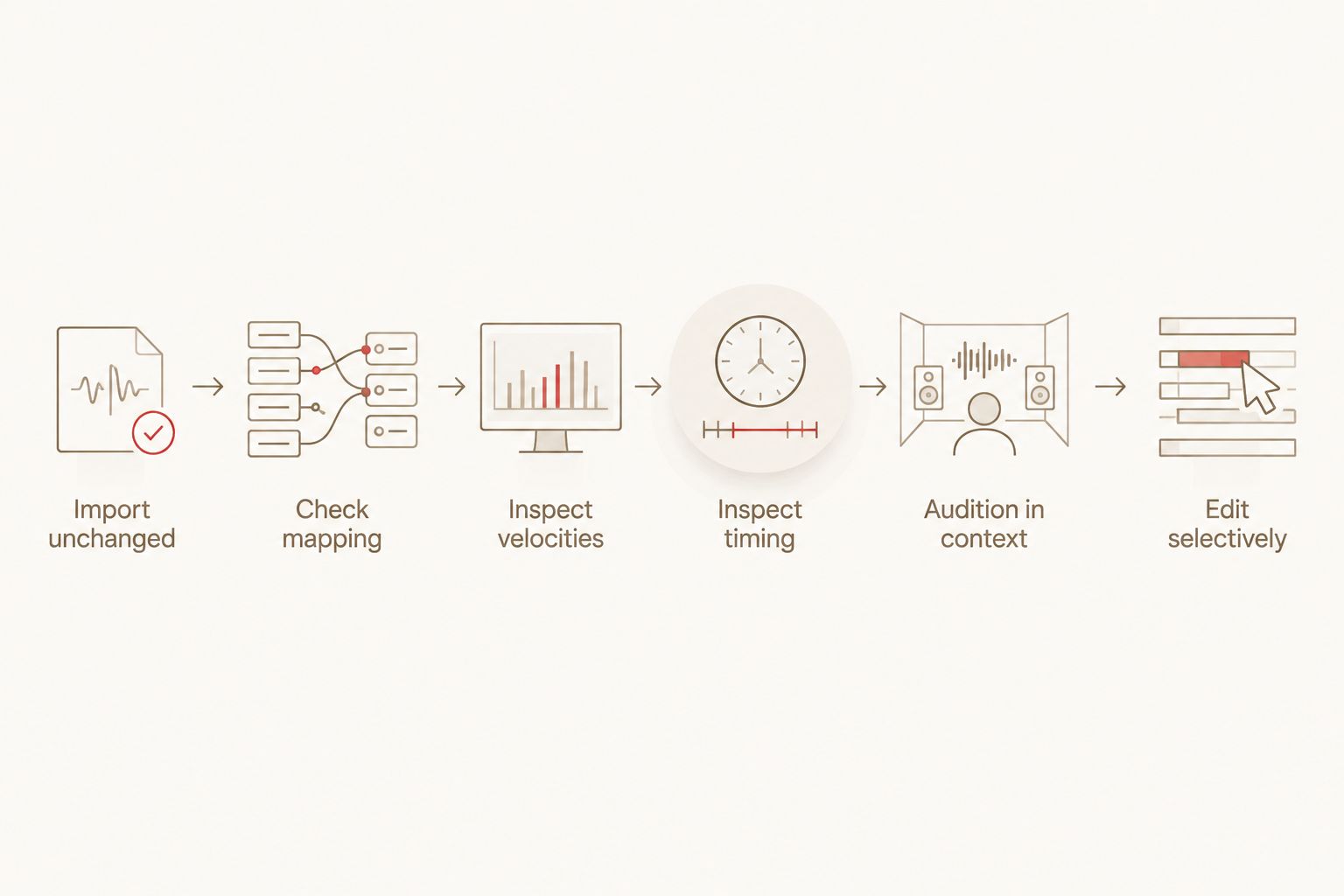
After the inspection, save your edited groove separately. Keep the source clip available whenever you change the kit, because a different velocity response can change which edits remain useful.
Why MIDI drum humanisation varies
The same MIDI notes can produce different results across drum instruments and projects. These factors explain the difference without assuming that every pack uses the same programming method.
- Authoring choices: A writer can prioritise grid-tight kicks, dynamic cymbals or a looser pocket. MIDI supports those choices but does not require them.
- Recorded or programmed input: A played performance can retain timing and velocity variation; a programmed groove can contain intentional variation too. Neither origin guarantees suitable phrasing.
- Export settings: Quantising or changing velocities before export alters the performance stored in the file.
- Import and DAW processing: Quantisation, velocity transformations and groove processing can change the imported notes or their playback.
- Sampler response: Velocity curves, articulations and sample selection influence how the same note data sounds.
- Arrangement context: A groove that works beneath sustained chords can conflict with a tightly articulated guitar riff.
For a 2026 pack assessment, distinguish claims about included MIDI from claims about a rendered demo. Listen for useful dynamics, but inspect the file before deciding which parts of that sound are stored in the notes.
Which groove fits a beatdown or hardcore arrangement?
Oracle Sound’s BEATDOWN/HARDCORE 10 SONG DRUM MIDI PACK is a genre-specific starting point for beatdown and hardcore writing. Its stated scope is 10 songs. Choose it for that musical focus, not as evidence of a particular humanisation setting.
Best for: beatdown and hardcore producers who want genre-matched drum MIDI as songwriting material. The advantage is the defined stylistic focus; the limitation is that song count and genre labels do not establish the velocity or timing treatment of individual files.
Once you import a groove, align its musical accents with your arrangement. Keep kick attacks tied to the riff where that relationship matters, check the snare’s emphasis, and shape the cymbal pattern around section changes. Use the inspection sequence above before adding a humaniser.
A pack does not have to sound loose to be useful. For a stop-start breakdown, preserving deliberate silence and coordinated attacks can matter more than introducing timing drift.
Should you add humanisation to an already varied groove?
Existing velocity and timing variation is a reason to inspect first, not automatically add more. Applying another layer of randomisation changes the relationships the file already contains. Compare with processing bypassed before keeping the change.
When the main pattern works but repeated cymbals feel static, edit those cymbals. When a fill lacks direction, adjust its accents. Avoid making unrelated kicks and snares move simply because a humanise control is available.
Does changing drum samplers change the humanisation?
Stored velocities from 1 to 127 remain MIDI values, but their audible effect depends on the receiving instrument. A different kit or velocity curve can change the balance between ghost notes and main hits without changing the MIDI file.
Start with the sampler’s velocity response, then revisit individual notes if needed. Check mapping at the same time: an incorrect snare articulation is not fixed by timing randomisation.
Can tightly quantised drums still have a natural feel?
Tightly quantised drums can retain dynamic phrasing through velocity, articulation and arrangement. Timing is only one part of the performance. Listen for believable accents, purposeful fills and clear differences between supporting hits and main attacks.
For heavy production, judge whether the drums support the riff. Do not sacrifice a working pocket simply to make the piano roll look less regular.
FAQ
Do MIDI drum packs include humanization automatically?
No. MIDI stores note velocities and timing positions, but deliberate humanisation depends on how each groove was created and exported. Inspect the file before adding processing.
Does every MIDI drum hit have a velocity value?
Standard MIDI Note On messages include a velocity value. Sounding notes use values from 1 to 127, while a Note On velocity of 0 functions as a note-off message.
How do I tell whether a drum groove has humanised timing?
Compare note starts with the grid in your DAW’s editor. Consistent offsets can reveal written timing variation, but they do not prove that a drummer performed the groove.
Will quantising a MIDI pack remove its humanisation?
Quantising can remove timing offsets from the affected notes. Timing-only quantisation does not itself flatten velocities, so check which parameters your command changes.
Is random velocity better than manually programming accents?
Random velocity is not a substitute for intentional accents. Establish the backbeat, ghost notes and fill emphasis first, then judge whether additional variation helps.
Do Oracle Sound MIDI drum packs need a humaniser plugin?
A humaniser is not required simply to use Oracle Sound MIDI drum packs. Inspect the imported notes and audition them through your drum instrument before deciding whether to change their feel.
Why does the same MIDI groove sound different with another drum kit?
Drum instruments interpret velocity and note mapping through their own playback settings. Check articulations and velocity response before rewriting the groove.
One last thing
Diagnose the quiet notes before moving the loud ones. If a groove feels lifeless, mute its main kick and snare attacks temporarily and listen to the remaining cymbals, ghost notes and fill details. You will hear whether the supporting performance has useful phrasing.
Restore the main hits and compare again. For your 2026 sessions, keep a bypassable version of every humanisation change: a busier velocity lane or a less regular grid is not proof of a better drum part.