

Do amp simulators sound as good as a real amp? Yes, 2026
Yes—guitar amp simulators can sound as good as a miked real amp in a recording, but that does not make every plugin indistinguishable from every amp. In 2026, the useful comparison is both signals through the same monitors, at matched loudness—not headphones against a loud cabinet moving air beside you.
- Do amp simulators sound as good as a real amp? Yes, for recorded guitar tones; amp-in-room feel is different.
- Neural Amp Modeler loads NAM profiles; check whether each profile includes the cabinet before adding speaker processing.
- Compare amp sims and miked amps through the same monitors, at matched loudness, inside your actual mix.
- Keep a clean DI so you can change the guitar signal chain without replaying the part.
For a metal, hardcore or punk session, start with the recording problem rather than the analogue-versus-digital argument. Oracle Sound supplies amp/pedal plugins and NAM tone profile packs; the decision here is whether that software workflow or a miked cabinet better serves your track.
Do guitar amp simulators sound as good as a real amp?
An amp simulator is a valid recording tool, not just a substitute for a rehearsal amp. Judge the finished guitar sound: pick attack, sustain, chord separation, noise and how the part sits against bass and drums.
A real amp reaches a recording through a speaker, microphone and preamp. An amp sim needs an equivalent speaker-and-microphone stage, whether that comes from a cabinet impulse response, built-in cabinet processing or a profile containing that part of the chain.
| Recording approach | Best for | Main advantage | Main limitation |
|---|---|---|---|
| Amp sim with cabinet processing | DAW-based writing and revisable recording | You can retain a clean DI and change processing later | Input level, monitoring latency and cabinet selection need attention |
| Real amp with a miked cabinet | Sessions built around a particular amp, speaker and microphone | You record that physical signal chain directly | Room sound, microphone position and acoustic volume affect the result |
| Real amp heard in the room | Players who want direct cabinet interaction | The guitar and loudspeaker interact physically | It is not the same listening perspective as a finished recording |
None wins every session. A miked amp can sound wrong for the arrangement, and an amp sim can sound wrong because its cabinet stage or input calibration is wrong. Fix the chain before blaming the format.
Why this matters for heavy guitar production
A soloed high-gain sound is not the finished rhythm tone. Bass supplies weight, cymbals occupy the top end, and the kick competes with palm-muted accents. A huge solo tone can become a blurred rhythm track once those parts enter.
For your 2026 sessions, make the decision in the arrangement you are recording. Use the same riff, backing track and listening level for both approaches. Choose the sound that preserves the picking pattern and supports the song, not the sound with the most impressive isolated low end.
The workflow matters too. If the song is still changing, a clean DI lets you revisit distortion and cabinet choices after editing. A committed microphone recording captures your decision immediately; preserve a separate DI if you want that same flexibility later.
Recorded sound and amp-in-room feel are different tests
A cabinet beside you produces sound in the room and interacts with your position. Headphones deliver a close, isolated listening perspective. Expecting those experiences to feel identical confuses monitoring with amp modelling.
A miked real amp played through headphones also loses that direct cabinet-in-room experience. The microphone selects a particular perspective on the speaker, and the headphones reproduce the recorded signal rather than the whole room.
Use these separate tests:
- Recorded tone: Compare both guitar recordings through the same speakers or headphones.
- Playing response: Check the delay between your pick attack and what you hear while tracking.
- Physical interaction: Decide whether you need the guitar to interact with a loudspeaker for feedback and sustain.
- Mix fit: Listen with the bass, drums and vocals rather than judging the rhythm guitar alone.
An amp sim does not reproduce physical cabinet interaction merely by modelling distortion. That is a genuine limitation when your performance relies on standing near a loud speaker. It is a different requirement from delivering a convincing recorded guitar track.
Build the amp-sim chain before judging its sound
Use a simple chain first. Extra processing makes faults harder to locate.
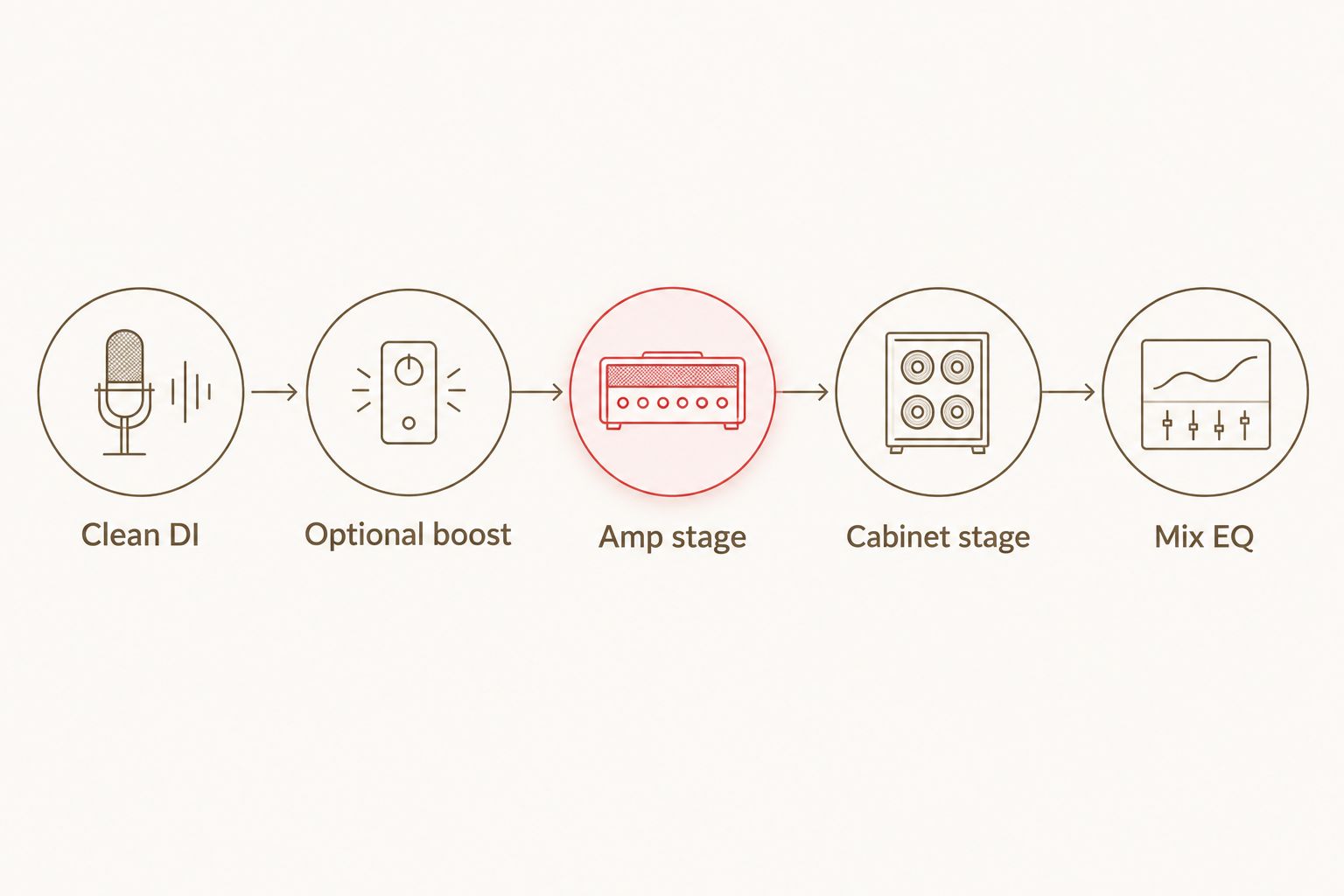
Clean DI, optional boost, amp stage, cabinet stage, mix EQ is a practical starting order. These are functional stages, not a requirement to load a separate plugin for each one.
- Clean DI: Connect the guitar to an appropriate instrument input. Avoid clipping at the interface; reducing a plugin's output cannot repair clipping already recorded.
- Optional boost: Add a drive or boost before the amp when the riff needs a different attack or low-frequency response. Start without it so you can hear what it changes.
- Amp stage: Set input level according to the plugin or profile documentation. Keep input calibration separate from gain and final listening volume.
- Cabinet stage: Use speaker processing appropriate to the amp signal. Check whether the profile or plugin already includes it before adding another cabinet stage.
- Mix EQ: Shape the recorded result against the arrangement. Do not use aggressive EQ to conceal an unsuitable cabinet or excessive distortion.
For tight palm-muted rhythm, reduce amp gain until the attack becomes clear, then judge sustain in the track. More distortion is not automatically more weight. Keep the gate open enough to preserve the intended note endings, especially on stops followed by ringing chords.
For punk rhythm, check open-chord separation rather than only palm-muted tightness. For doom or sludge, judge sustained notes and low-string definition. These are listening priorities, not universal presets.
Where NAM profiles fit
NAM profiles give you another route to an amp-style guitar signal inside a software workflow. A profile represents the captured behaviour of a signal chain; it is not automatically a full set of controls equivalent to the original hardware.
Oracle Sound's Tonectomy brutal guitar tone NAM profiles are relevant when you want to explore a NAM-based heavy guitar workflow. Oracle Sound is best suited to metal, hardcore and punk producers looking for amp sims and NAM tone profile packs.
The advantage is a profile-based starting point you can audition against your DI. The limitation is that you need to understand what the profile contains and use suitable loading and cabinet processing; the pack name alone does not establish its response with your guitar.
Check the supplied documentation before adding a cabinet impulse response. An amp-only profile needs a speaker stage for a conventional miked-cabinet sound. A profile that already contains a cabinet and microphone should not automatically receive another cabinet stage.
Why amp-simulator results vary
Differences between two recordings often come from the surrounding chain, not simply from whether the amp is software or hardware. Check these factors before changing products:
- Input level: The signal entering a nonlinear amp stage affects distortion. An interface gain setting and a plugin input control are not interchangeable fixes for every problem.
- Cabinet and microphone perspective: Speaker processing strongly shapes the final recorded tone. Compare equivalent perspectives rather than a dark cabinet against a bright one.
- Monitoring delay: Latency affects your timing and perceived connection to the instrument, even when the recorded tone itself is suitable.
- Gain structure: Distortion before the amp, amp gain and output volume perform different jobs. Match listening level after making gain changes.
- Performance and arrangement: Picking strength, muting and overlapping parts change what you hear. Use the same DI when comparing processing options.
- Monitoring system: Headphones, studio monitors and a guitar cabinet present sound differently. Keep the playback system consistent for the comparison.
These checks also apply to hardware recordings. A real amp does not remove input, speaker, performance or monitoring decisions from the session.
How do you compare an amp sim with a real amp fairly?
Use one clean performance and compare the resulting recordings at matched loudness. In 2026, a controlled session comparison is more useful than switching between unrelated online demos.
Record the DI, then route it through the amp sim. For the hardware version, use an appropriate reamping setup to feed the amplifier and record its cabinet through a microphone. Do not connect an amplifier's speaker output directly to an interface input; use equipment designed for that connection when recording from the amp output.
Match the playback loudness after processing. Hide the track names if possible, switch between versions and listen for chord definition, pick attack, sustain and unwanted noise. A louder version can influence your preference without being the better fit.
Finish the comparison with bass and drums running. If you prefer the software track in the mix but the hardware rig while playing, that is not a contradiction: recording tone and playing experience are different decisions.
Does latency make an amp sim sound less realistic?
Latency changes the playing experience; it does not by itself make the recorded amp tone less realistic. Delayed monitoring can make a responsive sound feel disconnected from your hands.
At 48 kHz, a 64-sample buffer spans approximately 1.33 milliseconds, while a 128-sample buffer spans approximately 2.67 milliseconds. Those are durations for one buffer—not measurements of total round-trip latency. Converters, drivers, routing and plugin processing add to the monitoring path.
For a 2026 tracking session, select a stable buffer setting and check the actual playing response. Bypass unnecessary processing while recording. If direct monitoring sends the dry guitar alongside the processed track, disable the unwanted path so you judge the amp sim rather than a blend of both signals.
Can an amp sim replace a real amp for metal recording?
Yes, an amp sim can replace a miked real amp for metal recording when its sound and monitoring response meet the session's needs. It does not replace every physical reason to use a cabinet, especially controlled feedback or a performance built around speaker interaction.
For double-tracked rhythms, record separate performances rather than duplicating one processed track and panning the copies. Keep the DI for each take. That lets you revisit the guitar chain without confusing tone changes with different playing.
Choose hardware when its particular speaker interaction or recorded character is central to the part. Choose software when you need a DAW-based chain and revisable processing. Neither choice excuses loose muting or conflicting bass and guitar parts.
FAQ
Do amp simulators sound as good as a real amp in 2026?
Yes, amp simulators can sound as good as a miked real amp in a recording. Compare both through the same monitoring system at matched loudness, and separate recorded tone from cabinet-in-room feel.
Why does my amp simulator sound fizzy?
Check the cabinet stage, input level and gain before adding corrective EQ. Missing speaker processing, an unsuitable cabinet choice or excessive distortion can produce an abrasive recorded sound.
Do I need a cabinet impulse response with NAM profiles?
You need a cabinet stage when the NAM profile contains an amp-only signal. If the profile already contains the cabinet and microphone, adding another cabinet stage changes that captured result.
Is a real amp better for guitar feedback?
A loud physical speaker provides direct guitar-to-speaker interaction for feedback. An amp sim monitored through headphones does not create that same interaction.
What buffer size should I use when recording an amp sim?
Use the lowest buffer size that remains stable in your session. A 64-sample or 128-sample buffer is a setting to audition, not a guarantee of a particular total monitoring latency.
Can I change an amp-sim tone after recording?
Yes, if you retain a clean DI, you can change the amp and cabinet processing after recording. A printed processed track alone does not give you the original unprocessed performance.
Are Oracle Sound NAM packs relevant to heavy guitar recording?
Yes, Oracle Sound sells NAM tone profile packs alongside guitar amp/pedal simulation plugins for producers and recording engineers. Check each pack's documentation for its intended signal chain before choosing cabinet processing.
One last thing
Save the dry performance, not just the sound you liked while tracking. Your final guitar decision belongs beside the finished bass and drum parts, which can change after the guitar session.
Before committing your 2026 mix, bypass the guitar-bus processing and listen again. If the riff only works with heavy corrective processing, revisit the source tone, cabinet stage or performance before adding another plugin.