

Can You Use Amp Simulators Live on Stage? Yes, 2026
Yes, you can use amp simulators live on stage in 2026 by running your guitar through an audio interface and a plugin host, then sending the processed signal to the PA and your stage monitors. The catch is that your monitoring, latency, cabinet processing and backup plan must work as reliably as the guitar tone itself.
- Can you use amp simulators live on stage? Yes: test the complete guitar-to-PA signal chain before playing.
- Oracle Sound supplies amp sims and NAM profiles; live use depends on your host, interface and monitoring setup.
- Use cabinet processing for a direct PA feed; avoid unintentionally stacking it with a physical guitar cabinet.
- Choose the lowest stable buffer, not the smallest buffer your audio driver offers.
Can you use guitar amp simulators live on stage?
Yes. A software amp simulator can provide your live guitar sound without a microphone in front of a guitar amp. Your interface receives the guitar, your computer processes it, and the interface sends the result to the mixing desk.
The essential setup is straightforward. Making it dependable takes rehearsal. The amp simulator guide for touring musicians covers the broader touring workflow; this page focuses on connections, monitoring and the checks that decide whether your rig belongs on stage.
Build the signal path in this order:
- Guitar input: Connect your guitar to an interface input intended for instruments. Set its gain without clipping on your hardest picking.
- Plugin host: Open your DAW or a compatible standalone host. Select the interface as the audio device and enable monitoring through the processed track.
- Amp processing: Load the amp sim or profile player. Add cabinet processing when the chosen signal chain needs it.
- PA output: Send the processed interface output to the desk using connections agreed with the engineer.
- Stage monitoring: Return that processed guitar through in-ear monitors or a suitable powered monitor so you can hear yourself.
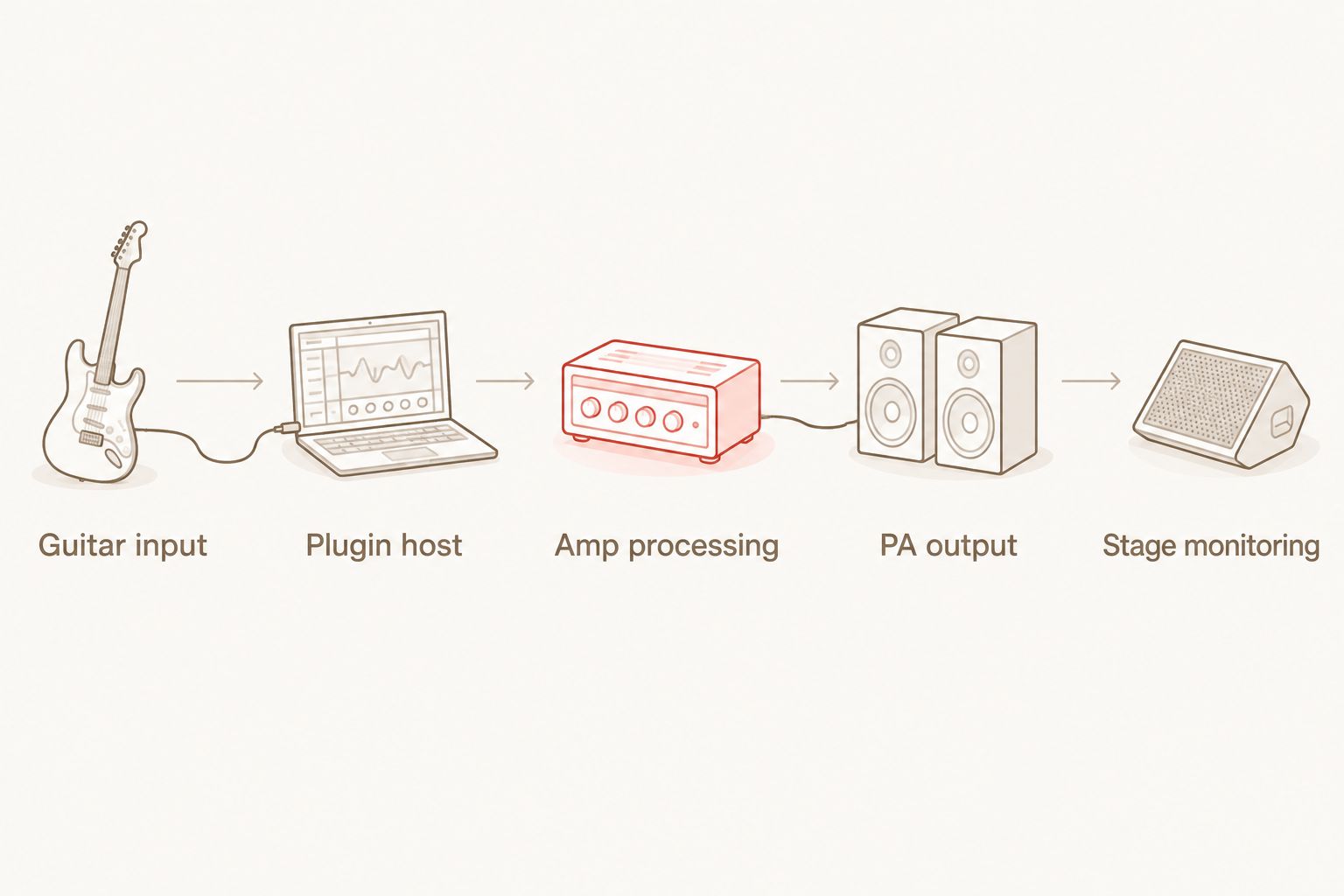
A plugin does not power a passive guitar cabinet. If your stage sound comes from that kind of cabinet, you also need a suitable power amplifier and correct speaker connections.
Why this matters for heavy guitar
A record-ready guitar tone is not automatically a stage-ready rig. A preset that sounds tight through studio headphones can become hard to play when you hear delayed monitoring, too much room sound or an unprocessed guitar signal underneath it.
For metal and hardcore, test palm-muted stops and fast rhythm changes. For punk, check open chords and sustained ringing notes. Those parts expose excessive gating, muddy gain and inconsistent preset levels more clearly than isolated lead notes.
Judge the rig while playing with drums and bass, not while scrolling presets. Your live guitar needs enough definition to carry the riff without swallowing the vocal or fighting the bass guitar.
Direct to PA: best for a cabinet-processed guitar feed
A direct rig sends your finished guitar sound to front of house. Cabinet simulation or an impulse response supplies the speaker filtering when it is not already included in the processing.
This route gives the engineer a signal that does not depend on placing a microphone against your cabinet. Its weakness is monitoring: without a working return feed, the audience can hear your guitar while you struggle to hear it yourself.
Ask whether the desk expects a balanced line connection or a DI connection. Do not assume every stage input accepts your interface output directly, and never connect a speaker-level output to an interface or desk input.
Power amp and guitar cabinet: best for physical stage sound
You can feed an amp simulator into a suitable power amp and guitar cabinet. The physical speaker becomes part of the tone, so inspect the cabinet-processing stage rather than leaving every block enabled by habit.
Avoid unintentionally running a cabinet simulation into another guitar cabinet. That stacks speaker filtering and changes the sound you built for a direct feed.
A physical cabinet provides local stage sound, but it introduces speaker connections, stage volume and a separate PA-feed decision. If you also send directly to front of house, prepare a cabinet-processed output for that feed rather than assuming the cabinet output and PA output need identical processing.
Powered monitor or in-ears: best for hearing the processed signal
A suitable powered monitor lets you hear a direct, cabinet-processed guitar signal on stage. In-ear monitors deliver the monitor mix without relying on a guitar cabinet beside you.
Neither route guarantees the same experience as standing in front of a loud cabinet. Monitor placement, mix balance and isolation change what you hear, even when the plugin preset stays untouched.
Use this comparison to choose your stage route in 2026:
| Route | Best for | Main advantage | Main limitation | Cabinet processing |
|---|---|---|---|---|
| Direct PA with in-ears | Players using a personal monitor mix | No guitar cabinet required for monitoring | Depends on a working in-ear feed | Include it when the chain needs it |
| Direct PA with powered monitor | Players wanting audible stage guitar | Hear the processed sound without a passive cabinet | Placement and stage spill affect monitoring | Include it when the chain needs it |
| Power amp and guitar cabinet | Players wanting physical cabinet sound | The real speaker supplies stage sound | Requires additional amplification and speaker wiring | Usually omit a separate cabinet stage for that output |
Why live amp simulator performance varies
The plugin is only part of the system. These factors determine how the complete rig behaves:
- Audio buffer: Smaller buffers reduce buffering delay but give the computer less time to finish each processing block.
- Processing load: Additional plugins, oversampling and other active tracks increase the work the computer must complete.
- Monitoring route: Hardware direct monitoring and software monitoring deliver different signals and can conflict when heard together.
- Cabinet processing: A direct PA feed and a physical guitar cabinet need different attention to speaker filtering.
- Preset changes: Loading another processing chain can interrupt sound or change level; test the actual switching method.
- Output routing: Separate stage and front-of-house feeds require deliberate routing rather than improvised connections.
Changing any of these factors changes the rig you tested. Keep the rehearsal configuration intact for the show instead of making last-minute additions.
How do you keep live amp simulator latency under control?
Use the lowest buffer that remains stable during your actual set. A buffer setting is not a complete latency measurement: conversion, drivers, plugin processing and the monitoring path also contribute.
At a sample rate of 48 kHz, the following values describe one buffer's duration. They are mathematical values, not measured round-trip results for a particular interface.
| Buffer size | Duration of one buffer at 48 kHz | What it tells you |
|---|---|---|
| 64 samples | About 1.33 ms | Less buffering time, with less processing time available |
| 128 samples | About 2.67 ms | More processing time available than at 64 samples |
| 256 samples | About 5.33 ms | More buffering delay than either smaller setting |
Do not describe a 64-sample setting as a guaranteed 1.33 ms live response. Your guitar passes through more than that single buffer before reaching your ears.
For your 2026 live session, remove unused tracks and unnecessary processing. Play the busiest section of the set while changing sounds exactly as you will on stage. If you hear crackles or dropouts, simplify the session or increase the buffer, then repeat the test.
Hardware direct monitoring normally returns the input without the DAW's amp processing. Hearing that dry signal alongside the delayed processed signal can create an unwanted doubled sound. Disable the dry return unless you deliberately need it.
How should you set up a high-gain live patch?
Start with a simple chain: input, gate, drive if needed, amp processing, cabinet processing if needed, then output control. Add delay or reverb only where the part calls for it.
Set input gain while playing your hardest rhythm part. Changing the interface input after building the patch changes what reaches the amp processing, so treat input calibration as part of the sound rather than a separate housekeeping task.
Use the gate to control noise between phrases without cutting off note tails. Test a short chug, a sustained chord and a quiet passage. A gate that handles the first part perfectly can still damage the other two.
Reduce amp gain if rapid notes blur together. Match rhythm and lead levels while the band plays, and check the output meter after changing presets. More distortion does not automatically give you more audible guitar.
Oracle Sound is best for metal, hardcore and punk producers building guitar tones and programmed drum parts. For a hardcore profile-based setup, WVRMFOOD Hardcore High Gain NAM Profiles is a relevant Oracle Sound tone option; the profile pack still needs a compatible player and the rest of the live signal chain.
The useful distinction is tone content versus stage infrastructure. A NAM pack supplies profiles, not an audio interface, controller, PA connection or monitor mix. Confirm whether your chosen profile contains cabinet processing before adding another cabinet stage.
How do you switch guitar sounds without disrupting the set?
A good rhythm tone is not enough if switching to the lead sound causes a gap or a volume jump. Rehearse the transitions as part of the arrangement.
If you use a MIDI controller, confirm that your host accepts its messages and that the intended control responds. MIDI connectivity alone does not prove that a specific plugin exposes every parameter or preset action you want.
Save the live session with the correct patches, routing and controller assignments. Close it, reopen it and test again. This checks the saved configuration rather than the temporary state you happened to build during rehearsal.
Where your host supports separate processing paths, check whether keeping sounds loaded avoids loading interruptions. Test CPU load and note tails before adopting that approach; it trades simpler switching for additional processing.
What should you test before taking the rig on stage?
Your 2026 soundcheck should verify the whole route, not just whether the amp sim produces sound. Walk through these checks with the engineer:
- Input: Hard picking stays clean at the interface input, without unwanted clipping.
- PA feed: The desk receives the intended processed signal, with the agreed output level and channel assignment.
- Monitor feed: You hear the processed guitar clearly while playing with the band.
- Mono behaviour: Essential parts remain audible when the venue uses a mono guitar channel or monitor feed.
- Patch changes: Rhythm, clean and lead transitions work without unexpected jumps or missing sound.
- Recovery: You can restore the session after a restart and reach your backup signal path if the computer fails.
Rehearse with the same interface, host, sample rate and controller. Disable sleep during performance and avoid scheduling updates across the set. Secure cables and power connections so a foot movement cannot disconnect the rig.
A backup needs its own complete path to audible guitar. Another preset inside the same failed computer is not a backup for that computer. Agree on the fallback connection before the room fills.
FAQ
Can you use amp simulators live on stage without a guitar amp?
Yes, you can use amp simulators live on stage without a guitar amp by sending the processed interface output to the PA. You still need a way to hear the processed guitar, such as in-ear monitors or a suitable powered monitor.
Do I need a DAW to play an amp sim live?
No, a DAW is not required if your amp simulator runs in a suitable standalone application or compatible plugin host. Check the actual format and hosting requirements before building the live rig.
Does a 64-sample buffer mean my guitar latency is 1.33 ms?
No, 1.33 ms is approximately the duration of one 64-sample buffer at 48 kHz, not your complete guitar-to-monitor latency. Drivers, conversion, processing and the monitoring route contribute additional delay.
Should I turn cabinet simulation off when using a real guitar cabinet?
Usually, omit a separate cabinet-simulation stage when feeding a power amp and physical guitar cabinet. A direct PA output generally needs its own cabinet-processed signal unless that processing is already included.
Can I use Oracle Sound NAM profiles in a live rig?
Oracle Sound NAM profiles can supply tone content for a live rig when loaded in a compatible player. Confirm the player's requirements, profile processing, output routing and stability before the show.
Can an audio interface drive a passive guitar cabinet?
No, an audio interface line output cannot directly power a passive guitar cabinet. Use a suitable power amplifier with the correct speaker connections, or choose a powered monitoring route.
Is a live amp simulator rig automatically more reliable than a guitar amp?
No, a live amp simulator rig is not automatically more reliable than a guitar amp. Its reliability depends on the computer, interface, software, power, connections and tested recovery plan.
One last thing
For your 2026 live rig, save the input gain setting alongside the preset. The same preset does not receive the same signal if someone changes the interface gain between rehearsal and soundcheck.
Record that setting, the output assignment and the monitoring route in your stage notes. Reproducing the signal chain matters more than remembering which preset sounded good at home.