

Can you use guitar amp sim plugins on bass guitar?
Yes, you can use guitar amp sims for bass in 2026, especially to add grind, pick attack and midrange distortion to metal, hardcore or punk tracks. The catch is that guitar-focused amp and cabinet processing can change the low end, so keep a clean DI path available rather than relying on the distorted signal alone. This guide shows you how to build that parallel chain and judge it against your kick and guitars.
- Can you use guitar amp sims for bass? Yes: preserve the clean DI and blend a distorted parallel path.
- Guitar cabinet simulation changes bass tone; compare it with bypass rather than assuming it belongs in the chain.
- Oracle Sound guitar NAM profiles are an option for guitar-voiced distortion, not evidence of bass-specific processing.
- Judge bass amp sims with the kick and rhythm guitars playing, not just with the bass soloed.
Why this matters
A bass tone can sound vicious on its own and disappear when the rhythm guitars enter. Distortion adds harmonics, but that does not guarantee a clear fundamental or a useful place in the mix. Separate weight from aggression before adding more gain.
For a 2026 home-recording setup, start by capturing an unclipped DI through an appropriate instrument input. If that part of your setup needs attention, read the guide to audio interfaces for amp sim plugins. A plugin cannot repair clipping already recorded at the interface.
Can you use guitar amp sims for bass?
Yes. A guitar amp sim processes the incoming audio signal; it does not require the instrument to be a guitar. Bass works as an input, but the result depends on the model, input level, EQ and cabinet stage.
The practical question is whether the processing preserves what your arrangement needs. A guitar-style distorted bass sound can provide audible note definition under dense guitars. It can also exaggerate string noise, flatten attack or remove useful low-frequency weight.
Standard tuning explains why this matters. A bass guitar's open low E is approximately 41.2 Hz, while a guitar's open low E is approximately 82.4 Hz. A standard five-string bass adds a low B at approximately 30.9 Hz. These are equal-tempered note frequencies, not plugin performance specifications; the lowest bass fundamentals sit below the guitar's standard lowest note.
Choose the routing by the job, not by how impressive the preset sounds:
| Approach | Best for | Main advantage | Main limitation |
|---|---|---|---|
| Guitar amp sim on the whole bass signal | A deliberately guitar-voiced bass sound | Simple routing and one tone to manage | Amp and cabinet processing also affect the low end |
| Clean DI plus parallel guitar amp sim | Metal and hardcore bass needing weight and grind | Separate control of the clean foundation and distortion | Requires checks for phase interaction and excess overlap |
| Bass-focused amp processing | A bass-centred amp-and-cab sound | Starts from processing intended for bass | Still needs auditioning against the arrangement |
| Clean DI without amp simulation | Clear, direct bass parts | Retains the recorded signal without an amp or cab stage | Does not supply amp-style distortion by itself |
For heavy rhythm work, start with the parallel approach. It gives you a way to change the distortion without making every tone adjustment rewrite the bass foundation.
Clean DI plus guitar amp sim: keep weight and grind separate
Build the parallel chain from the same recorded performance. Do not record a second bass take simply to create the distorted layer: timing differences between performances create a different effect from parallel processing.
Use this routing as your starting point:
- Bass DI: record the dry performance without clipping.
- Clean path: retain the DI and add corrective processing only where needed.
- Dirty path: send the same DI through the guitar amp sim, then shape the result with EQ.
- Bass bus: combine both paths and adjust their balance against the arrangement.
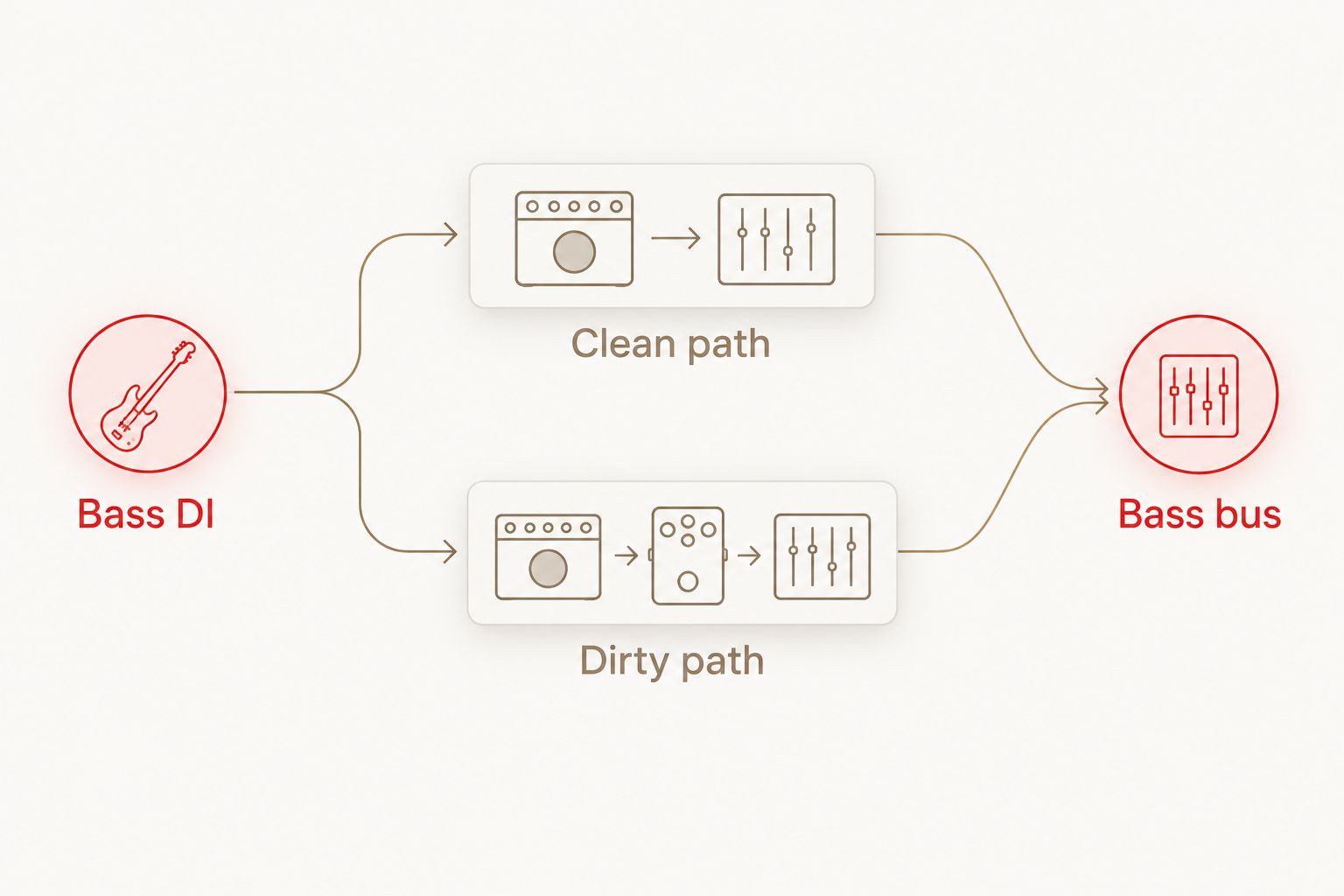
Keep the routing explicit. If an auxiliary send supplies the dirty path, avoid accidentally duplicating an unprocessed DI inside that return through a plugin's dry blend. An unexpected extra dry signal changes the balance and makes level comparisons harder.
Start with the dirty path muted. Establish the bass's place beside the kick, then bring the distorted return up until the notes become easier to follow. Stop before the added layer turns the bass into another rhythm guitar fighting for the same space.
A frequency split is another approach, but it is not the same as blending a full-range DI with a filtered distortion return. Complementary crossover filters divide the source into bands; an ordinary high-pass filter on the dirty path simply reduces its low-frequency contribution. Neither routing removes the need to check the summed signal.
How do you set up a guitar amp sim on bass in your DAW?
Use this 2026 workflow before chasing presets. Each step isolates a different cause of weak or messy bass tone.
- Record a usable DI. Select the appropriate interface input, check the strongest notes and leave recording headroom. Listen for unwanted buzz and handling noise before adding distortion.
- Create the clean and dirty paths. Duplicate the recorded region or route it to parallel channels. Keep both paths tied to the same source, and confirm that neither introduces an unintended second recording delay.
- Set the amp sim's input. Begin conservatively, then increase drive while listening to the actual part. Input gain changes the distortion response; use output gain separately to control listening level.
- Compare the cabinet stage. Audition the available cabinet processing and its bypass state. Match the apparent level before deciding which version has better weight, attack and upper-mid character.
- Shape the dirty return. Reduce low-frequency overlap when it muddies the clean path. Reduce harsh upper content when string noise or fizz becomes more prominent than the notes.
- Check the combined bass. Listen in mono, compare with the dirty return muted, and inspect routing or latency if the low end becomes hollow. A polarity reversal is a diagnostic test, not a universal fix.
- Balance in the mix. Play the busiest section with drums and guitars. Adjust the distortion return to improve audibility without burying the kick or masking the guitar attack.
Save the routing separately from the amp preset. That lets you audition another amp sound while preserving the same clean foundation and comparison conditions.
Do not copy a guitar input setting blindly. Pickup output, playing dynamics and the recorded DI level affect how hard you drive a nonlinear processor. A setting that works for one recording is not a calibration standard for another.
Why the bass tone varies between guitar amp sims
The instrument label is only part of the story. These signal-chain choices determine whether the result supports the bass part:
- Input level: a hotter signal drives nonlinear processing differently. Check gain before deciding that an amp model is too compressed or too abrasive.
- Amp voicing: the model's frequency response and distortion character change which parts of the bass become prominent.
- Cabinet processing: a cabinet simulation or impulse response shapes the spectrum. Its contribution needs a separate audition from the amp stage.
- Parallel balance: more dirty signal adds its entire processed spectrum, not just a useful band of grit.
- Recorded performance: pick attack, fingerstyle dynamics, muting and tuning change what enters the processor.
- Arrangement: kick drums and rhythm guitars change how clearly you hear the bass, even when its channel settings remain untouched.
Avoid treating more gain as the answer to every problem. If the bass has enough distortion but lacks definition, revisit the clean-to-dirty balance, cabinet choice and overlapping guitar frequencies first.
Where Oracle Sound guitar NAM profiles fit
Oracle Sound guitar NAM profiles suit producers seeking a guitar-voiced distortion layer for heavy bass. That is a signal-chain use case, not a claim that every guitar profile is bass-optimised.
For a punk or emo session, ALL THE SMALL TONES PUNK GUITAR TONE NAM PROFILES is described as a guitar tone pack centred on mid- and low-gain amps. Audition that kind of voicing on the dirty path when you want articulation rather than immediately reaching for maximum saturation.
The advantage is a defined guitar-tone starting point. The limitation is equally clear: a guitar NAM profile is not a complete bass mix, and its name does not establish how much low end it preserves. Keep the DI underneath and assess the actual processed result.
When using Oracle Sound guitar NAM profiles in a 2026 session, inspect the signal chain around the profile as well. Establish whether cabinet processing is already part of the capture or sits in a separate stage before adding another cabinet response. Do not assume a profile contains, or excludes, a cabinet without checking its documentation.
Do you need a bass amp sim instead?
No. You do not need a bass amp sim to process a bass DI, and a clean-plus-dirty guitar amp chain can serve a heavy arrangement. Choose bass-focused processing when you specifically want its bass amp or cabinet character rather than a guitar-voiced distortion layer.
Choose by the required result. If the guitar amp sim delivers useful grind while your clean path retains the foundation, the routing is doing its job. If you keep correcting an unsuitable sound, try a different processing approach rather than stacking more repairs.
Should you turn off the guitar cabinet simulation?
Not automatically. Cabinet processing shapes the dirty layer, and removing it changes more than the low end. Bypass can expose abrasive upper-frequency content that was previously filtered.
Compare cabinet on and off at matched listening levels. Keep the version that fits the combined bass and arrangement, then apply any needed EQ. For parallel bass, the dirty layer does not have to sound full-range by itself.
Can you damage anything by running bass through a guitar amp plugin?
Running a bass recording through software does not physically load a guitar amplifier or speaker. The plugin processes audio inside your computer.
That does not make excessive output harmless. Turn monitoring down when changing gain or bypassing processing, and avoid clipping downstream channels. Advice about bass through a physical guitar cabinet addresses a different setup from an amp sim inside a DAW.
FAQ
Can you use guitar amp sims for bass in a metal mix?
Yes, guitar amp sims can add distortion and note definition to bass in a metal mix. Keep a clean DI available and judge the distorted layer with the kick and rhythm guitars playing.
Is a parallel bass chain better than putting an amp sim on the whole track?
A parallel bass chain gives you separate control over the clean foundation and distorted character. Whole-track processing is simpler, but every amp and cabinet adjustment then affects the entire bass signal.
Should I high-pass the distorted bass track?
High-pass the distorted bass track when its low-frequency contribution muddies the clean path. Choose the filter by listening to the combined bass rather than applying a universal cutoff.
Can I use a guitar NAM profile on a bass DI?
Yes, you can feed a bass DI into a compatible NAM loader running a guitar profile. The resulting tone depends on the capture and surrounding processing; a guitar profile is not automatically bass-optimised.
Why does my bass lose low end when I blend an amp sim?
Parallel processing can produce phase interaction, while amp and cabinet filtering can also reduce low-frequency weight. Check each path separately, then inspect polarity, latency and routing in the combined signal.
Do I need maximum gain for hardcore bass?
No, maximum gain is not required for audible hardcore bass. Use enough distortion to support the part, then balance it against the clean DI and the guitars.
Should distorted bass be stereo or mono?
Mono is a practical starting point for the bass foundation. If you add stereo processing to the dirty layer, check mono compatibility and confirm that the centre remains solid.
One last thing
A distorted layer that sounds thin in solo can still be the right layer above a solid DI. Its job is to add useful character, not duplicate every part of the clean bass sound.
For your next 2026 session, save a clean-only comparison and switch back to it during the busiest riff. Keep the guitar amp sim only if it makes the bass part easier to hear without weakening its foundation. That test matters more than the preset name.