

Can you edit a NAM profile after downloading it?
Yes—you can change how a downloaded NAM profile sounds using input level, EQ, cabinet processing and effects, but a conventional fixed capture does not expose the original amp’s controls for editing inside the model. In 2026, the practical approach is to keep the downloaded profile intact and save your changes in the loader or DAW; a genuinely different captured amp setting requires another capture, not a renamed file.
- Can you edit NAM profiles after downloading? Yes, edit the signal chain; conventional fixed captures retain their trained response.
- Neural Amp Modeler input level changes how hard you drive the capture; output level controls loudness afterwards.
- Oracle Sound NAM profiles suit heavy producers who want captured guitar tones to shape inside a DAW.
- Use a cabinet IR with a DI amp capture; check capture notes before adding cabinet processing.
Can you edit a NAM profile after downloading it?
You can edit the playback settings and processing around a NAM profile without rewriting its captured amp response. For a conventional fixed capture, turning down the signal entering the model is not the same operation as turning down the original amplifier’s gain control before capture.
The distinction matters when you want tighter palm mutes, less fizz or a cleaner punk rhythm sound. Some changes belong before the model, some belong after it, and some require a different profile altogether.
| What you want to change | Where to make the change | What stays unchanged |
|---|---|---|
| How hard your guitar drives the model | Input trim or processing before NAM | The model’s learned response |
| Playback volume | Output trim or a downstream fader | The signal level already entering NAM |
| Frequency balance of the finished tone | EQ after the model and cabinet stage | The original captured amp settings |
| Cabinet and microphone character | Cabinet IR stage, when separate from the capture | The amp capture itself |
| Delay, reverb or modulation | Effects in your DAW chain | The downloaded model |
| Original amp settings or captured hardware | Load a different capture or create another one | The existing fixed capture |
For the loading stage, use the guide to connecting NAM profiles to Neural Amp Modeler. Once the model loads correctly, build your tone around it rather than treating the download as an editable amp schematic.
Why this matters
A metal guitar tone can sound wrong even when the profile is working correctly. An overloaded input, an unsuitable cabinet stage or excessive low end before distortion changes what you hear.
Fix the signal chain before replacing the capture. Otherwise, you can spend a session auditioning profiles while the same routing problem follows every one of them.
For a 2026 recording session, keep the dry guitar DI alongside your processed tone. That gives you a repeatable source for comparing changes and lets you reamp the performance without recording the riff again.
The goal is record-ready guitar tones in the arrangement, not a soloed sound with every control pushed. Listen against the bass, kick and cymbals before deciding that the model needs changing.
What can you change without editing the NAM file?
Input level: change the drive into the model
Input level changes the signal presented to the captured response. With a nonlinear amp capture, that affects distortion and playing response rather than simply changing playback volume.
Start with the capture creator’s calibration instructions when supplied. There is no universal input setting that makes every interface, pickup and capture behave identically.
For tight hardcore rhythm guitars, compare a lower input level against your current setting using the same recorded DI. Listen for separation between palm-muted notes and whether sustained chords retain the distortion you need.
Compensate for loudness after the model when comparing input settings. A quieter result is not automatically a worse tone, and a louder result is not automatically tighter.
EQ: decide whether you need less distortion or less frequency energy
EQ before NAM changes what drives the nonlinear stage. EQ after NAM changes the frequency balance of its output.
That is an audible distinction. Removing low end before a high-gain model changes how the low notes feed distortion; removing it afterwards reduces the resulting low-frequency energy without undoing the distortion already produced.
Use pre-model EQ when the low strings overwhelm the distortion texture. Use post-model EQ when the basic response is right but the guitar crowds the bass or fights the cymbals.
Avoid treating an external EQ as the original amp’s tone stack. You can shape the result, but you are not recreating the captured hardware’s internal control positions.
Cabinet processing: check what the capture already contains
A DI amp capture normally needs a separate cabinet stage to produce a conventional miked-guitar sound. A capture that already includes the cabinet and microphone response does not need that same treatment added again.
Check the pack documentation rather than guessing from the filename. Putting a cabinet IR after an already cabinet-inclusive capture adds another filtering stage and can produce an overly dark or restricted sound.
With a separate cabinet IR, you can change the speaker and microphone character without changing the amp model. That is a useful first move when the gain texture works but the upper mids do not sit in the mix.
Effects: save the complete sound as a chain
Noise gates, pedal plugins, delay and reverb belong in your processing setup. Their settings do not become part of the downloaded NAM capture simply because you save a DAW preset.
Gate the dry input when you need tighter stops, but check that the gate does not cut off intentional sustain. Place time-based effects after the distortion and cabinet stages when you want repeats and tails that remain separate from the distorted attack.
Save the entire chain. A model filename alone does not document the sound you used on the record.
How do you customise a downloaded NAM profile in a DAW?
Use this process for metal, hardcore or punk rhythm guitars. It separates gain structure from mix processing so you can identify what each edit actually changes.
- Keep the original. Leave the downloaded model untouched and retain its documentation. Make your tone changes in a session or preset instead.
- Record a dry DI. Use a riff with palm mutes, open chords and sustained notes. Check for clipping before the signal reaches the model.
- Set Input trim. Follow any supplied calibration guidance, then compare the model’s response using the same DI performance.
- Load NAM. Confirm that the model produces sound before adding more processors. Bypass unrelated effects while checking the capture.
- Check Cabinet IR. Add a separate cabinet stage for a DI amp capture; do not assume every profile needs one.
- Apply Post EQ. Shape the finished guitar against the bass and drums. Correct the problem you hear rather than copying a preset curve.
- Set Output trim. Match playback loudness for comparisons, then save the model reference and processing settings together.
A basic signal chain is: dry DI, Input trim, NAM, Cabinet IR when required, Post EQ, Output trim. A gate or pedal plugin can sit before NAM when the part calls for it.
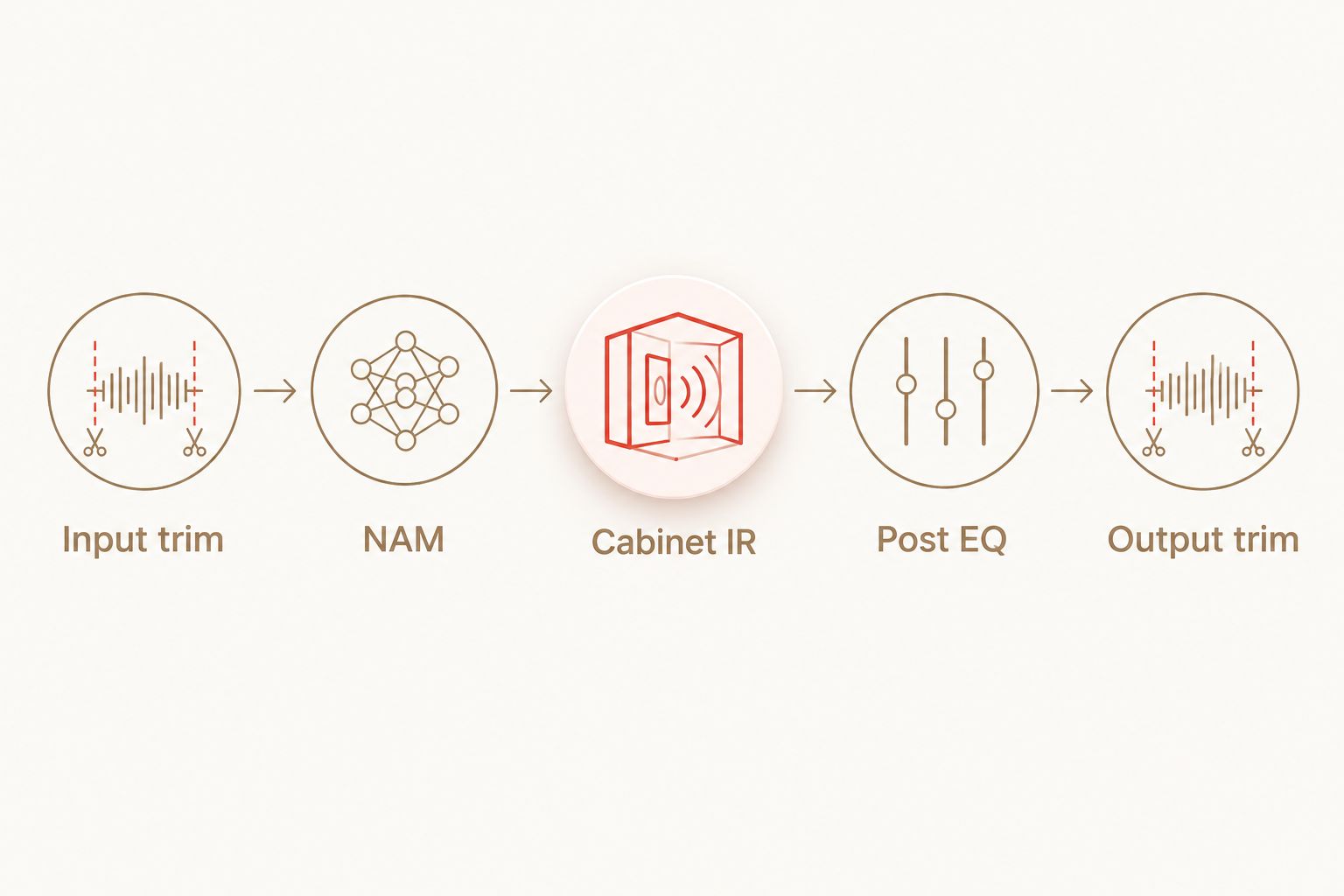
For a 2026 session template, start with EQ flat and optional effects bypassed. Add one processor at a time and audition it in the full arrangement.
When you compare two settings, use the same section of the same DI. A different picking performance can obscure whether the improvement came from processing or from the take.
When should you choose a different NAM capture?
Choose another capture when the underlying distortion character or response is wrong for the part. Post EQ cannot turn every saturated metal capture into an articulate low-gain punk amp sound.
Oracle Sound NAM profiles give you genre-focused starting points, but the best choice still depends on the performance and signal chain. Oracle Sound suits metal, hardcore and punk producers who want captured guitar tones to shape in a DAW.
These two packs serve different starting points rather than offering two ways to edit the same captured model:
| NAM profile pack | Best for | Supported contents or focus | Editing limit |
|---|---|---|---|
| VIC AUDIO METAL 2 NAM | High-gain production with separate amp, pedal and cabinet choices | 20 DI amp captures from 10 high-gain amps, 10 pedal captures and 22 cab IRs | Separate components still need routing and gain staging; they do not make a fixed capture’s original knobs editable |
| ALL THE SMALL TONES PUNK GUITAR TONE NAM PROFILES | Pop punk and emo parts built around mid- and low-gain amp tones | A punk guitar tone pack focused on punchy, articulate mid- and low-gain sounds | Its stated focus is not high-gain metal; choose the capture for the part rather than expecting EQ to supply missing distortion character |
VIC AUDIO METAL 2 NAM explicitly separates DI amp captures and cabinet IRs. Its 20 DI amp captures and 22 cab IRs provide different components to audition; those counts do not describe editable amp controls.
ALL THE SMALL TONES PUNK GUITAR TONE NAM PROFILES addresses a different production need. When the arrangement needs less saturation, choosing a suitable starting capture is more direct than trying to remove an unsuitable distortion texture afterwards.


Why NAM profile editing results vary
The same processing move does not produce the same result with every capture. These factors explain why:
- Captured operating point: a fixed capture represents the hardware response at the settings used for capture. Another operating point requires another appropriate model.
- Input signal: pickup output, interface gain and upstream processing affect the signal reaching NAM. Check clipping and calibration before chasing EQ.
- Capture scope: a pedal capture, DI amp capture and cabinet-inclusive capture need different surrounding chains. Read the supplied notes.
- Processing position: an EQ cut before distortion changes its input; the same cut afterwards changes its output. Those operations are not interchangeable.
- Arrangement: low-end weight that works on a solo guitar can mask the bass or kick. Make final decisions with the rhythm section playing.
Do not assume more processing means more control. Each added stage should solve an audible problem; otherwise, it makes the chain harder to diagnose and recall.
Can you change the gain on a NAM profile?
You can change the level driving a NAM profile, which changes the response of a nonlinear capture. That is not identical to moving the original amp’s gain knob, so choose another capture when you need a different captured gain setting rather than just a different input level.
Can you change the cabinet without changing the amp capture?
You can change a separate cabinet IR while keeping the same DI amp capture. If the profile already contains the cabinet and microphone response, swapping an external IR does not remove that embedded response.
Does saving a preset overwrite the downloaded profile?
Saving a loader or DAW preset normally saves playback settings and references to the model, not a newly trained capture. For your 2026 project archive, retain the model file, cabinet IR and session settings so the preset can find its dependencies later.
FAQ
Can you edit NAM profiles after downloading them in 2026?
Yes—you can edit playback settings and surrounding processing, but a conventional fixed NAM capture does not expose its original amp settings for editing. Save input level, cabinet processing, EQ and effects in your loader or DAW.
Can I make a high-gain NAM profile sound cleaner?
Lowering the input level can reduce distortion in a nonlinear NAM capture. For a substantially different clean response, choose a capture made for that sound rather than relying on post EQ.
Can I open a NAM file and change the amp's bass and treble settings?
A conventional fixed NAM file does not contain editable original amp knobs. Use external EQ to shape the sound or select a capture made with different hardware settings.
Does every NAM profile need a cabinet IR?
No—a cabinet-inclusive capture already contains a cabinet and microphone response. A DI amp capture normally needs separate cabinet processing for a conventional miked-guitar tone.
Is input gain the same as output volume in Neural Amp Modeler?
No—input gain changes the signal entering the model, while output volume changes the level afterwards. With a nonlinear capture, input changes can alter distortion as well as loudness.
Can I save my NAM edits for another recording session?
Yes—save a loader preset or DAW chain and retain the referenced model and IR files. The preset preserves your playback setup rather than turning it into a newly captured amp model.
Should I change the profile or EQ when my guitar sounds muddy?
Check input level, cabinet routing and processing position before replacing the profile. Use pre-model EQ for low end driving excessive distortion and post-model EQ for frequency balance in the mix.
One last thing
Save the dry DI, not just the finished guitar. It is the part of your 2026 session that lets you change the capture, cabinet and processing without asking the guitarist to repeat the performance.
Name the saved chain by its role in the song and document its model and IR dependencies. That is more useful at mix recall than a preset name that tells you nothing about the sound.