

Do MIDI Drum Packs Work in Any DAW? Yes, With Checks | 2026
Yes, MIDI drum packs work in any DAW that imports standard MIDI files and routes MIDI notes to a drum instrument. In 2026, the main compatibility check is the drum instrument’s note mapping, not the DAW’s name: a file can import correctly but trigger the wrong drums.
- Do MIDI drum packs work in any DAW? Yes, provided the DAW supports MIDI-file import and instrument routing.
- Oracle Sound drum MIDI packs suit metal, hardcore and punk producers who want editable drum arrangements.
- MIDI drum tracks contain performance data, not recorded drum audio; you need a drum instrument for playback.
- Match the groove library’s drum mapping to your instrument before editing velocities or mixing.
Why this matters
A breakdown loses its impact when kick notes trigger toms or cymbal chokes play as open crashes. Check routing and mapping before changing the groove. Otherwise, you are editing around a playback problem rather than fixing it.
Oracle Sound sells MIDI drum tracks and groove libraries for these production workflows. For a 2026 session, separate three questions: can the DAW read the file, can the drum instrument run in that DAW, and do the notes trigger the intended kit pieces?
Can MIDI drum packs be used in any DAW?
A standard MIDI drum file is not tied to the DAW used to create it. The receiving DAW reads its note events, timing and velocities, then sends those events to the instrument you choose.
Use this sequence to check compatibility:
-
Check the file type. Look for a standard MIDI file, commonly ending in
.mid. A proprietary project or preset is not the same thing. - Import the file. Use your DAW’s MIDI import command or its supported drag-and-drop workflow. Put the imported notes on a MIDI-capable instrument track.
- Load a drum instrument. Choose a sampler or virtual drum instrument that runs in your DAW. The MIDI file does not supply that instrument.
- Route the notes. Confirm that the imported track sends MIDI to the drum instrument and that the instrument’s audio reaches your mix output.
- Check the mapping. Audition kick, snare, hats, toms and cymbals. Correct any notes that trigger the wrong sounds.
- Check timing. Listen against your project’s tempo and arrangement before copying the groove across the song.
Successful import is only the first test. Correct drum playback is the second. Seeing notes in the piano roll proves that the DAW has read the performance; it does not prove that the instrument interprets every note correctly.
Standard MIDI files versus DAW-specific content
The file format determines what moves between sessions. Do not treat every downloadable drum asset as an interchangeable MIDI pack.
| Content type | Best for | What transfers | Limitation |
|---|---|---|---|
| Standard MIDI file | Editing drum performances across MIDI-capable DAWs | Notes, timing and performance events | Requires a drum instrument and a compatible note map |
| DAW project or session | Reopening an arrangement in its original environment | Session structure and supported settings | Requires the appropriate DAW and any referenced instruments or assets |
| Audio drum loop | Using an existing recorded drum sound | Rendered audio | Does not provide individual MIDI hits for direct note editing |
Standard MIDI wins when you want to change kick placement, rewrite a fill or audition a different drum kit. Its limitation is equally clear: the sound comes from the receiving instrument, so moving the file does not preserve the original drum tone.
An audio loop does the opposite. It carries the recorded sound, but replacing a snare articulation is not as straightforward as selecting a MIDI note and assigning another kit piece.
For cross-DAW work in 2026, keep the editable MIDI and render a reference audio track. The reference lets the next producer hear the intended performance while checking the imported notes.
Drum mapping decides which sounds you hear
Drum mapping assigns MIDI note numbers to kit pieces and articulations. A kick in one mapping can land on a different sound in another, even though the DAW imports every event correctly.
The MIDI Association’s General MIDI Level 1 percussion map assigns note 36 to Bass Drum 1, note 38 to Acoustic Snare and note 42 to Closed Hi-Hat. Those are useful reference points, not a guarantee that every drum library follows that map.
| General MIDI note number | Assigned percussion sound | What to check |
|---|---|---|
| 36 | Bass Drum 1 | Does the imported kick trigger the intended bass drum? |
| 38 | Acoustic Snare | Does the backbeat trigger the intended snare articulation? |
| 42 | Closed Hi-Hat | Does the hat pattern remain closed rather than opening unexpectedly? |
Check MIDI note numbers rather than relying only on octave labels in the piano roll. Octave-naming conventions differ between software, so the displayed note name can create confusion during troubleshooting.
Start with the main groove, then test the fills. A verse can sound correct while a tom run, ride bell or cymbal choke exposes a mapping mismatch.
Remap the drum voices; do not transpose the whole performance. Moving every note by the same interval changes all kit assignments together and does not solve an arbitrary mapping difference.
Build a working drum signal chain
Keep the playback path simple while you diagnose an imported groove:
Drum MIDI → Instrument track → Drum instrument → Audio output
- Drum MIDI: contains the notes and performance events you imported.
- Instrument track: holds or receives those events and routes them to the instrument.
- Drum instrument: turns the note events into drum sounds.
- Audio output: carries those sounds to the mixer and your monitoring path.
A separate MIDI track routed to an instrument also works where your DAW supports that arrangement. The essential requirement is an unbroken path from note events to audible output.
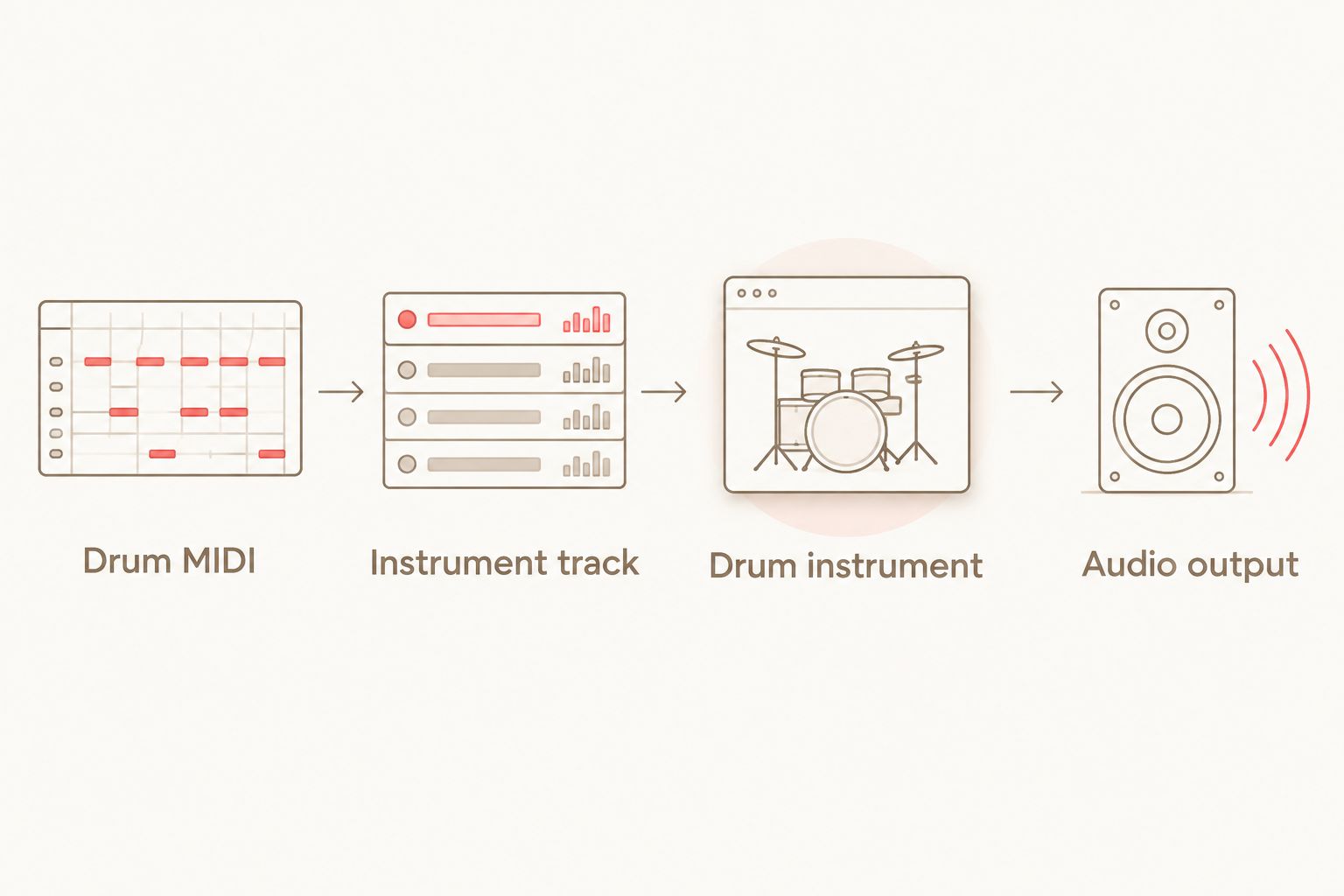
Watch the MIDI activity indicator and the audio meter separately. MIDI activity without audio points you towards the instrument, its mapping or its output routing; audio activity without audible playback points you towards the monitoring path.
For a troubleshooting pass, bypass unnecessary processing and solo the drum track. Restore your drum-bus processing after the kit plays correctly. Compression cannot fix a kick note that triggers a crash.
Choose a pack by mapping, then by genre
Oracle Sound lists SSD, EZ Drummer, Superior Drummer and GGD mappings for the following drum MIDI packs. That is a specific mapping statement, not a promise that every instrument preset or DAW configuration requires no adjustment.
| Drum MIDI pack | Best for | Stated content and mapping | Compatibility check |
|---|---|---|---|
| HEAVY METAL II 8 SONG DRUM MIDI PACK | Heavy metal songwriting | 8 songs; SSD, EZ Drummer, Superior Drummer and GGD mappings | Select the mapping for your receiving instrument and audition its articulations |
| ALTERNATIVE METAL 11 SONG DRUM MIDI PACK | Alternative metal songwriting | 11 songs; SSD, EZ Drummer, Superior Drummer and GGD mappings | Confirm that the chosen mapping matches the kit you load |
The benefit is editable drum material with stated mapping options. The limitation is that a drum MIDI pack does not supply the receiving instrument’s audio engine or automatically reproduce another producer’s mix.
Choose the pack for the performance you need, then choose the mapping for the instrument you use. A larger song count does not resolve an incompatible kit layout.
For your 2026 workflow, test an imported groove before building the arrangement around it. Once the kick, snare and cymbal articulations play correctly, you can evaluate whether the performance fits the riff rather than whether the setup works.
Why MIDI drum compatibility varies
Compatibility varies because the file, host and instrument handle different parts of the job. Check these factors separately:
- File format: a standard MIDI file travels differently from a proprietary project, preset or groove-browser asset.
- DAW import behaviour: an import operation can create tracks or handle tempo information differently from placing notes into an existing arrangement.
- Instrument support: the drum instrument must run in your DAW; MIDI-file compatibility does not establish plugin compatibility.
- Note mapping: kit pieces and articulations must match the imported note assignments.
- Routing and channels: the receiving instrument must get the track’s MIDI events and send audio to the intended output.
- Tempo and meter: the performance must sit correctly against the destination project’s tempo map and bar structure.
Use a controlled check rather than changing everything at once. Confirm import, then routing, then mapping, then timing. That order keeps a silent track from becoming a pile of unnecessary edits.
Make the imported groove fit your riff
Once playback works, edit the arrangement rather than treating the pack as a finished drum production. Start with the kick pattern against the guitar accents, then listen to the snare placement and cymbal phrasing.
For beatdown and hardcore, check whether the kick supports the breakdown accents or competes with them. For punk, check whether the hat or ride pattern supports the riff’s drive without cluttering the transitions.
- Kick placement: move or remove hits that fight the guitar rhythm.
- Snare phrasing: keep the backbeat intentional and check fill exits.
- Cymbal choice: use the articulation that fits the section, not whichever sound a mismatched note happens to trigger.
- Velocity: adjust emphasis after confirming that each note plays the right drum.
- Fill length: trim the phrase so its final hit lands where your next section starts.
Standard MIDI note-on velocity uses values from 0 to 127; a note-on velocity of 0 represents note-off behaviour. How a drum instrument turns the remaining values into loudness or sample selection depends on that instrument.
Do not flatten every hit to the same velocity before listening. Keep useful accents and change the hits that clash with the riff. Also avoid stacking duplicate MIDI clips over the same instrument unless the doubled performance is intentional.
Do I need a drum plugin to hear a MIDI drum pack?
You need a sound source to hear a MIDI drum pack, but that source does not have to be a third-party plugin. A DAW’s included drum instrument or a suitably routed hardware drum module can provide playback.
The important distinction is between the performance and the sound generator. Importing the notes does not load samples, create a kit or establish the audio routing for you.
Will the same MIDI groove sound identical in another DAW?
The same MIDI groove does not guarantee identical audio in another DAW. The receiving drum instrument, loaded kit, mapping, velocity response and processing determine the rendered sound.
To preserve a reference, export audio alongside the MIDI. To preserve editability, retain the MIDI and document the instrument and mapping used for playback.
FAQ
Do MIDI drum packs work in any DAW?
MIDI drum packs work in DAWs that support standard MIDI-file import and MIDI routing to a drum instrument. Correct playback also requires matching drum-note assignments and a working audio path.
Why does my MIDI drum pack import but make no sound?
An imported MIDI drum pack makes no sound unless its notes reach a sound-generating instrument with an audible output. Check the instrument, MIDI routing, mute status and audio output before editing the groove.
Why are my kick notes playing cymbals?
Kick notes play cymbals when the imported note mapping does not match the receiving drum instrument. Select a matching map or reassign the affected notes instead of transposing the whole clip.
Can I change the tempo of MIDI drum tracks?
Yes, MIDI drum tracks can play against a different project tempo. Check how your DAW handles imported tempo information and listen to fills and section transitions at the destination tempo.
Do Oracle Sound drum MIDI packs include recorded drum audio?
MIDI drum tracks contain performance events rather than recorded drum audio. Use a receiving drum instrument to turn those events into sounds; do not treat a MIDI file as an audio loop.
Which Oracle Sound packs list multiple drum mappings?
HEAVY METAL II 8 SONG DRUM MIDI PACK and ALTERNATIVE METAL 11 SONG DRUM MIDI PACK list SSD, EZ Drummer, Superior Drummer and GGD mappings. Match the supplied mapping to your receiving instrument and verify the articulations.
Can I edit an imported drum groove in my DAW?
Yes, an imported standard MIDI groove is editable in a MIDI-capable DAW. You can change note placement, velocities and arrangement length, then hear the result through your drum instrument.
One last thing
Keep an untouched copy of the imported MIDI before remapping it. Editing note assignments for one instrument can make that version unsuitable for another kit, even though the file itself remains readable.
For a reusable 2026 session template, save the instrument, its note map and your routing together. When the next groove arrives, you can check the performance instead of rebuilding the playback chain.