

Best NAM profiles for thrash metal guitar tone in 2026
Best overall: VIC AUDIO METAL 2 NAM. Best for thrash/hardcore crossover: WVRMFOOD HARDCORE HIGH GAIN NAM PROFILES. For fast palm-muted riffs that blur under distortion, start with a documented capture chain rather than adding more gain; this 2026 guide compares the packs and shows how to audition them in your DAW.
- VIC AUDIO METAL 2 NAM is the default shortlist pick for NAM profiles for thrash metal guitar tone.
- VIC AUDIO METAL 2 NAM includes 20 DI amp captures, 10 pedal captures and 22 cab IRs.
- WVRMFOOD HARDCORE HIGH GAIN NAM PROFILES is the crossover shortlist pick for hardcore-focused high-gain guitar production.
- Compare the same DI performance through each NAM profile at matched output level, with bass and drums playing.
Why this matters
Thrash rhythm guitar needs distortion without losing the boundary between consecutive pick attacks. A huge soloed sound is not the same thing as a usable rhythm track.
Oracle Sound's VIC AUDIO METAL 2 NAM is the default shortlist pick for thrash producers who want documented amp, pedal and cabinet options. That recommendation rests on the pack's stated contents, not a claim that every capture beats every alternative.
What makes the best NAM profiles for thrash metal guitar tone?
- Pick definition: Fast notes remain distinguishable in the arrangement.
- Low-end control: Palm mutes leave room for bass and kick.
- Capture scope: You know whether cabinet processing is included.
- Useful variation: Different captures answer an actual production need.
- DAW fit: Your NAM loader supports the supplied format.
NAM profile packs at a glance
| Pack | Best for | Standout documented feature | Key limitation |
|---|---|---|---|
| VIC AUDIO METAL 2 NAM | Building an amp, pedal and cabinet chain | 20 DI amp captures from 10 high-gain amps, 10 pedal captures and 22 cab IRs; NAM A1 and A2 formats | DI amp captures need cabinet processing to form a conventional recorded guitar chain |
| WVRMFOOD HARDCORE HIGH GAIN NAM PROFILES | Thrash/hardcore crossover projects | Listed amp sources include 5153, Soldano SLO, Crab CALI, Crab SATAN, Diezel VH4 and Bogner UBERSCHALL | Its stated focus is hardcore high gain, not a dedicated thrash collection |
The first pack gives you a documented set of separate building blocks. The second gives you a hardcore-focused shortlist with named high-gain amp sources. Neither product description establishes a measured winner for pick definition, noise or CPU use.
1. VIC AUDIO METAL 2 NAM: best for building a thrash recording chain
VIC AUDIO METAL 2 NAM contains 20 DI amp captures from 10 high-gain amps, plus 10 pedal captures and 22 cabinet IRs. The supplied formats are NAM A1 and A2. That makes it the clearest starting point here when you want to choose the amp capture and cabinet response separately.
For your 2026 thrash session, begin with an amp capture and a cabinet IR. Leave the pedal stage bypassed until you hear what the amp does with your guitar's DI signal. More stages mean more variables; establish the basic rhythm sound first.
VIC AUDIO METAL 2 NAM pros:
- Its stated contents cover amp, pedal and cabinet stages.
- Separate cabinet IRs let you audition cabinets without replacing the amp capture.
- The documented high-gain amp selection supports comparison within one pack.
VIC AUDIO METAL 2 NAM cons:
- DI amp captures require a cabinet stage for a conventional miked-cab sound.
- Separate stages require routing decisions rather than a single complete preset.
- Format compatibility still needs checking against your chosen loader.
Best for: Producers and recording engineers who want control over the recording chain, rather than selecting a complete sound without changing its components.
Verdict: Buy VIC AUDIO METAL 2 NAM for a documented, configurable high-gain starting point. Audition its captures against your actual riff before committing to the final guitar sound.
2. WVRMFOOD: best for thrash/hardcore crossover sessions
WVRMFOOD HARDCORE HIGH GAIN NAM PROFILES is a hardcore-focused NAM pack. Its description names 5153, Soldano SLO, Crab CALI, Crab SATAN, Diezel VH4 and Bogner UBERSCHALL among its high-gain sources. Choose it as a crossover candidate when the session moves between fast thrash picking and hardcore rhythm parts.
Test a continuous picking passage and a stopped breakdown through the same candidate capture. Listen for both note separation and clean gaps. A sound that works for sustained chords still needs to pass the fast-riff test.
WVRMFOOD pros:
- Its stated hardcore focus matches crossover production.
- Its description identifies several high-gain amp sources.
- It gives hardcore-focused producers another NAM option beyond a broadly named metal pack.
WVRMFOOD cons:
- Hardcore positioning does not establish suitability for a specific thrash reference tone.
- Named amp sources do not tell you how each capture responds to your DI.
- You need to establish each capture's cabinet scope before adding an IR.
Best for: Producers recording thrash/hardcore crossover material who want to investigate a hardcore-focused capture collection.
Verdict: Buy WVRMFOOD for crossover work; hold if your only goal is a specific thrash reference sound. Resolve that choice with a relevant audio demonstration, not the amp names alone.
The two packs below serve different starting points. Choose the documented modular chain for general thrash production, or the hardcore-focused collection for a crossover session.


Build a thrash NAM signal chain in your DAW
For an amp-only capture, use this order: DI input, optional pedal, NAM amp, cabinet IR, corrective EQ. Keep the source recording dry so you can change the processing without recording the performance again. A full-rig capture needs a different routing decision: do not automatically add cabinet processing to a capture that already includes it.
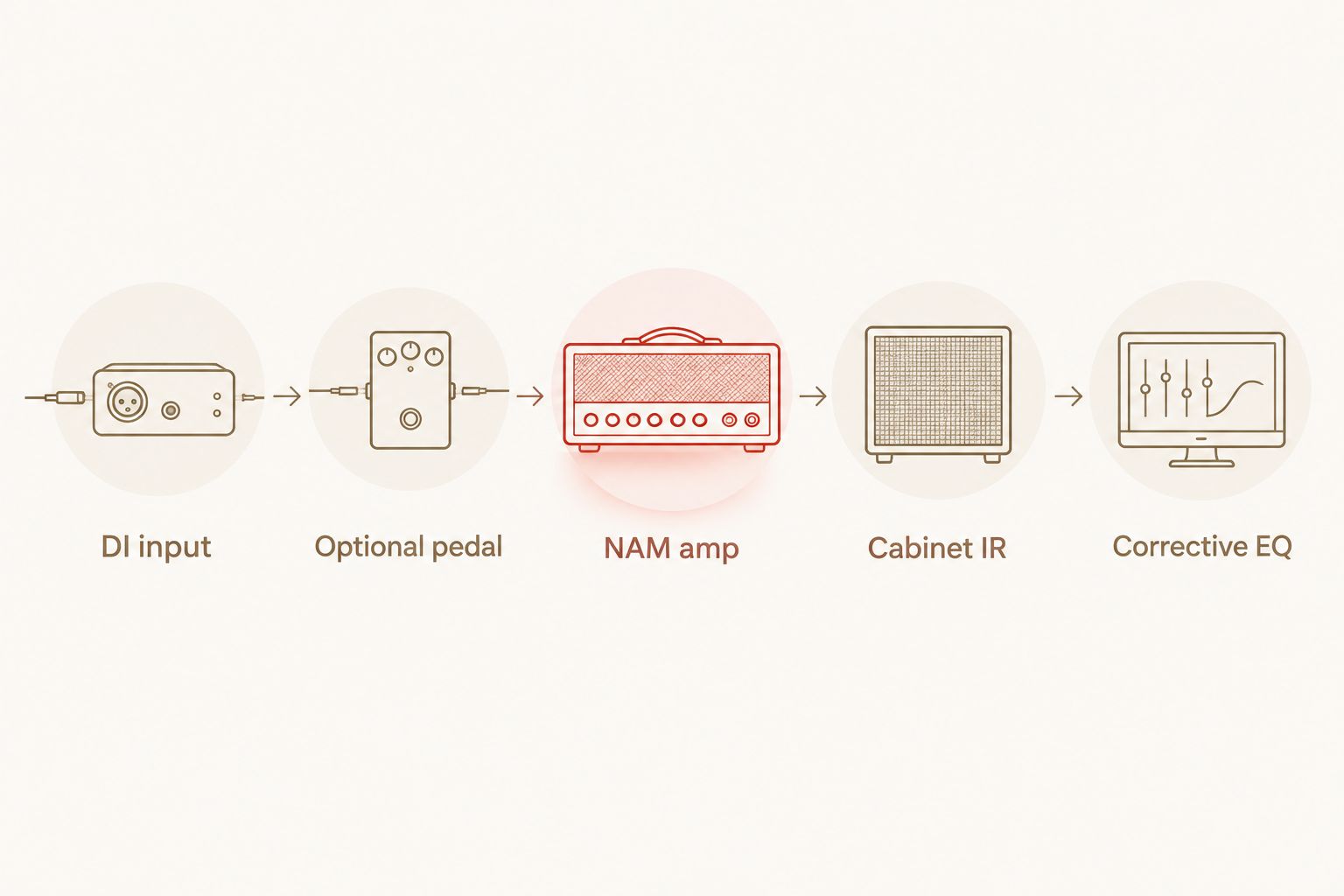
Set the input before judging the capture
Record through your interface's instrument input and avoid clipping the incoming signal. Keep the same DI recording and input trim when comparing captures. Follow any supplied calibration instructions rather than assuming every capture expects the same input level.
Input trim changes the signal entering the nonlinear amp model; output trim changes the listening level after it. Use output trim to match comparison loudness. Do not use extra input drive merely to make a candidate sound louder.
Start without the pedal stage
Bypass the optional pedal and establish the amp-plus-cabinet sound first. Then enable the pedal stage and compare its effect on the same passage. Keep it only if the change helps the riff in the arrangement.
Avoid stacking distortion stages by habit. A pedal capture is another processing choice, not a compulsory ingredient in every thrash chain. Check that your loader and routing support the supplied capture before inserting it.
Choose the cabinet before corrective EQ
For an amp-only capture, audition the cabinet response before drawing a detailed EQ curve. Keep the amp, DI and output level fixed while changing the IR. This isolates the cabinet decision instead of changing the whole sound at once.
Listen to upper-mid attack, low-mid congestion and high-frequency fizz with the drums playing. Choose the response that needs the least correction for your arrangement. Do not treat an impressive soloed cabinet sound as an automatic mix winner.
Set the gate around the performance
Adjust the gate while listening to both the shortest stops and the longest sustained notes. Raise the threshold only enough to control unwanted noise between phrases. Back it off if quiet attacks disappear.
A gate does not repair uneven picking. Check the dry DI when stops sound messy, because excessive gating can hide the cause while shortening notes you intended to keep.
Use EQ to solve a named problem
Apply a high-pass filter to address unwanted low-frequency energy, then check that the palm mutes retain their body. Use a low-pass filter only when high-frequency content needs controlling. Move each filter while listening in context rather than copying a universal cutoff.
For a crowded guitar sound, identify the troublesome region before making a cut. Recheck against bass, kick, snare and cymbals. The correct setting is the one that solves the audible problem without removing the riff's useful character.
Audition NAM profiles with a repeatable thrash test
For a 2026 comparison, use one dry performance containing fast alternate picking, palm-muted gallops, open chords and abrupt stops. Route that performance through each candidate. Playing a different take for every profile mixes performance differences into the tone judgement.
Keep the cabinet fixed when comparing amp-only captures. Keep the amp fixed when comparing IRs. If you compare complete rigs, treat them as complete rigs rather than pretending the amp is the only changing element.
Use this listening checklist:
- Fast picking: Can you follow consecutive notes without staring at the grid?
- Palm mutes: Does the low end obscure the next attack?
- Open chords: Are the chord changes readable under distortion?
- Stops: Do unwanted tails remain after the intended cutoff?
- Full mix: Does the riff remain clear beside bass and drums?
Match output levels before choosing. Then listen at a quieter monitoring level as another check on balance. If a candidate wins only when it is louder, repeat the comparison before saving it as the session default.
Save the winning chain with its input trim, capture file, cabinet choice and processing order. Those details make the sound reproducible; a favourite pack name alone does not.
How these packs are ranked
This 2026 ranking prioritises stated capture contents, intended genre and signal-chain flexibility. VIC AUDIO METAL 2 NAM takes the default slot because its description documents separate amp captures, pedal captures and cabinet IRs. WVRMFOOD takes the crossover slot because its stated focus is hardcore high gain.
The ranking does not assign scores for realism, latency or noise. Those properties need a relevant comparison under controlled conditions. Oracle Sound NAM profile packs belong on your shortlist when their documented scope matches the recording job. Your DI and arrangement decide the final capture.
Which NAM profile pack should you choose?
Choose VIC AUDIO METAL 2 NAM if you are undecided. Its documented components give you a clear route from amp capture to cabinet processing, with pedal captures available for further comparison. Start simple and save a working rhythm chain before exploring every variation.
Choose WVRMFOOD when your 2026 project specifically combines thrash with hardcore production. Keep the crossover purpose attached to that recommendation; it is not evidence that WVRMFOOD recreates a particular record.
For record-ready guitar tones, prioritise a repeatable DI performance and a clear arrangement over collecting more captures. Finish the riff, audition the chain, then commit.
FAQ
What's the best starting pack for NAM profiles for thrash metal guitar tone?
VIC AUDIO METAL 2 NAM is the default shortlist pick here because its description documents amp, pedal and cabinet components. It includes 20 DI amp captures from 10 high-gain amps, 10 pedal captures and 22 cab IRs. Choose the final capture using your own DI performance in the mix.
Is WVRMFOOD a good option for thrash and hardcore crossover?
WVRMFOOD HARDCORE HIGH GAIN NAM PROFILES is a relevant crossover candidate because its stated focus is hardcore high gain. Its description names several high-gain amp sources, including Soldano SLO, Diezel VH4 and Bogner UBERSCHALL. Audition fast picking and stopped rhythm parts before selecting a capture.
Do I need a cabinet IR after a NAM profile?
An amp-only NAM capture needs cabinet processing for a conventional recorded guitar sound. A capture that already includes a cabinet does not automatically need another IR. Establish the capture scope before building the chain.
Should I add a pedal before my thrash NAM profile?
Add a pedal stage only when it improves the riff in context. Establish the amp and cabinet sound first, then compare the pedal enabled and bypassed at matched listening levels. Confirm that your loader supports the supplied pedal capture.
What gain setting should I use for fast thrash riffs?
Use a capture and input level that preserve the separation between consecutive pick attacks. NAM captures do not provide a universal equivalent of every original amp control. Follow supplied calibration guidance and compare alternatives with the same DI recording.
How do I stop palm-muted NAM guitars from sounding muddy?
Check the dry performance, cabinet choice and low-frequency balance before adding more processing. Listen with bass and kick playing, and change one part of the chain at a time. Keep any filtering that clears the arrangement without stripping the palm mutes of body.
Are NAM profiles the same as standalone amp sim plugins?
NAM profiles are model files that need a compatible loader; they are not automatically standalone amp sim plugins. Check the supplied format against the loader you intend to use. Oracle Sound sells both plugins and NAM tone profile packs, so confirm the product type before choosing.
One last thing
Double-track the performance, not the file. Duplicating a guitar recording and panning the copies does not create two independent takes. Record the second rhythm part separately, then judge whether the NAM chain still keeps the combined guitars clear against the drums.