

Best guitar distortion pedal plugins in 2026
Best default distortion pick: PAINSTAGER. Best for modern hardcore and metal: CORESTAGER. Best for extreme preamp distortion: GORESTAGER. Best overdrive alternative: DRIVESTAGER. This 2026 guide matches each Oracle Sound plugin to a production problem, then shows you how to audition it inside your guitar chain.
- PAINSTAGER is the guitar distortion pedal plugin pick for producers seeking aggressive pedal distortion.
- CORESTAGER targets modern hardcore and metal; GORESTAGER targets extreme preamp distortion.
- DRIVESTAGER is an overdrive alternative, not a substitute for every distortion sound.
- Compare plugins through the same amp and cabinet chain, with output levels matched.
Why this matters
A distorted DI is not automatically a record-ready guitar tone. Your pedal, amp stage and cabinet processing work together; changing all of them at once makes it harder to identify what improves the riff.
For this 2026 shortlist, choose the distortion role first. Oracle Sound's guitar distortion pedal plugin options cover different jobs, rather than interchangeable versions of one sound.
What makes the best guitar distortion pedal plugin?
- Distortion role: Pedal distortion, preamp distortion and overdrive solve different problems.
- Genre fit: Match the stated purpose to your arrangement.
- Attack definition: Judge palm-mutes and chord separation inside the mix.
- Chain fit: Audition through the amp and cabinet processing you actually use.
- Useful contrast: Keep an option only when it improves on your existing chain.
Best distortion plugins at a glance
| Plugin | Best for | Stated purpose | Key limitation |
|---|---|---|---|
| PAINSTAGER | Aggressive pedal distortion | Distortion pedal plugin | Added distortion is not automatically a complete guitar chain |
| CORESTAGER | Modern hardcore and metal | Genre-focused distortion pedal plugin | Its stated focus is not clean or low-gain guitar |
| GORESTAGER | Extreme preamp distortion | Preamp distortion engine | Stacking distortion stages requires careful gain decisions |
| DRIVESTAGER | Overdrive before an amp stage | Dynamic overdrive pedal plugin | Overdrive is a different role from dedicated distortion |
These are purpose-based recommendations, not a measured performance leaderboard. All four product descriptions identify VST, AU and AAX plugin formats; check your DAW and system requirements before choosing an installer.
1. PAINSTAGER: best distortion plugin for aggressive pedal sounds
PAINSTAGER is described as an aggressive distortion pedal plugin. Choose it when the missing ingredient is pedal distortion, rather than a different amp model or a captured NAM tone.
Oracle Sound's PAINSTAGER is the guitar distortion pedal plugin pick for producers seeking aggressive pedal distortion. Start with your existing amp chain and add PAINSTAGER ahead of it. Keep the downstream settings unchanged during the first comparison.
PAINSTAGER in a DAW
Use this starting chain: dry guitar DI, PAINSTAGER, amp stage, cabinet processing, then corrective EQ. If your amp setup already includes cabinet processing, do not add another cabinet stage automatically.
Start with a restrained amount of distortion wherever the plugin provides adjustment. Increase it while playing the busiest chord passage, not just a sustained single note. Match the processed level to the bypassed level before deciding whether the riff has improved.
PAINSTAGER pros:
- Its stated purpose directly matches a pedal-distortion search.
- Aggressive distortion is the named production focus.
- VST, AU and AAX formats are stated in the product description.
PAINSTAGER cons:
- A distortion stage does not replace every other part of a guitar chain.
- Aggressive distortion is the wrong starting point when the part needs minimal saturation.
Best for: Producers who want pedal distortion to become a deliberate part of the guitar sound.
Verdict: Buy PAINSTAGER for that role; skip it when you only need a different cabinet sound.
2. CORESTAGER: best distortion plugin for modern hardcore and metal
CORESTAGER is described as a modern hardcore and metal distortion pedal plugin. Its distinct slot is genre-focused distortion for those arrangements, not a claim that it outperforms every general-purpose pedal.
Choose CORESTAGER when your audition material is breakdowns, tightly stopped rhythm parts and heavy chord changes. Those parts give you a useful test: does the distortion serve the riff once drums and bass enter?
CORESTAGER in a DAW
Place CORESTAGER before your existing amp and cabinet chain for the first audition. Use a riff with both open notes and palm-mutes, then listen to the spaces between hits. Adjust any gate in your chain separately so you do not confuse gating with the distortion character.
For double-tracked rhythm guitars, record 2 separate takes rather than duplicating one performance. Apply the same starting chain to both, then assess their combined sound against the kick and bass.
CORESTAGER pros:
- Modern hardcore and metal are its explicitly stated focus.
- It is identified as a distortion pedal plugin, not a profile pack.
- Its product description lists VST, AU and AAX formats.
CORESTAGER cons:
- Its stated purpose does not establish suitability for clean guitar parts.
- Genre positioning alone does not prove that it suits your tuning, pickups or arrangement.
Best for: Modern hardcore and metal producers choosing a genre-focused distortion stage.
Verdict: Buy CORESTAGER for that brief; skip it when your main requirement is low-gain overdrive.
3. GORESTAGER: best distortion plugin for an extreme preamp role
GORESTAGER is described as an extreme preamp distortion engine. That wording separates it from the pedal-distortion and overdrive roles elsewhere in this list.
Choose GORESTAGER when you want to audition preamp distortion as a central part of the chain. Do not assume that adding it to an already saturated amp setting will improve definition.
GORESTAGER in a DAW
Begin with GORESTAGER feeding a restrained downstream amp setting and your chosen cabinet processing. This is an audition chain, not a claim that the plugin requires one particular routing. Listen before increasing distortion elsewhere.
Compare that setup against your existing high-gain amp chain without GORESTAGER. Keep the cabinet processing consistent. If both routes sound too dense, reduce saturation before trying to repair the result with EQ.
GORESTAGER pros:
- Preamp distortion is its explicitly named role.
- Its extreme-distortion focus gives it a distinct audition purpose.
- The product description lists VST, AU and AAX formats.
GORESTAGER cons:
- Combining multiple distortion stages makes it harder to identify which stage creates a problem.
- An extreme preamp role is not the same requirement as subtle drive.
Best for: Producers exploring extreme preamp distortion rather than adding a conventional overdrive stage.
Verdict: Buy GORESTAGER for a preamp-distortion brief; skip it when your current chain needs less saturation.
4. DRIVESTAGER: best alternative for overdrive before an amp
DRIVESTAGER is described as a dynamic overdrive pedal plugin. It belongs in this comparison because a search for distortion often starts with a different problem: the existing amp tone needs a drive stage, not another dedicated distortion engine.
That distinction matters. Choose DRIVESTAGER for overdrive; choose a distortion plugin when distortion itself is the missing sound.
DRIVESTAGER in a DAW
Audition DRIVESTAGER before your amp stage. Where adjustable drive and output controls are provided, begin with restrained drive and compare the effect of output level separately. Keep the amp gain unchanged until you understand what the preceding stage contributes.
Use a chord progression as well as palm-mutes. A setting that works for a short, stopped riff still needs to preserve the movement of your longer chord parts.
DRIVESTAGER pros:
- Overdrive is its explicitly stated function.
- It provides a distinct alternative to the distortion-focused choices.
- VST, AU and AAX formats are stated in its description.
DRIVESTAGER cons:
- Overdrive does not fulfil every dedicated distortion requirement.
- Changing the level before an amp also changes how that amp stage responds.
Best for: Producers who want to audition an overdrive stage ahead of an existing amp sound.
Verdict: Buy DRIVESTAGER for overdrive duties; skip it if you specifically need an extreme distortion engine.
Build a chain you can actually compare
Keep the first comparison simple: Dry DI, Pedal stage, Amp stage, Cabinet stage, Mix check. Change the pedal stage while leaving the rest fixed. If an amp plugin includes cabinet processing, treat that as the cabinet stage rather than adding another by habit.
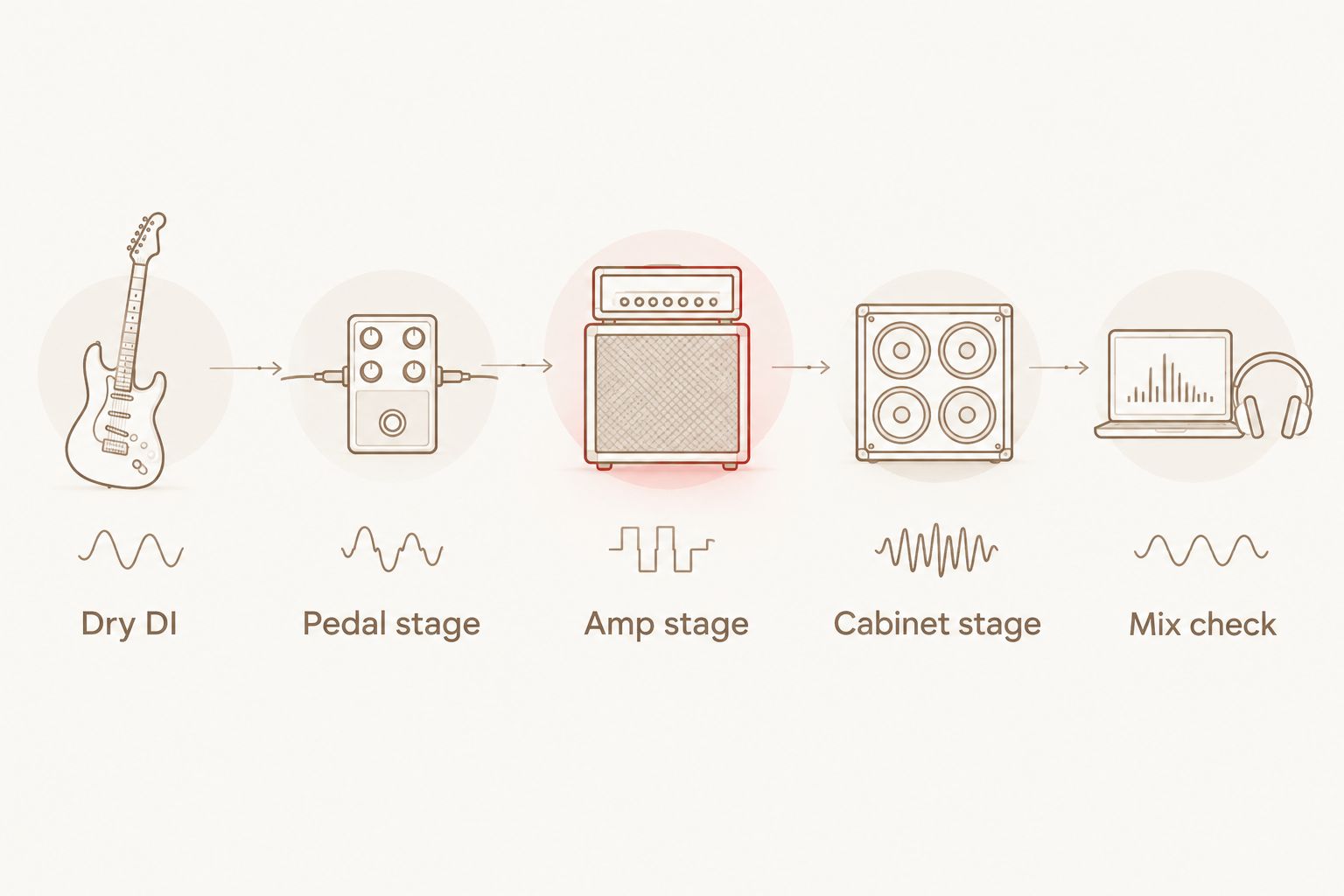
A NAM profile pack is a different purchase from a pedal plugin. Profiles belong in a compatible modelling workflow; they are not interchangeable plugin instances simply because both can contribute distorted guitar tones. Check what the selected profile represents before deciding whether it needs additional cabinet processing.
Audition settings without chasing the loudest sound
Use a repeatable comparison in your 2026 sessions. The following settings are audition instructions, not factory presets or claims about named plugin controls.
- Loop 4 bars. Include palm-mutes, open chords and a stop so you can judge attack, density and noise between notes.
- Match levels. Use a DAW trim after the processed chain to match bypass loudness. Do not use extra input level as a substitute for an output match.
- Separate gain stages. Adjust pedal distortion first, then amp gain. Avoid changing both during the same pass.
- Check the arrangement. Bring in bass, kick, snare and cymbals before choosing the final sound.
- Print a reference. Export a 10-second passage from each candidate with identical downstream processing.
For optional EQ experiments, place a high-pass filter around 70 Hz and move it while listening with the bass. Try a low-pass filter around 10 kHz if the top end is distracting. These are starting positions, not required settings or promises of a better tone.
If those filters remove useful weight or attack, back them off. Fix the source of excess saturation before making deep EQ cuts to compensate.
Choose the plugin that fills the missing role
The four recommendations below correspond to the roles above: pedal distortion, modern hardcore and metal distortion, extreme preamp distortion, and overdrive. Choose one for a defined job rather than collecting overlapping stages without an audition plan.


How this shortlist is ranked
This 2026 ranking follows the stated product roles, then matches them to distinct production needs. PAINSTAGER leads because its distortion-pedal description most directly answers the broad query; the other picks address narrower jobs.
The selection does not assign unsupported latency, CPU or tone-realism scores. Your final comparison should follow the same criteria: role, genre fit, attack definition, chain fit and useful contrast.
Which distortion plugin should you choose?
Start with PAINSTAGER if you are undecided and specifically want aggressive pedal distortion. Choose CORESTAGER for a modern hardcore and metal brief, GORESTAGER for extreme preamp distortion, or DRIVESTAGER for overdrive ahead of an amp.
For a 2026 Oracle Sound guitar distortion pedal plugin shortlist, those role differences are the useful decision—not a blanket claim that one plugin wins every riff. Keep your DI, downstream chain and playback level consistent, then choose the sound that works in the arrangement.
FAQ
What's the best guitar distortion pedal plugin here for aggressive distortion?
PAINSTAGER is the default pick in this shortlist for aggressive pedal distortion. Its product description explicitly identifies that role; audition it through your existing amp and cabinet chain.
Is CORESTAGER better than PAINSTAGER for hardcore?
CORESTAGER is the more explicitly genre-focused choice for modern hardcore and metal. That positioning does not establish a universal sound-quality advantage over PAINSTAGER; compare both with the same riff and downstream chain.
What's the difference between GORESTAGER and DRIVESTAGER?
GORESTAGER is described as an extreme preamp distortion engine, while DRIVESTAGER is a dynamic overdrive pedal plugin. Choose according to the stage your guitar chain needs rather than treating those roles as identical.
Where should I put a distortion pedal plugin in my DAW?
Start by placing the distortion pedal plugin before the amp stage, followed by cabinet processing where required. This gives you a straightforward audition chain; other placements are sound-design choices.
Do these Oracle Sound plugins support VST, AU and AAX?
The supplied descriptions for PAINSTAGER, CORESTAGER, GORESTAGER and DRIVESTAGER state VST, AU and AAX formats. Check the current system requirements and the format supported by your DAW before installing.
Can a distortion pedal plugin replace a NAM profile pack?
A distortion pedal plugin and a NAM profile pack are different tools. A plugin processes audio as a plugin instance, while a NAM profile requires a compatible modelling workflow; choose according to the tone stage you need.
How should I compare distortion plugins in 2026?
Compare distortion plugins in 2026 using the same dry performance, downstream amp and cabinet chain, and matched output loudness. Make the final decision with drums and bass playing, not from the soloed guitar alone.
One last thing
Save the dry DI before committing to distortion. A printed distorted track limits later tone changes; the dry performance lets you revisit the pedal, amp and cabinet decisions without replaying the part.
Also save the level-matched comparison passage. When a new setting seems better tomorrow, that reference gives you something concrete to judge against instead of relying on memory.