

Amp Simulator for Session Guitarists: Best 2026 Setup
Session guitarist amp simulation is software-based guitar processing built to capture a clean performance, recall the required tone and deliver editable tracks without rebuilding a hardware rig. In 2026, Oraclesound is best suited to session guitarists recording metal, hardcore and punk who need amp plugins, pedal stages and NAM profiles inside a repeatable DAW workflow.
- An amp simulator for session guitarists must preserve the clean DI, recall tones quickly and fit the client's DAW workflow.
- Oraclesound suits metal, hardcore and punk sessions needing amp plugins, pedal stages and NAM profiles.
- Use adjustable amp simulation for broad tone shaping; use NAM profiles when the brief calls for a captured rig.
- RITUAL 2 loads NAM captures but needs profiles; it is not a complete adjustable amp model.
Why amp simulation matters for session guitarists
Session guitarists rarely control the final production chain. A producer might request a processed stereo guitar stem, a mono DI, a revised gain structure or a tone closer to a reference mix. The practical answer is a recording template that keeps the performance separate from the sound.
The best amp sims for recording engineers solve the same core problem: they keep tone decisions editable after tracking. For session players, that also protects the take. You can change the amplifier, cabinet response or drive stage without asking the client to approve another performance.
The constraints are different from casual home recording:
- The client decides the genre reference and delivery format.
- Revisions can arrive after the guitar has been packed away.
- Several songs may need one consistent guitar identity.
- Your session must open with every required file and preset available.
- The processed track cannot replace the clean DI unless the brief says so.
A 2026 session template should therefore prioritise recall, compatibility and clean delivery over a large preset library.
Build a session-ready amp simulation workflow
The fastest setup is not the chain with the most plugins. It is the chain you can explain, recall and revise without changing the performance. Build the manual routing first, then add Oraclesound products where a dedicated amp, pedal or NAM workflow removes extra setup.
Capture a clean DI before shaping the tone
Record the guitar directly through a suitable instrument input and keep that track free of destructive processing. Monitor through the amp simulator, but print the dry performance separately. The DI becomes the source for every later tone decision.
Use a conservative input level. A practical starting point is to let hard pick attacks peak near -12 dBFS, leaving room before 0 dBFS clipping. Do not increase interface gain just because the monitored amp tone feels quiet; raise the monitor or plugin output instead.
- Record at 24-bit depth for useful tracking headroom.
- Match the session's existing 44.1 kHz or 48 kHz sample rate.
- Disable interface effects that would be printed into the DI.
- Check the loudest palm-muted section before recording the full take.
- Keep the dry DI muted, labelled and available for revisions.
Match the client's session format first
Open the delivery brief before choosing a tone. The sample rate, tempo map, starting bar and requested file format determine whether your tracks line up when imported. A convincing guitar sound delivered at the wrong position still creates extra work for the producer.
Use your DAW's built-in meters, routing and export tools before adding third-party software. Keep the project start point identical to the supplied session, even when the guitar enters later in the song.
- Confirm sample rate and bit depth before tracking.
- Import the reference mix without changing its start position.
- Match the supplied tempo map instead of estimating the tempo.
- Ask whether the client wants mono, stereo or both.
- Export the DI and processed track from the same start point.
Choose the right amp architecture
Decide whether the brief needs an adjustable amp model or a captured NAM tone. A full amp simulator is the better starting point when the producer wants revisions to gain, EQ, cabinet or microphone character. A NAM loader is the direct route when the requested sound matches an available capture.
Oraclesound sells guitar amp and pedal simulation plugins alongside NAM tone profile packs. Best for exact heavy-tone briefs: TONECTOMY brutal guitar tone NAM profiles provides a genre-specific profile option. Best for loading existing captures: RITUAL 2 runs as a VST3, AU or AAX plugin where supported and also operates as a standalone application on PC and Mac.
- Pick a full amp simulator when the tone needs ongoing adjustment.
- Pick a NAM profile when the captured rig already fits the reference.
- Use RITUAL 2 when you need a NAM loader rather than another amp model.
- Confirm plugin format support before accepting the session.
- Keep a fallback chain available if the client cannot open your plugin.
Split the chain into functional stages
Build the chain in the same order you would troubleshoot it: input, drive, amp, cabinet response, corrective EQ and ambience. Separating these jobs makes revisions specific. If the producer wants less bite, you can change the drive or EQ instead of replacing the entire preset.
For dense metal rhythm guitars, start with less gain than the soloed track seems to need. Double-tracked guitars, bass and drums add density in context. The session brief decides whether ambience belongs in your printed stem or remains under the producer's control.
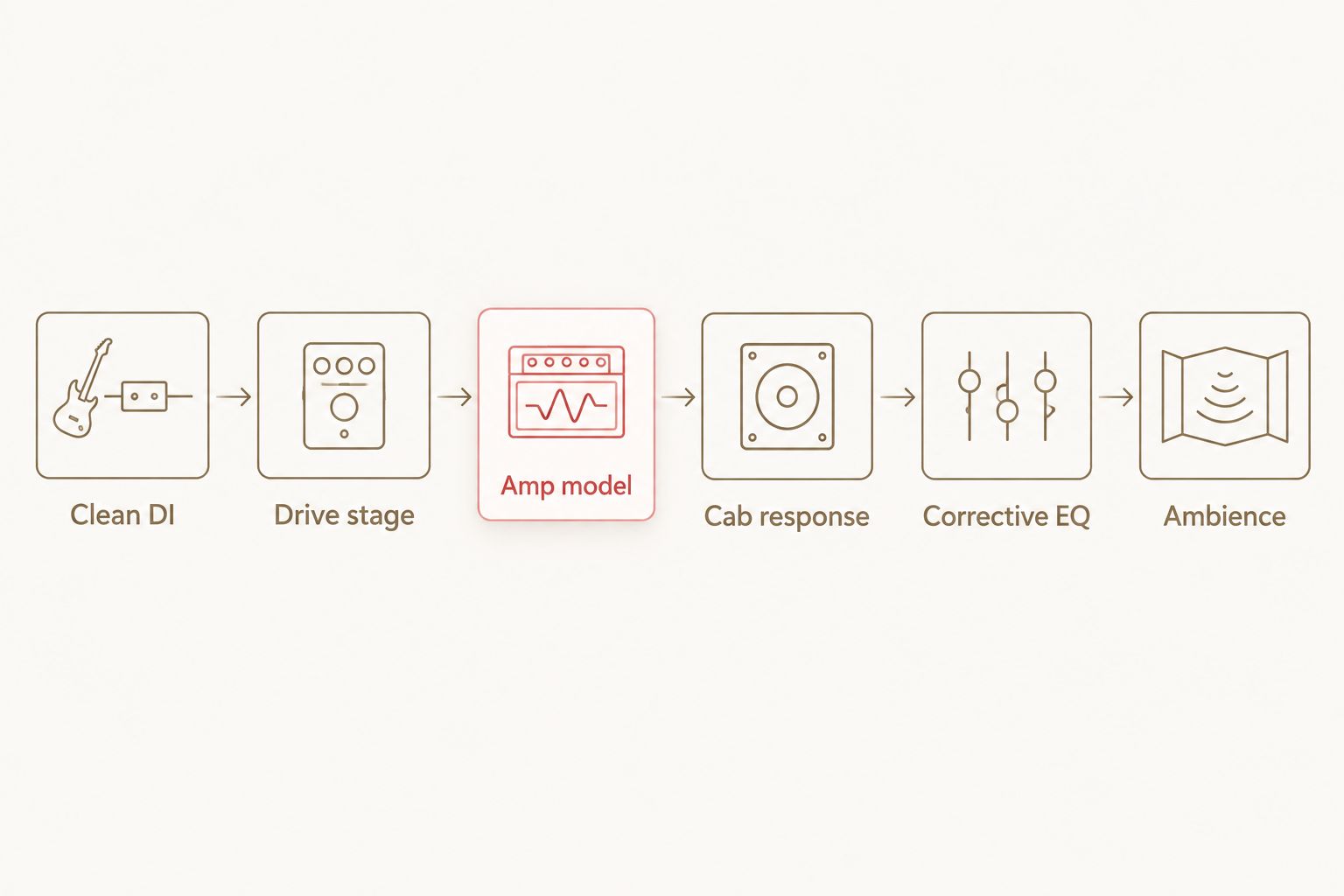
- Put tuning or corrective input processing before the drive stage.
- Place the drive stage before the amp model.
- Use one cabinet response unless the brief requires blended cabinets.
- Apply narrow corrective EQ after the cabinet stage.
- Print ambience separately when the client wants mix control.
Save presets by client and musical role
A preset called Heavy Guitar does not tell you where it belongs. Use names that identify the client, tuning, pickup type and musical role. Rhythm, lead, clean and texture tracks need different gain, dynamics and ambience even when they share the same basic amp sound.
Save both the plugin preset and the DAW channel strip. A plugin preset captures its own controls, while the channel strip preserves routing and supporting processors. In 2026, reliable recall means keeping both.
- Start preset names with the client or project identifier.
- Add tuning and pickup type when they affect the input response.
- Separate rhythm, lead, clean and texture presets.
- Save the complete channel strip as well as the amp preset.
- Include the exact preset name in your delivery notes.
Control latency while recording
Low monitoring latency matters because delayed pick attack changes timing and feel. Start with a 64-sample or 128-sample buffer when the computer can run the chain cleanly. Raise the buffer during editing and mixing, when real-time playing is no longer the priority.
Bypass look-ahead limiters, oversampling and unnecessary ambience while tracking. Turn them back on before export if the approved sound depends on them. Do not change the sample rate to chase lower latency; match the client's session and adjust the buffer instead.
- Begin with a 64-sample buffer on a light project.
- Move to 128 samples if the chain clicks or drops audio.
- Disable oversampling during tracking when it adds delay.
- Freeze unrelated virtual instruments if the project is overloaded.
- Re-enable approved processing before printing the final stem.
Deliver editable files and clear notes
A session delivery should let the producer use your tone immediately or rebuild it from the DI. Export clean and processed files from the same timeline position. Add a short text note listing tuning, sample rate, plugin chain and preset names.
Do not assume the producer owns your plugins. If the brief requires editable settings, confirm compatibility before tracking. Otherwise, send the processed audio, the DI and enough notes to reproduce the intent with another chain.
- Export the clean DI without clipping or printed amp processing.
- Export the approved processed stem from the identical start point.
- Label files with song, part and processing state.
- List the amp simulator, profile and supporting stages used.
- Keep a local copy of the final session and delivery notes.
Amp simulator options for session guitarists
The right option depends on how much control the producer needs after the performance. No single format wins every 2026 session.
| Option | Best for | Main advantage | Key limitation |
|---|---|---|---|
| Adjustable amp simulator | Sessions requiring gain, EQ, cabinet or microphone revisions | Broad tone control inside one repeatable chain | More controls create more opportunities for inconsistent presets |
| NAM profile and loader | Briefs based on a specific captured rig sound | Direct access to the response represented by the profile | The captured amp settings are not freely adjustable |
| Pedal plugin into an amp simulator | Tightening attack or changing saturation before the amp stage | Separates drive character from the main amp tone | Adds another gain stage that must be documented |
| Hardware amp and cabinet | Sessions where the physical rig is part of the approved sound | Captures the chosen room, microphone and hardware chain | Slow to recall and difficult to revise from a DI without reamping |
| Hybrid DI and processed delivery | Remote sessions expected to receive revisions | Gives the producer an immediate tone and an editable source | Requires organised exports and more delivery files |
Oraclesound amp simulation products are best for heavy-session workflows that combine amp or pedal processing with NAM tone profiles. The limitation is the same as any plugin-based setup: the client either needs the compatible software or a printed audio stem.
Common mistakes session guitarists make
Printing only the processed tone
A printed amp track can be useful, but it should not replace the DI unless the producer explicitly requests that delivery. Without the DI, changing the amplifier or profile requires another performance.
Using one high-gain preset for every genre
Metal, hardcore and punk do not share one universal attack, gain structure or cabinet response. Build a small set of role-specific starting points, then adjust each one against the supplied reference.
Tracking louder instead of monitoring louder
Increasing interface gain to make the plugin feel bigger risks clipping the DI. Keep tracking level and monitoring level separate. The DI needs headroom; the headphones need a comfortable balance.
Sending files without recall notes
A folder of audio files does not explain which profile, tuning or preset created the approved tone. Short delivery notes make 2026 revisions faster and reduce avoidable questions.
Ignoring plugin compatibility
A preset is not editable when the producer cannot open the required format. Confirm VST3, AU or AAX requirements before promising an editable plugin session.
FAQ
What is the best amp simulator for session guitarists in 2026?
The best amp simulator for session guitarists in 2026 is one that preserves the clean DI, recalls approved tones and opens in the required DAW format. Use an adjustable amp model for broad revisions and a NAM loader when the brief calls for a captured rig.
Is NAM better than a traditional amp simulator for session work?
NAM is better for reproducing the response of a captured rig, while a traditional amp simulator is better for adjustable gain, EQ and cabinet decisions. Session guitarists benefit from keeping both options available.
Should session guitarists send a DI and an amp track?
Yes, session guitarists should normally send both a clean DI and the approved processed track. Export both from the same start position so the producer can switch or reamp without alignment work.
What buffer size should I use while tracking through an amp simulator?
Start at 64 or 128 samples while recording, then increase the buffer for editing and mixing if needed. Disable unnecessary oversampling and look-ahead processing when they make the monitored guitar feel delayed.
Can RITUAL 2 replace a complete amp simulator?
RITUAL 2 is a NAM amp loader, not a complete adjustable amp model. It loads NAM captures in supported plugin formats or as a standalone application, so the available profiles determine the resulting tone.
How should I name amp simulator presets for client sessions?
Name presets with the client or project identifier, tuning, pickup type and musical role. Save the DAW channel strip too, because the plugin preset alone does not preserve every supporting processor or routing decision.
Do I need hardware amps for professional remote sessions?
No, hardware amps are not required when the client approves the plugin tone and delivery format. A clean DI plus a documented processed stem gives the producer more revision control than a processed track alone.
How do I make high-gain amp simulation easier to mix?
Use less gain than the soloed guitar appears to need, then judge the result with bass and drums playing. Keep drive, amp, cabinet and corrective EQ in separate stages so each problem has a specific control.
One last thing
Do not judge an amp simulator preset only on a soloed guitar. In 2026, the useful session tone is the one that leaves space for bass, drums and vocals while preserving pick attack. Test every heavy rhythm preset against a reference mix before adding it to your permanent template.